

SimpleReportPlugin
ReportPlugin is a lightweight Spigot/Paper report system that lets players report others with anti-spam limits, allows staff to review reports in a GUI to ban or delete them, and persists all reports in a JSON file across restarts.
📖About SimpleReportPlugin
SimpleReportPlugin
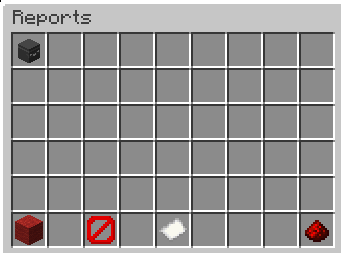
A simple and lightweight player report system for Spigot/Paper 1.21.x. Players can report other players with a reason, while staff/OPs can review all reports in a clean inventory GUI and decide to ban the reported player or delete the report.
All reports are stored persistently in a JSON file, so they remain available after server restarts.
Features
- /report: Players can report other players (including a reason)
- Anti-spam protection
- A player can report the same target only once as long as that report still exists
- Global 5 minute cooldown: a player can only create one new report every 5 minutes
- Staff GUI / Reports overview
- OPs can view reports in an inventory GUI
- Select a report by clicking the player head
- Actions via buttons:
- Ban (Red Wool): bans the reported player and removes the selected report
- Delete (Barrier): deletes the selected report (no ban)
- Close (Redstone): closes the GUI
- Reports stay after restart
Configuration (
config.yml)
The plugin automatically generates a configuration file on the first startup. It allows you to paste a Discord Webhook URL to receive instant logs in your Discord channel whenever a report is made, with an optional toggle to ping a specific role or @everyone.
Commands
/report <player> <reason>
Creates a report for the given player.
Examples:
/report Steve Fly hacks/report Alex Chat harassment
Rules:
- You cannot report yourself
- You cannot report the same player multiple times while the report exists
- You can only create one report every 5 minutes
/reports
Opens the reports GUI.
- OP only by default (
default: op) - Shows each report as a player head item including:
- reporter
- reason
- timestamp
Staff GUI Usage
- Run
/reports - Click a head to select a report
(the paper item will showSelected: <playername>) - Click one of the action buttons:
- Ban (Red Wool): bans the player and removes the selected report
- Delete (Barrier): deletes the selected report only
- Close (Redstone): closes the GUI
Data Storage
- Reports are automatically saved when:
- a report is created
- a report is deleted
- the server stops / plugin disables
Note: Only reports are saved. The 5-minute cooldown is currently stored in memory and resets after server restart (reports remain saved).
Compatibility
- Designed for Spigot/Paper 1.21.x
- Recommended: Paper for best performance
- Java: Java 21
Installation
- Put the
.jarinto your serverplugins/folder - Start the server
- The plugin will automatically create
plugins/ReportPlugin/reports.jsononce reports exist
Support
If you find a bug add me on Discord Petarhrv16