

SimpleGPS
Advanced GPS navigation with interactive GUI menus, realtime Bossbar/Actionbar tracking, visual destination particles, Economy integration, permission limits, and SQLite support.
📖About SimpleGPS

SimpleGPS is a modern, lightweight GPS & waypoint plugin for Paper/Spigot 1.21+.
Provide your players with a clean and immersive navigation experience using a modern /gps GUI, live waypoint tracking, actionbar navigation, bossbar navigation, visual destination markers, public and private waypoints, waypoint sharing, and optimized per-player GPS systems.
Built to feel like a premium-quality plugin with modern UI design, clean feedback systems, lightweight performance, safe storage handling, detailed configuration, and extensive customization.
⮞ Showcase Gps Tracking
⮞ Preview
⮞ Features
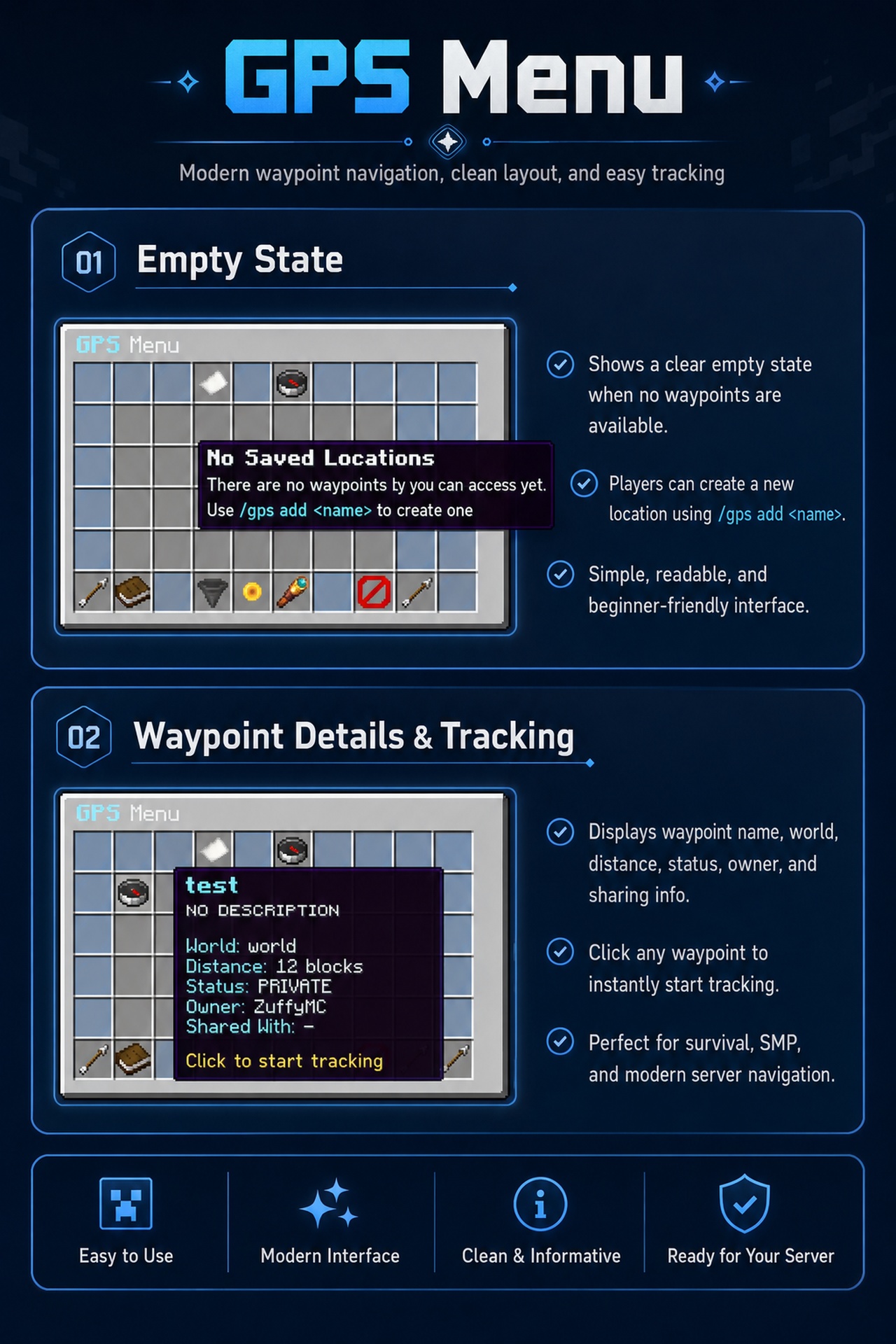
Modern GPS Menu
- Open using
/gps - Clean and responsive GUI layout
- Navigation controls
- Private waypoint section
- Public waypoint section
- Shared waypoint section
- Nearest location button
- Stop tracking button
- Sorting & pagination support
- Instant waypoint tracking
- Utility buttons for refresh, help, close, and stop tracking
- Waypoint status display
- Distance display
- World display
- Owner display
Waypoint Management
- Save locations using
/gps add <name> - Remove locations using
/gps remove <name> - Rename locations using
/gps rename <old> <new> - View location details using
/gps info <name> - List accessible locations using
/gps list - Edit descriptions using
/gps desc <name> <description> - Persistent data after restart
- Custom colors, fonts, and material icons for every waypoint
- Owner-based waypoint data
- Timestamp support for created and updated data
- Safe handling for missing or invalid waypoint files
Public & Private Waypoints
- Create personal private waypoints
- Create public server waypoints
- Change waypoint status using
/gps public <name> - Change waypoint back to private using
/gps private <name> - Public waypoints can be used for server locations like Spawn, Shop, Crates, RTP, Arena, Banker, Jobs, Quests, and more
- Private waypoints stay personal to the owner
- Public waypoint access can be controlled using permissions
- GUI indicator for public, private, and shared waypoints
Waypoint Sharing
- Share a waypoint with another player using
/gps share <player> <name> - Shared waypoints only appear for players who have access
- Useful for teams, bases, events, meeting points, and temporary locations
- Permission-based sharing system
- Safe access validation
Nearest Waypoint
- Find the nearest accessible waypoint using
/gps nearest - Only checks waypoints in the same world
- Respects public, private, and shared waypoint access
- Respects player permissions
- Shows waypoint name and distance
- Clickable output to start tracking
- Available as a GUI button:
Nearest Location
Advanced GPS Tracking
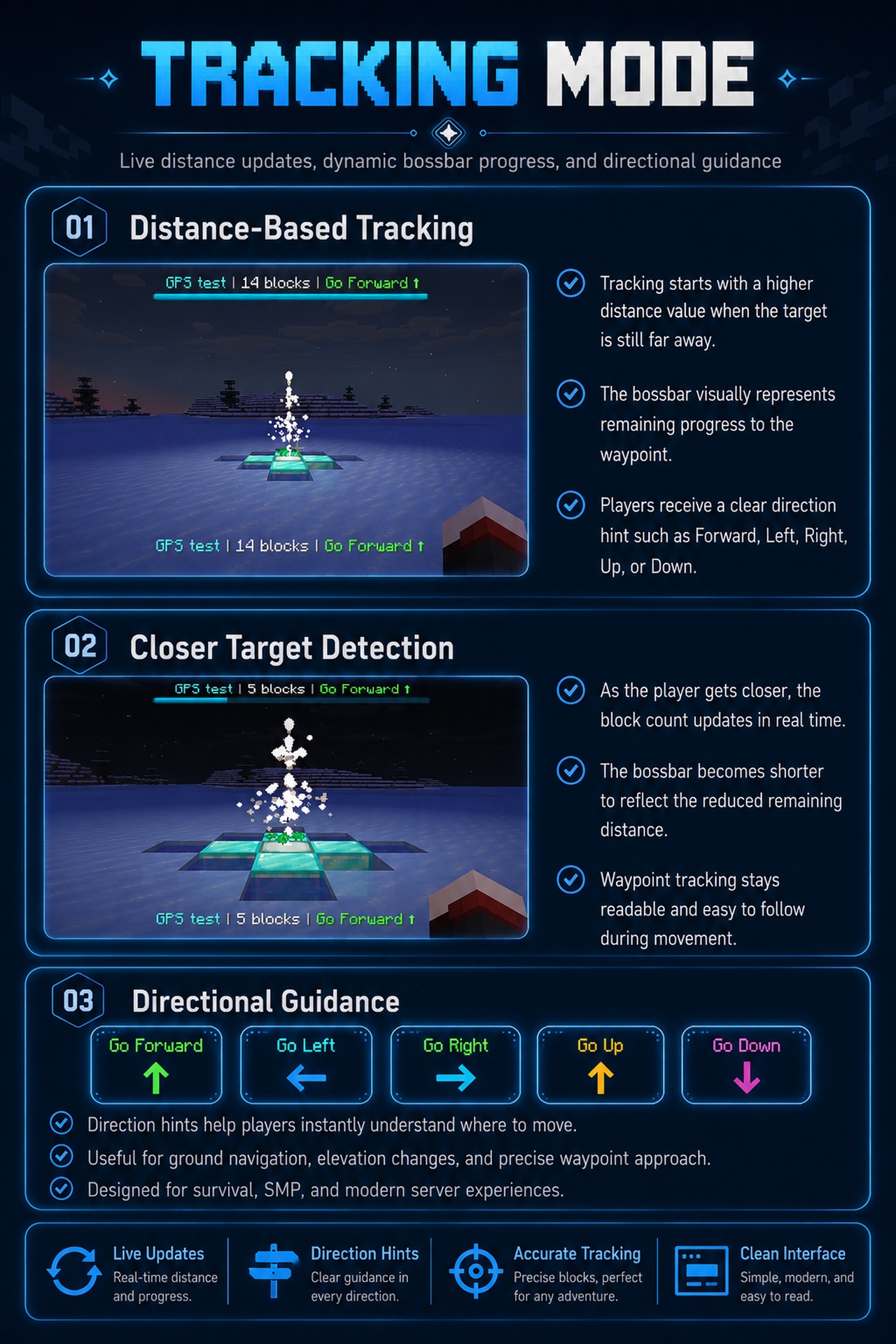
- Real-time actionbar navigation
- Optional bossbar navigation
- Direction guidance and distance tracking
- Automatic arrival detection
- Cross-world safe handling
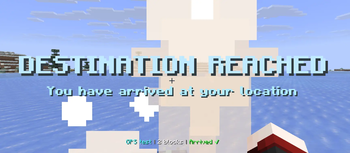
- Start and arrival title feedback
- Per-player GPS sessions
- Stop tracking using
/gps stop - Tracking cleanup on logout
- Tracking cleanup on world change
- Tracking cleanup on plugin reload
- Safe session handling to avoid duplicated tasks
Bossbar Tracking Mode
- Premium-looking bossbar navigation
- Configurable bossbar text
- Configurable bossbar color
- Configurable bossbar style
- Supports multiple display modes:
ACTIONBARBOSSBARBOTH
- Bossbar automatically disappears when tracking stops, player arrives, player logs out, or the waypoint is removed
Visual & Immersive Feedback
- Destination particle markers
- Floating waypoint effects
- Soft navigation sounds
- Arrival sounds
- Start tracking title
- Arrival title
- Clean actionbar messages
- Minimal and modern visual design
- Configurable particles and sounds
Admin Waypoint Templates
- Create reusable waypoint templates
- Apply template settings to existing waypoints
- Speed up server setup
- Keep public server waypoints visually consistent
Template data can include:
- Icon
- Color
- Font
- Description
- Category
- Particle
- Sound
Cooldown & Limit System
- Optional waypoint limit system
- Optional cooldown system
- Prevents waypoint spam
- Permission-based maximum waypoint limits
- Bypass permission support
- Supports time formats like
10s,5m, and1h - Useful for survival and economy servers
Import, Export & Backup
- Export waypoint data
- Import waypoint data
- Create backups
- Restore backups
- Auto-backup support
- Configurable backup interval
- Configurable backup retention
- Safe duplicate handling on import
- Useful for server migration and data safety
Optional SQLite Storage
- YAML storage remains the default
- SQLite storage is optional
- Designed for larger servers
- Database file auto-generation
- Safe table creation
- Optional storage migration support
- Lightweight by default, scalable when needed
Optional Economy Cost System
- Optional Vault-based cost system
- Disabled by default
- No economy dependency required unless enabled
- Charge players for selected actions
- Supported actions can include:
- Add waypoint
- Start tracking
- Create public waypoint
- Share waypoint
- Admin teleport
- Bypass permission support
- Safe validation before charging money
Fully Configurable
- Fully configurable messages
- Indonesian language file support
- English fallback language support
- Custom GUI strings
- Configurable sounds & particles
- Adjustable tracking intervals
- Configurable marker behavior
- Flexible waypoint styling system
- Configurable backup system
- Configurable storage type
- Configurable console startup banner
- Configurable console reload summary
Premium Console Logs
- Clean startup banner
- ASCII-style plugin branding
- Download link shown in console
- Loaded location statistics
- Loaded template statistics
- Storage status
- Language status
- Backup status
- Cost system status
- Compatibility status
- Detailed reload summary
- Warning and error details when something fails
⮞ Commands
| Command | Description |
|---|---|
/gps |
Open the GPS menu |
/gps add <name> |
Save current location |
/gps remove <name> |
Remove a location |
/gps rename <old> <new> |
Rename a waypoint |
/gps desc <name> <description> |
Edit location description |
/gps color <name> <color> |
Set waypoint color |
/gps font <name> <font> |
Set waypoint font style |
/gps icon <name> <icon> |
Set waypoint icon |
/gps public <name> |
Make a waypoint public |
/gps private <name> |
Make a waypoint private |
/gps share <player> <name> |
Share a waypoint with another player |
/gps nearest |
Find the nearest accessible waypoint |
/gps info <name> |
Show waypoint information |
/gps list |
List accessible waypoints |
/gps stop |
Stop active tracking |
/gps teleport <name> |
Teleport to a waypoint |
/gps reload |
Reload SimpleGPS configuration and data |
/gps help |
Show help |
/gps version |
Show plugin version |
Template Commands
| Command | Description |
|---|---|
/gps template create <templateName> |
Create a waypoint template |
/gps template apply <templateName> <waypoint> |
Apply a template to a waypoint |
/gps template delete <templateName> |
Delete a template |
/gps template list |
List available templates |
/gps template info <templateName> |
Show template information |
Backup & Import Commands
| Command | Description |
|---|---|
/gps backup |
Show backup help |
/gps backup create |
Create a backup |
/gps backup list |
List backups |
/gps backup restore <file> |
Restore a backup |
/gps export |
Export waypoint data |
/gps export all |
Export all waypoint data |
/gps import <file> |
Import waypoint data |
Storage Commands
| Command | Description |
|---|---|
/gps storage migrate yaml sqlite |
Migrate YAML data to SQLite |
/gps storage migrate sqlite yaml |
Migrate SQLite data to YAML |
Color Examples
sky
aqua
lime
gold
violet
#7AFFC1
grad:#00FFFF:#7AFFC1
Font Styles
normal
bold
smallcaps
bold_smallcaps
Icon Examples
COMPASS
BEACON
ENDER_PEARL
MAP
CHEST
DIAMOND
EMERALD
NETHER_STAR
ENDER_EYE
BOOK
⮞ Permissions
| Permission | Description |
|---|---|
gps.menu.use |
Use /gps |
gps.setup |
Use /gps add |
gps.remove |
Use /gps remove |
gps.description |
Use /gps desc |
gps.color |
Use /gps color |
gps.font |
Use /gps font |
gps.icon |
Use /gps icon |
gps.help |
Use /gps help |
gps.version |
Access version command |
gps.rename |
Use /gps rename |
gps.info |
Use /gps info |
gps.list |
Use /gps list |
gps.stop |
Use /gps stop |
gps.nearest |
Use /gps nearest |
gps.public.use |
Use public waypoints |
gps.public.manage |
Manage public/private waypoint status |
gps.share |
Share waypoints |
gps.share.receive |
Receive shared waypoints |
gps.template.use |
Use waypoint templates |
gps.template.manage |
Manage waypoint templates |
gps.teleport |
Use /gps teleport |
gps.reload |
Use /gps reload |
gps.backup |
Use backup commands |
gps.import |
Use import commands |
gps.export |
Use export commands |
gps.storage.migrate |
Use storage migration commands |
gps.limit.10 |
Set waypoint limit to 10 |
gps.limit.30 |
Set waypoint limit to 30 |
gps.limit.50 |
Set waypoint limit to 50 |
gps.limit.bypass |
Bypass waypoint limits |
gps.cooldown.bypass |
Bypass cooldowns |
gps.cost.bypass |
Bypass economy costs |
gps.admin |
Access all admin features |
⮞ Storage System
SimpleGPS is built with safe and flexible storage handling.
YAML Storage
- Default storage type
- File-based YAML storage
- One file per waypoint
- Easy to edit manually
- Easy to backup
- Cached locations in memory
- Safe file handling
SQLite Storage
- Optional storage type
- Better for larger servers
- Single database file
- Auto table creation
- Useful for bigger waypoint data
- YAML remains default for lightweight usage
Storage Path
plugins/SimpleGPS/locations/
Each waypoint stores:
- Location coordinates
- World information
- Owner UUID
- Description
- Status
- Shared players
- Timestamps
- Style settings
- Icon settings
- Category
- Particle settings
- Sound settings
⮞ Generated Folder Structure
When the plugin starts, SimpleGPS will generate a clean folder structure.
plugins/SimpleGPS/
├── config.yml
├── messages/
│   ├── en_US.yml
│   └── id_ID.yml
├── locations/
│   ├── example-waypoint.yml
│   └── ...
├── templates/
│   ├── shop.yml
│   ├── spawn.yml
│   └── ...
├── backups/
│   ├── simplegps-backup-YYYY-MM-DD-HH-mm.zip
│   └── ...
├── exports/
│   ├── simplegps-export-YYYY-MM-DD-HH-mm.yml
│   └── ...
└── database/
    └── simplegps.db
Folder Details
| Folder / File | Description |
|---|---|
config.yml |
Main plugin configuration |
messages/en_US.yml |
English fallback messages |
messages/id_ID.yml |
Indonesian messages |
locations/ |
YAML waypoint storage |
templates/ |
Admin waypoint templates |
backups/ |
Manual and automatic backups |
exports/ |
Exported waypoint data |
database/simplegps.db |
Optional SQLite database |
⮞ Configuration Preview
SimpleGPS includes a clean and organized configuration file.
language:
  default: "id_ID"
  fallback: "en_US"

storage:
  type: YAML # YAML or SQLITE
  sqlite:
    file: "database/simplegps.db"

tracking-display:
  mode: BOTH # ACTIONBAR, BOSSBAR, BOTH
  update-interval-ticks: 20
  actionbar:
    text: "&b⟐ {waypoint} &7| &f{distance} blocks away"
  bossbar:
    enabled: true
    color: BLUE
    style: SOLID
    text: "&b⟐ {waypoint} &7| &f{distance} blocks away"

waypoints:
  public-enabled: true
  sharing-enabled: true
  nearest-enabled: true
  allow-cross-world-tracking: false

backup:
  enabled: true
  auto-backup:
    enabled: true
    interval-hours: 12
    keep-last: 10

cost:
  enabled: false
⮞ Performance & Optimization
SimpleGPS is designed to remain lightweight even on larger servers.
Optimization Features
- Async file I/O
- Cached waypoint system
- Per-player tracking tasks only when required
- No unnecessary global tracking loops
- Reduced scheduler usage
- Safe cleanup handling
- Low memory usage
- Efficient GPS update handling
- Bossbar cleanup protection
- Reload-safe task handling
- Storage caching system
Designed For
- Small SMP servers
- Survival economy servers
- Medium-sized community servers
- Large servers with many player waypoints
- Networks that need clean public locations
⮞ Compatibility
SimpleGPS is designed for Paper/Spigot 1.21+.
The plugin is not designed to block compatible patch versions unnecessarily. If your server uses a compatible 1.21.x version, SimpleGPS will try to keep the main system working safely.
Supported environment:
- Java 21
- Paper 1.21+
- Spigot 1.21+
- Compatible 1.21.x patch versions
⮞ Requirements
- Java 21
- Paper/Spigot 1.21+
- No required external dependencies
Optional:
- Vault, only if the economy cost system is enabled
⮞ Installation
- Download
SimpleGPS.jar - Put
SimpleGPS.jarinto your/pluginsfolder - Restart the server
- Run
/gps - Configure the plugin in:
plugins/SimpleGPS/config.yml
- Edit messages in:
plugins/SimpleGPS/messages/
⮞ Support
Need help, found a bug, or have feature suggestions?
Discord Support:
https://discord.gg/PDr4UEDtNa