

PluginGPL-3.0-only
Simple Discord Whitelist
Just a simple Discord Whitelist
26
Downloads
1
Followers
2 months ago
Updated
📦
2
Versions
📖About Simple Discord Whitelist
Simple Discord Whitelist
A lightweight and efficient solution to secure your Minecraft server using Discord.
What is it?
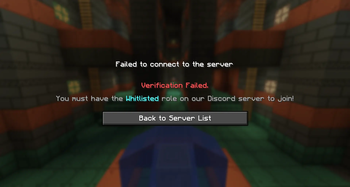
Simple Discord Whitelist is a plugin designed to link your Minecraft server with your Discord community. It ensures that only members of your Discord (with a specific role) can connect to your game server.
Quick Setup Guide
1. Create the Discord Bot
- Go to the Discord Developer Portal.
- Click "New Application" and give it a name of your choice.
- Go to the "Bot" tab (left sidebar).
- Critical Step: Scroll down to the "Privileged Gateway Intents" section and ENABLE ONLY:
- SERVER MEMBERS INTENT
(Other intents are no longer required, making the bot lighter and more private!)
- SERVER MEMBERS INTENT
- Click "Reset Token" to copy your token. Keep it safe; it is the key to your bot.
2. Invite the Bot to Your Server
- Go to "OAuth2" -> "URL Generator".
- Under "Scopes", check: bot and applications.commands.
- Under "Bot Permissions", check: Administrator (or Manage Roles and Send Messages if you prefer manual management).
- Copy the generated link and paste it into your browser to invite the bot to your server.
3. Retrieve Identifiers (IDs)
- Open your Discord Settings -> Advanced -> Enable "Developer Mode".
- Right-click your Discord server icon and click "Copy Server ID" (this is your Guild ID).
- Paste this ID and your Token into the plugin configuration file (config.yml).
Why Choose Simple Discord Whitelist?
- Ultra Lightweight: Uses very few server resources.
- Maximum Security: Uses the latest Discord technologies (Slash Commands).
- Automatic: If a player loses their role on Discord, they are instantly removed from the Minecraft whitelist.
- Simple: No complex commands; everything is managed through clear menus.