
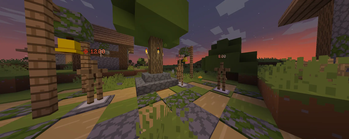

ShowDamage
ShowDamage is a simple, yet configurable plugin, that allows you to see the damage done to an entity.
📖About ShowDamage

ShowDamage
Hey, what does this one do?
This is a simple plugin, that allows you to see the damage done to an entity via pop-up.
ShowDamage have a highly configurable config, so any colors, icons or visibility settings can be changed.
And this is how it looks:
Non-critical damage dealt to entity:
Critical damage have it's own colors, and an indicator:
Damage dealt to entity combines with a nearest sweep attacks damage:
Explosion damage counts as well:
The plugin also displays messages in the chat or on the hotbar if damage was dealt using a projectile.
It will only appear if the distance between the target and the attacker is greater than the value specified in the configuration:
And all colors can be configurated as well.
Commands
/showdamage toggle-popup: Toggles a pop-up visibility for you.Requires permission:
"showdamage.command.disablepopup"/showdamage reload-config: Reloads the configuration.Requires permission:
"showdamage.command.reloadconfig"
Config entries
messages:
  - hotbar-messages: (true/false) Should hotbar projetile damage be visible?
  - chat-messages: (true/false) Should chat projectile damage messages be visible?

display-settings:
  - popup-background-transparency: (0-255) Sets the alpha value of the popup background color, or how transparent it should be. 0 = fully transparent, 255 = black.
  - popup-lifetime-ticks: Pretty self-explanatory. Defines how many ticks (20 ticks - 1 second) a popup should be visible.
  - popup-visibility-distance: The radius from the entity to the player at which it becomes invisible.
  - popup-additional-height: Additional pop-up position height. By default, pop-up spawn location is 0.15 above entity.
  - count-multiple-entities: Should the plugin combine direct attacks and sweeping sword attacks in a single hit span?
  - multiple-entities-count-distance: The range within which the plugin can link attacks with a sword swing.
  - projectile-message-distance: The distance at which messages about hits from a bow, snowball, trident, or other projectile begin to appear in the chat and hotbar.
  - allow-toggle-command: Should the plugin allow players to disable pop-ups locally?
  - show-to-damage-source-only: Should the plugin display pop-ups only to the attacker?
  - show-damage-as-hearts: Enables hearts mode. Displays damage as full HP (big heart) and half HP (small heart).
  - show-through-walls: Should the damage be visible thru the blocks?
  - filter-non-living-entities: Should the plugin also show damage dealt to End Crystals, Armor Stands* etc.?
Plugin uses HEX colors to render all it's gradients. If you want to pick something better, use RGB Birdflop:
https://www.birdflop.com/resources/rgb/
colors:
  - crit-damage:
    - first: First color of the gradient, stored in HEX, without a '#' (like BE2510)
    - second: Second color of the gradient, stored in HEX, without a '#' (like FD7348)
  - mitigated-damage: Basically a blocked damage that shows above your hotbar when you are hit.
    - first: First color of the gradient.
    - second: Second color of the gradient.
    - icon: An icon that will be displayed left to the damage. Can be empty.
  - message:
    - first: Color of the message text. Default one is green (`25af46`)
    - second: Color of the 'i' sign.
    - elements: Color of `Entity` name and `DAMAGE HP` text.

prefixes:
  - show-attack-prefixes: (true/false) Should the prefixes (crit sign, sweep, explosion, mace, projectile, trident etc.) be visible at all.
  - crit-prefix: A symbol or a string that applies to the damage if it was critical.
  - sweep, explosion, mace, projectile, trident, spear: should be pretty self-explanatory.
Releases
I'll try to make this plugin as polished as i even can, so this plugin can be updated really often.
Other
For any questions, suggestions etc. you can contact me directly, using Discord: @turbotaliz
Or GitHub: https://github.com/xw1w1/.