


PluginGPL-3.0-only
ShockAirHeads
A 1.21+ NPC replacement with flair.
585
Downloads
3
Followers
3 months ago
Updated
📦
12
Versions
📖About ShockAirHeads
Create points of interest for players to interact with, completely themed to match your server & the role the AirHead plays. Create as many as you like, customizing each one down to the letter. It runs completely standalone and is open source.
This plugin requires Packet Events!
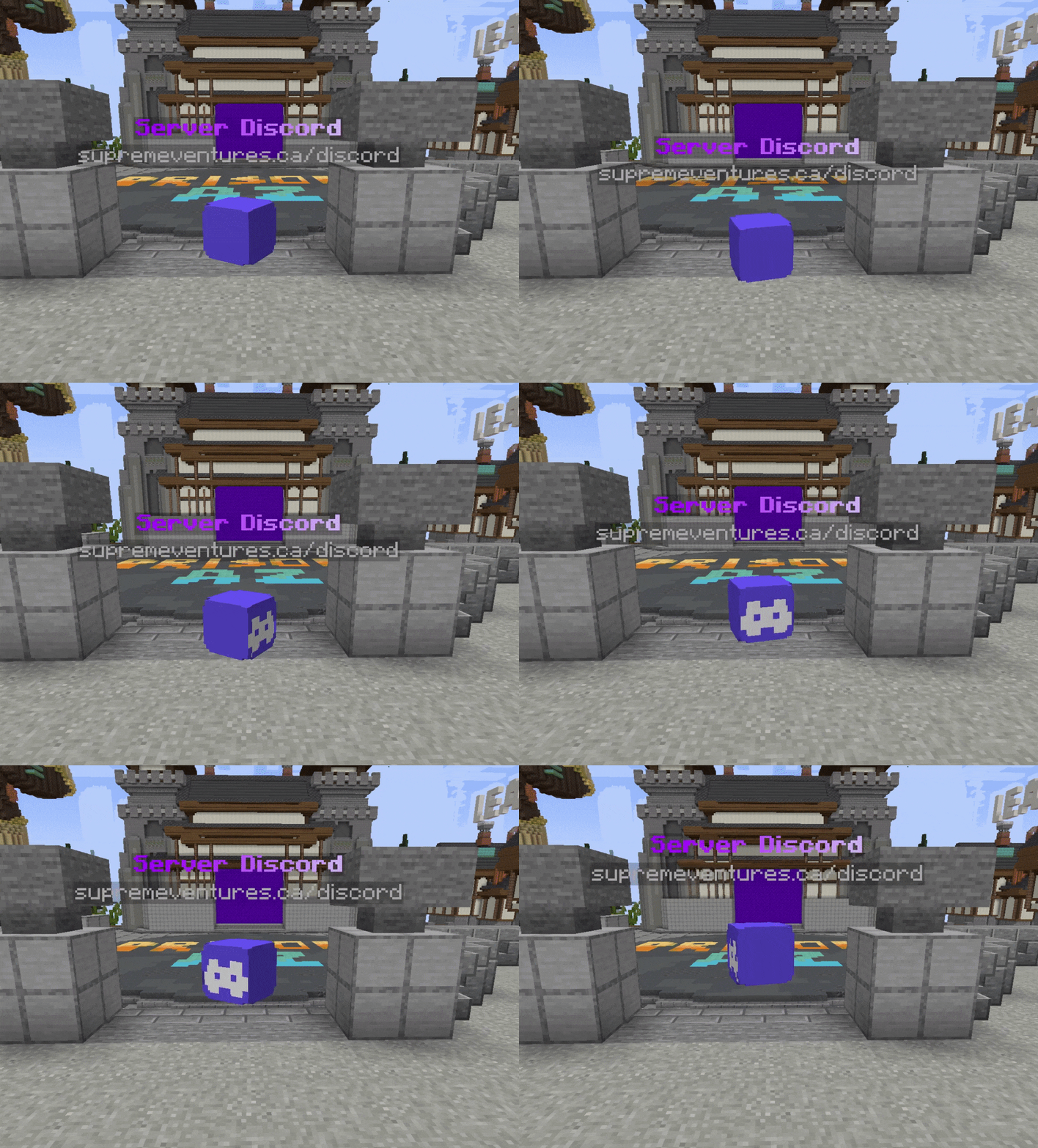
Key Features
- 1.20.5 - 1.21.8 Supported
- Create unlimited unique AirHeads, put them everywhere!
- Configure each AirHeads animation, appearance, and behavior.
- Lightweight & fast. No real entities bogging down your server.
- Powerful developer API for spawning AirHeads wherever & whenever you want.
- Internal Holograms using new 1.20+ TextDisplay entities (Background color, Billboard Display, etc)
- Scale heads up to 10x normal size, and down to 5% of normal size.
- Sends messages, play sounds, dispatch console commands or execute commands as the player.
- Add block-overlays to the AirHead, to add another layer of depth to your AirHeads.
- Velocity Send-To-Server support
airheads:
  levels:
    # The location the AirHead will spawn at.
    location:
      world: test_world
      x: -438.0
      y: -38.0
      z: 293.0
      yaw: 0.0 # Used if rotation is disabled
      pitch: 0.0 # Used if rotation is disabled
    hologram-text-display-settings:
      # How the hologram rotates with the player.
      # Options:
      # FIXED - Hologram doesn't rotate at all.
      # VERTICAL - Hologram rotates with the player, but only on the Y axis.
      # HORIZONTAL - Hologram rotates with the player, but only on the X axis.
      # CENTERED - Hologram rotates with the player on all axes.
      billboard-constraints: VERTICAL
      # How text is auto aligned in the hologram.
      # Options:
      # LEFT - Text is aligned to the left.
      # CENTERED - Text is aligned to the center.
      # RIGHT - Text is aligned to the right.
      text-alignment: CENTERED
      hologram-text:
        - <#ADBED1><st>--</st> <#fded07><bold>ᴘʟᴀʏᴇʀ ʟᴇᴠᴇʟꜱ</bold> <#ADBED1><st>--</st>
        - <gray>1.20.5 - 1.21.5
      # How far above the AirHead the hologram is.
      hologram-offset: 0.5
      # How big/small to scale the hologram. Between 0.1 and 10.0
      scale-x: 1.0
      scale-y: 1.0
      scale-z: 1.0
      # How to translate the holograms position (Advanced users)
      translation-x: 0.0
      translation-y: 0.0
      translation-z: 0.0
      # Override the width/height of the hologram.
      # Will be override if text size is larger.
      width: 200
      height: 50
      # Does text on the hologram have a shadow?
      has-text-shadow: false
      # Is the hologram background transparent?
      transparent-background: true
      # If not transparent, what color is the background?
      # Uses ARGB format. #AARRGGBB
      background-color: '#40000000'
      # The radius of the hologram shadow.
      shadow-radius: 0.0
      # The strength of the hologram shadow.
      shadow-strength: 0.0
      # How often does the hologram update placeholders.
      # -1 to disable if not using placeholders are used or change.
      update-interval-ticks: 5
      # How far away should the hologram be visible.
      render-distance: 100
      # Hologram pitch and yaw.
      pitch: 0.0
      yaw: 0.0
    appearance-settings:
      # Head texture in base64 format.
      head-texture: eyJ0ZXh0dXJlcyI6eyJTS0lOIjp7InVybCI6Imh0dHA6Ly90ZXh0dXJlcy5taW5lY3JhZnQubmV0L3RleHR1cmUvMWUzMWRhZWEzMGU1NzFiYjhiZGZhMGM2ZDJjOGVhMWJjNzIxYTRiMTJhY2NmN2RhNDM4YjZmMDU5OGJmMDg4NiJ9fX0=
      # Scale of the head. Between 0.1 and 10.0
      scale: 2.0
      # Material overlapping the head (like a helmet)
      # AIR - No overlay, just the head.
      overlay-material: YELLOW_STAINED_GLASS
      # How much larger to scale the overlay. (How much bigger is the helmet)
      overlay-offset: 0.45
    interact-settings:
      # Executed by the player on every interact
      interact-commands:
        - levels
      # Executed by the player on every left-click
      left-click-commands: []
      # Executed by the player on every right-click
      right-click-commands: []
      # Executed by the console on every interact
      console-commands: []
      # Executed by the console on every left-click
      left-click-console-commands: []
      # Executed by the console on every right-click
      right-click-console-commands: []
      # Message sent to the player on every interact
      interact-message: []
      # Sound played to the player on every interact
      sound-settings:
        volume: 1.0
        pitch: 1.0
        sound: minecraft:entity.player.levelup
        enabled: true
      # Send a player to another server when they interact with the AirHead.
      # leave empty to disable.
      send-to: "factions"
    animation-settings:
      # Should the head float up and down?
      do-float: true
      # How far above and below the starting position should it float
      float-up-max: 0.5
      float-down-max: 0.5
      # How long, int ticks, should the animation take to run 1 up-down cycle.
      # Higher = slower
      float-cycle-duration-ticks: 80
        # Should the head rotate?
      do-rotation: true
      # How fast, in degrees, should the head rotate per tick.
      # Higher = faster
      rotation-per-tick: 5