
MINECRAFTBIBLE
Loading...
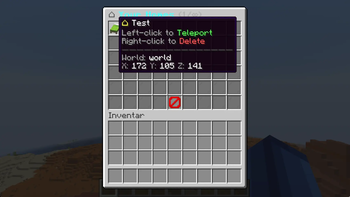

SetHomePlugin is a feature-rich, fully configurable home management plugin with paginated GUI, LuckPerms integration, multi-language support and smooth delayed teleportation.
SetHomePlugin is a clean, feature-rich home management plugin for Spigot/Paper servers. Players set named homes at any location and teleport back with a countdown, particles and sounds. Admins control per-rank home limits via LuckPerms or permission nodes — no manual config needed. A polished paginated GUI with delete-confirmation makes home management intuitive for every player.
| Command | Alias | Permission | Description | Default |
|---|---|---|---|---|
/sethome <name> |
/sh |
sethome.use |
Save a home at your current location | ✅ All |
/home <name> |
/h |
sethome.use |
Teleport to a saved home | ✅ All |
/delhome <name> |
/deletehome, /removehome |
sethome.use |
Delete a saved home | ✅ All |
/homes |
/homelist, /listhomes |
sethome.use |
Open the paginated homes GUI | ✅ All |
/sethomereload |
/shreload |
sethome.admin |
Reload the plugin configuration | 🔒 OP |
| Permission | Default | Description |
|---|---|---|
sethome.use |
All | Use /sethome, /home, /delhome, /homes |
sethome.admin |
OP | Reload config, bypass home limits |
sethome.homes.1 – sethome.homes.10 |
false | Allow exactly N homes (1, 2, 3, 5, 10) |
sethome.homes.unlimited |
OP | Allow unlimited homes |
The plugin resolves the home limit for each player in this order — first match wins:
| Priority | Source | Example |
|---|---|---|
| 1 | Permission node sethome.homes.unlimited |
→ unlimited homes |
| 2 | Highest numeric permission node sethome.homes.N |
sethome.homes.10 → 10 homes |
| 3 | LuckPerms primary group matched in rank-homes config |
group vip → 5 homes |
| 4 | general.default-max-homes in config.yml |
default → 3 homes |
The homes GUI is a paginated 6-row inventory. The bottom row is always a navigation bar; the top 5 rows display home items. Right-clicking a home opens a 3-slot confirmation screen before deletion.
| Action | Behavior |
|---|---|
| Left-click a home | Close GUI and start delayed teleport |
| Right-click a home | Open delete-confirmation GUI (if enabled) |
| Previous / Next arrows | Page through homes |
| Barrier (close button) | Close inventory without action |
general:
  language: en               # en, de
  default-max-homes: 3
  teleport-delay: 3          # seconds countdown before teleport
  cancel-on-move: true       # cancel teleport if player moves

  sounds:
    enabled: true
    teleport: ENTITY_ENDERMAN_TELEPORT
    set-home: BLOCK_ENCHANTMENT_TABLE_USE
    delete-home: ENTITY_ITEM_BREAK
    open-gui: BLOCK_CHEST_OPEN
    error: ENTITY_VILLAGER_NO

  particles:
    enabled: true
    type: PORTAL
    count: 30

rank-homes:
  default: 1
  vip: 5
  premium: 10

gui:
  rows: 6
  home-item: LIME_BED
  filler-item: GRAY_STAINED_GLASS_PANE
  show-coordinates: true
  show-world: true
  confirm:
    enabled: true
    confirm-item: LIME_CONCRETE
    cancel-item: RED_CONCRETE
config.yml| Code | Language |
|---|---|
en |
🇬🇧 English |
de |
🇩🇪 Deutsch |
| Server Software | Version | Supported |
|---|---|---|
| Paper | 1.21 – 1.21.x | ✅ |
| Purpur | 1.21 – 1.21.x | ✅ |
| Spigot | 1.21 – 1.21.x | ✅ |
| Bukkit | 1.21 – 1.21.x | ✅ |
| Folia | 1.21 – 1.21.x | ✅ |
Java 21 required. LuckPerms is an optional soft-dependency.
💬 Support & Updates: Join our Discord