

ServerScope
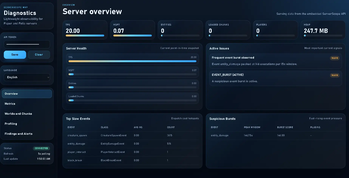
ServerScope is a monitoring and observability plugin for Paper and Folia servers that provides administrators with clear insights into server performance, health, and stability through an integrated diagnostics system.
📖About ServerScope
ServerScope
Minecraft server monitoring and diagnostics
📊 About the plugin
ServerScope is a modern monitoring and observability plugin with a web dashboard for Minecraft servers running on Paper / Folia 1.21+.
It gives administrators full control over the server’s status: performance, lag, load, suspicious events — all in one place.

💡 Suitable for:
- SMP servers
- Vanilla+ servers
- Large-scale projects with high load
⚡ Why you need it
With ServerScope, you can quickly understand:
- ❓ Why the server is lagging right now
- 🌍 Which chunks are causing the load
- 🐄 Whether the number of entities is increasing
- ⚠️ Whether it’s a real problem or just a warning
- 🔌 Which plugins are behaving suspiciously
🚀 Key features
- 📈 Live metrics:
TPS, MSPT, entities, chunks- 🌍 World and chunk diagnostics
- 🔍 Event and plugin profiling
- 🚨 Alert system
- 🌐 Built-in web dashboard
- 🔗 JSON API
- 🎮 Admin game commands
- 💾 Data storage (SQLite)
📦 Requirements
Java 21+
Paper / Folia 1.21+
📥 Installation
- Download the .jar file
- Move it to the plugins/ folder
- Start the server
- Wait for the configurations to be generated
📁 Configuration:plugins/ServerScope/config.yml
⚙️ What’s included straight away
The following are already active after the first launch:
- storage
- collectors
- alerts
- profiling
- web panel
🔒 Default web panel:
- access only locally (127.0.0.1)
- port 8080
- token generated automatically
🌐 How to access the web panel
If you’re on the same machine:
http://127.0.0.1:8080/
Next:
- Open config.yml
- Find web.auth-token
- Paste it into the panel
**🌍 How to enable external access (hosting)**
If the server is hosted:
- Check if you can open the port
- Specify in the config:
web:
  host: 0.0.0.0
  port: 25656
- Restart the server
- Open:
http://IP:PORT/
📌 Important:
the token is mandatory
the port must be allowed by the hosting provider
🔐 Security (IMPORTANT)
❌ Do not publish the token
❌ Do not open the dashboard without protection
🧠 Profiling
Allows you to track:
- slow events
- frequent events
- load spikes
- plugin impact
📌 By default:
- player_interact
- block_break / place
- entity_damage
- inventory_click
- creature_spawn
🚨 Alerts
Notification system:
🔴 CRITICAL — appears in-game
🟡 WARN — remains in the UI / console
Examples:
- low TPS
- high MSPT
- chunk overload
- many entities
💾 Storage
- SQLite database
- asynchronous writing
- minimal load
📁 File:
plugins/ServerScope/serverscope-mvp.db
🎮 Commands
/serverscope
/serverscope status
/serverscope reload
/serverscope report
/serverscope findings
/serverscope alerts
/serverscope web regenerate-token
🔑 Permissions
serverscope.admin
serverscope.command.*
serverscope.alerts
📌 Default: OP access
⚠️ Common issues
❌ Dashboard is there, but no data
→ incorrect token
❌ 401 Unauthorised
→ token missing
❌ 429 Too Many Requests
→ too many requests
❌ Dashboard won’t open
→ check:
- port
- host
- firewall
- hosting
🔄 Regenerate token
/serverscope web regenerate-token
💡 Conclusion
ServerScope is essentially ‘Grafana for Minecraft’, but right inside the server.
If you want to:
- find lags faster
- understand server behaviour
- monitor load
→ this plugin is a must-have.