Logo
MINECRAFTBIBLE
Items
Items

All game items

Blocks
Blocks

Building blocks

Mobs
Mobs

Creatures & monsters

Biomes
Biomes

World biomes

Structures
Structures

Generated structures

Recipes
Recipes

Crafting guides

Advancements
Advancements

Achievements

Loot Tables
Loot Tables

Drop rates

Tags
Tags

Item groupings

All Versions
View all data →
Capes
Cape ArchiveNEW

Browse rare Minecon capes, OptiFine capes, and custom capes from players worldwide

Browse

Player Database
Player DatabasePopular

Search any player

Skin Browser
Skin Browser

Browse & download skins

Cape Gallery
Cape GalleryNEW

Minecon & OptiFine capes

Seed Vault
Seed Vault

Curated seeds

Learn

Guides
GuidesNew

Tutorials & tips

Blog
Blog

News & updates

Community

Community Hub
Community HubHub

Posts, discussions & more

All Versions
View community →
Seed Analyzer
Seed Analyzer

World seed analysis

Loot Explorer
Loot Explorer

Drop rates

Crafting Calculator
Crafting Calculator

Material planning

Enchant Calculator
Enchant Calculator

Probability math

Redstone Lab
Redstone Lab

Signal timing

Trading Profit
Trading Profit

Villager ROI

All Versions
View all tools →
Mods
Mods

Browse all mods

Plugins
Plugins

Server plugins

Resource Packs
Resource Packs

Textures & sounds

Shaders
Shaders

Visual enhancements

Datapacks
Datapacks

World logic

Scanner
Mod Intelligence

Scan & analyze any mod

All Versions
View all mods →
Loading...
IntroductionIntroductionVersion HistoryVersion HistoryGuidesGuidesBlog & NewsBlog & News
ItemsItemsBlocksBlocksMobsMobsRecipesRecipesBiomesBiomesStructuresStructuresAdvancementsAdvancementsLoot TablesLoot TablesTagsTags
ModsModsPluginsPluginsResource PacksResource PacksShadersShadersDatapacksDatapacks

MinecraftBible

The Ultimate Wiki

Logo
MINECRAFTBIBLE

The ultimate Minecraft reference. Every item, block, mob, and recipe documented with precision.

Community

  • Player Database
  • Skin Browser
  • Cape Gallery
  • Community Hub
  • Seed Vault

Database

  • Items
  • Blocks
  • Mobs
  • Recipes
  • Biomes
  • Structures

Tools

  • Seed Analyzer
  • Mod Intelligence
  • Crafting Calculator
  • Enchant Calculator

Mods & Packs

  • Mods
  • Plugins
  • Resource Packs
  • Shaders
  • Datapacks

© 2026 MinecraftBible. Not affiliated with Mojang or Microsoft.

PrivacyTermsContact
SecureCommands
PluginLicenseRef-All-Rights-Reserved

SecureCommands

Secure your Server's most vulnerable commands!

326
Downloads
2
Followers
4 months ago
Updated
📦
12
Versions
managementutilitybukkitpaperpurpurspigot
Download Latestv2.5View on Modrinth

📖About SecureCommands


SecureCommands is a plugin that allows you to easily add more security to your server by focusing on the most vulnerable commands that can cause the most damage if used by an unauthorized user.

You can support the plugin by making a donation through this link: https://paypal.me/PabloHernandez601

Join to my Support Discord Server

📤 Installation Guide

This plugin is compatible from version 1.18x to 1.21x.

Download the latest version of the plugin and upload it to your server's plugins folder.

Once uploaded, restart the server for the changes to take effect.

✅ Features:

  • Block vulnerable commands using individual codes for user and user whitelisting.
  • Discord Webhook Integration
  • Database Connection (Required)
  • Automatic detection of users who have OP but have not been added to the Plugin Whitelist.
  • Automatic Premium User Detection. Cracked users are now prevented from accessing the server if they have previously logged in as Premium.
  • Added new PlugmanBlocker module, you cannot use Plugman commands with this plugin.

⌨️ Commands:

  • /sc setcode
  • /sc resetcode
  • /sc reload
  • /sc resetall
  • /sc add
  • /sc remove
  • /sc addcommand
  • /sc removecommand
  • /sc premium
  • /sclogin

⁉️ FAQ:

Connect your Plugin with a Discord Webhook

Send plugin updates and security notifications to your Discord with the Discord Webhook config.

I forgot the set code what do I do?

To reset the code you must execute the /sc resetcode command from the server console, once done the /sc setcode command will be enabled again.

I want to reset the code for all users, how can I do it?

To do this you just need to run the /sc resetall command from the server console.
📸 Screenshots

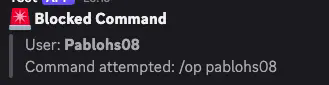
Discord Webhook Integration

Discord Webhook Integration: You will receive notifications when a user performs a command without being logged in with the pre-defined code.
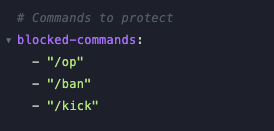
Command Blocker

Command Blocker: You can lock the commands you need so that unauthorized users cannot use them.
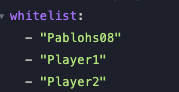
Whitelisted Users

Whitelisted Users: You can add users to the whitelist. If a user guesses the code but isn't on this list, they won't be able to use the corresponding command.
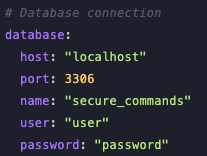
Database Connection

Database Connection (Required): This plugin requires connection to a database as the encrypted code you set will be stored there.

SpigotMC:

https://www.spigotmc.org/resources/securecommands-1-18x-1-21x.128091/

👥 Team & Contributors

Pablitoo_h
Pablitoo_hOwner

⚙️ Compatibility

Environment
🖥️ Server-side
Loaders
bukkitpaperpurpurspigot
Minecraft Versions
1.111.11.11.11.21.121.12.11.12.21.131.13.1+44 more

🔗 Links

Modrinth Page