Logo
MINECRAFTBIBLE
Items
Items

All game items

Blocks
Blocks

Building blocks

Mobs
Mobs

Creatures & monsters

Biomes
Biomes

World biomes

Structures
Structures

Generated structures

Recipes
Recipes

Crafting guides

Advancements
Advancements

Achievements

Loot Tables
Loot Tables

Drop rates

Tags
Tags

Item groupings

All Versions
View all data →
Capes
Cape ArchiveNEW

Browse rare Minecon capes, OptiFine capes, and custom capes from players worldwide

Browse

Player Database
Player DatabasePopular

Search any player

Skin Browser
Skin Browser

Browse & download skins

Cape Gallery
Cape GalleryNEW

Minecon & OptiFine capes

Seed Vault
Seed Vault

Curated seeds

Learn

Guides
GuidesNew

Tutorials & tips

Blog
Blog

News & updates

Community

Community Hub
Community HubHub

Posts, discussions & more

All Versions
View community →
Seed Analyzer
Seed Analyzer

World seed analysis

Loot Explorer
Loot Explorer

Drop rates

Crafting Calculator
Crafting Calculator

Material planning

Enchant Calculator
Enchant Calculator

Probability math

Redstone Lab
Redstone Lab

Signal timing

Trading Profit
Trading Profit

Villager ROI

All Versions
View all tools →
Mods
Mods

Browse all mods

Plugins
Plugins

Server plugins

Resource Packs
Resource Packs

Textures & sounds

Shaders
Shaders

Visual enhancements

Datapacks
Datapacks

World logic

Scanner
Mod Intelligence

Scan & analyze any mod

All Versions
View all mods →
Loading...
IntroductionIntroductionVersion HistoryVersion HistoryGuidesGuidesBlog & NewsBlog & News
ItemsItemsBlocksBlocksMobsMobsRecipesRecipesBiomesBiomesStructuresStructuresAdvancementsAdvancementsLoot TablesLoot TablesTagsTags
ModsModsPluginsPluginsResource PacksResource PacksShadersShadersDatapacksDatapacks

MinecraftBible

The Ultimate Wiki

Logo
MINECRAFTBIBLE

The ultimate Minecraft reference. Every item, block, mob, and recipe documented with precision.

Community

  • Skin Browser
  • Cape Gallery
  • Seed Vault
  • Blog
  • Guides

Database

  • Items
  • Blocks
  • Mobs
  • Recipes
  • Biomes
  • Structures

Tools

  • Seed Analyzer
  • Mod Intelligence
  • Crafting Calculator
  • Enchant Calculator

Mods & Packs

  • Mods
  • Plugins
  • Resource Packs
  • Shaders
  • Datapacks

Site & Legal

  • About
  • Authors
  • Editorial Policy
  • Corrections
  • Contact
  • Privacy Policy
  • Terms of Service
  • DMCA
  • Sitemap

© 2026 MinecraftBible. Not affiliated with Mojang or Microsoft.

PrivacyTermsContact
Safe Zone Claims
PluginMIT

Safe Zone Claims

Server-only land-claim mod for Minecraft with vanilla-client-compatible claims, trust menus, and admin tools.


597
Downloads
1
Followers
2 months ago
Updated
📦
6
Versions
utilityfabricpaper
Download Latestv1.4.0View on Modrinth

📖About Safe Zone Claims

Safe Zone

fabric paper


Minecraft 1.21.11
Mod Loader
Environment
Java 21+
License MIT

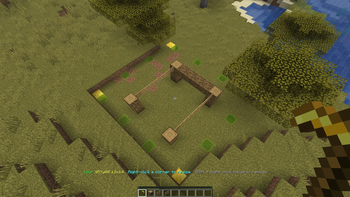
Safe Zone is a server-only Fabric and Paper land-claim mod for Minecraft 1.21.11. Players protect builds with a configurable vanilla claim wand (Golden Hoe by default), admins manage claims with /sz, and unmodded clients can still join and use the core workflow.

Highlights

  • Server-side land claims for Fabric servers
  • No client mod required for normal play
  • First-join starter wand using a vanilla item
  • In-world claim creation, resizing, trust management, and removal
  • Player self-service tools through /claim
  • Admin moderation and management tools through /sz
  • JSON-based world data stored under <world>\safe-zone\

Requirements

  • Minecraft 1.21.11
  • Fabric Loader
  • Fabric API
  • Java 21+

Install

  1. Install Fabric or Paper Loader on the server.
  2. Put Safe Zone (and Fabric API for Fabric Servers) in the server mods folder.
  3. Start the server once to generate the Safe Zone data/config files.
  4. Join normally. Players do not need this mod installed on the client for the current feature set.

Player quick start

  1. Join the server and receive the configured claim wand once (default: Golden Hoe).
  2. Right-click one block with the wand to save corner 1.
  3. Right-click a second block with the wand to create the claim.
  4. Stand inside your claim and:
    • Shift + left-click with the wand to open the build-access menu
    • Shift + right-click with the wand to remove the claim after confirming
    • Right-click one of your claim corners to start resizing
  5. Use /claim for claim lists, trust helpers, and claim info.

Current feature set

  • First-join starter kit that gives each player one claim wand
  • Two-corner claim creation in the Overworld
  • Claim resizing by right-clicking an owned corner with the wand
  • Claim removal by Shift + right-click inside an owned claim, with a default 5-second confirmation window
  • Trust management by Shift + left-click inside an owned claim with the wand, opening a vanilla chest-style menu
  • Player self-service claim browsing and trust/remove helpers through /claim
  • Admin claim inspection, transfer, trust overrides, teleport, reload, give-wand, and limit controls through /sz
  • Server-side outline/preview visualization without a client mod

Commands

Player commands

/claim and /claims are aliases.

  • /claim
  • /claim help
  • /claim list [page]
  • /claim trusted [page]
  • /claim here
  • /claim info [claimId]
  • /claim trust <claimId>
  • /claim remove <claimId>

/claim remove requires the same command twice within the configured confirmation window (10 seconds by default).

Admin commands

/sz and /safezone are aliases and require operator/game-master level access.

  • /sz
  • /sz help
  • /sz list [page]
  • /sz list owner <player> [page]
  • /sz list trusted <player> [page]
  • /sz info [claimId]
  • /sz remove <claimId>
  • /sz removeall <player>
  • /sz notifications
  • /sz notifications purge
  • /sz notifications purge confirm
  • /sz transfer <claimId> <player>
  • /sz trust <claimId> <player>
  • /sz untrust <claimId> <player>
  • /sz tp <claimId>
  • /sz inspect
  • /sz reload
  • /sz givewand [player]
  • /sz limits <player> <maxClaims>

/sz inspect toggles inspect mode. While it is enabled, admins can Shift + right-click with an empty hand to read claim info in-world.

Configuration and data

Safe Zone stores gameplay and ops settings together in <world>\safe-zone\config.json. The file is pretty-printed and grouped into gameplay and ops sections on first load.

Defaults

  • claimWandItemId — minecraft:golden_hoe
  • starterKitEnabled — true
  • dropStarterKitWhenInventoryFull — true
  • defaultMaxClaims — 3
  • maxClaimWidth / maxClaimDepth — 64 / 64
  • claimGapEnforced — false
  • claimGapMinDistance — 10 blocks when enabled
  • claimExpiryDays — 30 days stored in config; automatic inactivity expiry is still future work
  • notificationsEnabled — true; when false, offline admin notices are disabled
  • notificationRetentionDays — 30 days; pending offline admin notices older than this are pruned from notifications.json
  • wandRemoveConfirmSeconds — 5
  • commandRemoveConfirmSeconds — 10

Rules and files

  • Claims are Overworld-only
  • Claims are full-height columns
  • Per-player claim limits are stored in player_limits.json
  • Ops settings live in the ops section of <world>\safe-zone\config.json
    • auditLogEnabled defaults to false
    • mirrorAuditToServerLog defaults to false
    • createDataBackups defaults to false
    • recoverFromBackupOnLoadFailure defaults to false
  • Stored files include:
    • claims.json
    • config.json
    • player_limits.json
    • starter_kit_recipients.json
    • notifications.json
    • safe-zone_audit.log

notifications.json stores pending offline admin notices, such as claim removals done while a player is away. Entries are written when a notice is queued, removed after delivery on join, and stale undelivered notices are pruned after the configured retention window. When notificationsEnabled is false, Safe Zone clears pending offline admin notices and stops queuing new ones. Config JSON files stay pretty-printed for editing, while runtime state JSON is saved compactly. All JSON state files save atomically, and backup creation is controlled by ops.createDataBackups in config.json. /sz reload also reloads config.json.

Protection coverage

Safe Zone currently protects:

  • Block breaking
  • Block placement attempts
  • Bucket placement/use targets
  • Fluid spread into protected claims from outside or a different claim
  • General block use inside claims
  • Minecart interaction in claims
  • Fire spread into claims
  • Explosion block damage in claims
  • Explosion-created fire in claims
  • Paintings, item frames, minecarts, boats, and armor stands from explosion damage or movement
  • Trusted/owner/admin-bypass players from explosion damage and knockback inside claims
  • Claim-wand interactions without hoe tilling or durability use

Not implemented yet:

  • Piston movement protection
  • Enderman grief prevention
  • General non-explosion entity-damage protection
  • Automatic inactivity expiry processing

👥 Team & Contributors

E
Eloquence2781Owner

⚙️ Compatibility

Environment
🖥️ Server-side
Loaders
fabricpaper
Minecraft Versions
26.126.1.126.1.2

🔗 Links

Modrinth Page