Rtag
The "readable tag" Bukkit library, an easy way to handle block, entity, item NBT and data components
📖About Rtag




⭐For server owners
Downloading
Click on download button and select rtag .jar file to download, then put it on plugins folder.
Requirements
- At least Minecraft 1.8.8, lower versions may be not compatible.
- Minimum Java 11, update your Java version, old MC versions works fine on Java 11.
Compatibility
✅ Bukkit
✅ Spigot
✅ Paper
✅ Paper with Mojang Mappings
✅ Folia
✅ Any of above without craftbukkit relocation (see PaperMC announce)
⚓For developers
⏩What is Rtag?
Rtag provides an easy way to edit NBT tags without NMS and avoiding bad performance impact on big servers.
So it's completely shadeable, you can implement rtag directly in your plugin.
For detailed information about Rtag, visit the wiki page.
Rtag convert any Java object into NBT tag and viceversa:
// Using Item
RtagItem tag = new RtagItem(item);
// Using Entity
RtagEntity tag = new RtagEntity(entity);
// Using block
RtagBlock tag = new RtagBlock(block);


// --- Put values
// Set the value "Custom Text" at "display.Name" path
tag.set("Custom Text", "display", "Name");
// Or set an integer at "someKey" path
tag.set(40, "someKey");
// Including compatibility with any type of object like MyObject
MyObject myobject = new MyObject();
tag.set(myobject, "any", "path");

// So you can add lists
tag.set(new ArrayList(), "list", "path");
// And add values into list
tag.add((short) 3, "list", "path");
// Or replace the values of existing list
tag.set((short) 5, "list", "path", 0); // index 0

// --- Get values
// Value from path "display" -> "Name"
String name = tag.get("display", "Name");
// Safe value get from path "someKey", or -1 by default
int intValue = tag.getOptional("someKey").or(-1);
int sameValue = tag.getOptional("someKey").asInt(-1); // This method try to convert any type to int
// Explicit value get for custom objects
MyObject sameobject = tag.getOptional("any", "path").as(MyObject.class);
// Merge values into tag
tag.merge(Map.of("asd", 123, "someKey", 41), true);

// Get lists
List<Short> list = tag.get("list", "path");
// Get list value from index
short listValue = tag.get("list", "path", 0); // index 0

// Get the entire object tag as Map of Java objects
Map<String, Object> map = tag.get();

// --- Load changes into object
// Load changes into original object
tag.load();
// RtagItem as the option to create an item copy with changes loaded
ItemStack itemCopy = tag.loadCopy();

// --- Update current tag if the original object was edited
tag.update();
⏩Get Rtag
For Gradle Groovy project:
build.gradlerepositories {
maven { url 'https://jitpack.io' }
}
dependencies {
compileOnly 'com.saicone.rtag:rtag:VERSION'
// Other modules
compileOnly 'com.saicone.rtag:rtag-block:VERSION'
compileOnly 'com.saicone.rtag:rtag-entity:VERSION'
compileOnly 'com.saicone.rtag:rtag-item:VERSION'
}
For Gradle Kotlin project:
build.gradle.ktsrepositories {
maven("https://jitpack.io")
}
dependencies {
compileOnly("com.saicone.rtag:rtag:VERSION")
// Other modules
compileOnly("com.saicone.rtag:rtag-block:VERSION")
compileOnly("com.saicone.rtag:rtag-entity:VERSION")
compileOnly("com.saicone.rtag:rtag-item:VERSION")
}
For Maven project:
pom.xml<repositories>
<repository>
<id>Jitpack</id>
<url>https://jitpack.io</url>
</repository>
</repositories>
<dependencies>
<dependency>
<groupId>com.saicone.rtag</groupId>
<artifactId>rtag</artifactId>
<version>VERSION</version>
<scope>provided</scope>
</dependency>
<!-- Other modules -->
<dependency>
<groupId>com.saicone.rtag</groupId>
<artifactId>rtag-block</artifactId>
<version>VERSION</version>
<scope>provided</scope>
</dependency>
<dependency>
<groupId>com.saicone.rtag</groupId>
<artifactId>rtag-entity</artifactId>
<version>VERSION</version>
<scope>provided</scope>
</dependency>
<dependency>
<groupId>com.saicone.rtag</groupId>
<artifactId>rtag-item</artifactId>
<version>VERSION</version>
<scope>provided</scope>
</dependency>
</dependencies>
⭐Features
There are other libraries to edit NBT tags, why should Rtag be used over the others?
1️⃣Easy to understand
You don't need to be an expert with NBT tags, just with simple methods you can set and get normal Java objects.
Rtag rtag = new Rtag();
rtag.set(compound, "Normal string", "CustomTagPath");
String string = rtag.get(compound, "CustomTagPath");
The main RtagEditor instances have methods to make tag editing easier.
RtagItem tag = new RtagItem(item);
tag.setUnbreakable(true);
tag.setRepairCost(20);
int level = tag.getEnchantmentLevel("unbreaking"); // Enchantment enum, name or id

RtagEntity tag = new RtagEntity(entity);
tag.setAttributeBase("generic.attackDamage", 0.5);

RtagBlock tag = new RtagBlock(block);
tag.setCustomName("§eColored name");
You can edit objects using functions inside RtagEditor instances and return any type of object.
ItemStack item = ...;
// Edit original
RtagItem.edit(item, tag -> {
    tag.set("Custom Text", "display", "name");
    tag.set(30, "someKey");
});
// Return a copy
ItemStack copy = RtagItem.edit(item, tag -> {
    tag.set(30, "someKey");
    return tag.loadCopy();
});
2️⃣Edit data components! (Experimental)
Since Minecraft 1.20.5, items use components to save vanilla data.
With RtagItem you can edit components in a simple way as normal Java objects.
RtagItem tag = new RtagItem(item);

if (tag.hasComponent("minecraft:custom_model_data")) {
    tag.removeComponent("minecraft:custom_model_data");
} else {
    tag.setComponent("minecraft:custom_model_data", 40);
}

Object component = tag.getComponent("minecraft:custom_model_data");
Integer number = ComponentType.encodeJava("minecraft:custom_model_data", component).orElse(null);
3️⃣Store custom objects
By default, Rtag uses the Gson library inside Bukkit to (de)serialize custom objects, but you need to get them using explicit conversion.
Rtag rtag = new Rtag();
MyObject myObject = new MyObject();

rtag.set(compound, myObject, "CustomTagPath");
MyObject sameObject = rtag.getOptional(compound, "CustomTagPath").as(MyObject.class);
So you can register (de)serializers in Rtag instance to set and get custom objects with automatic conversion.
This conversion put an additional key into your saved tag to detect it using the provided ID.
public class MyObjectSerializer implements RtagSerializer<MyObject>, RtagDeserializer<MyObject> {

    public MyObjectSerializer(Rtag rtag) {
        rtag.putSerializer(MyObject.class, this);
        rtag.putDeserializer(this);
    }

    // MyObject -> Map
    @Override
    public String getInID() {
        // It's suggested to use a unique namespaced key
        return "myplugin:MyObject";
    }

    // Map -> MyObject
    @Override
    public String getOutID() {
        return "myplugin:MyObject";
    }

    @Override
    public Map<String, Object> serialize(MyObject object) {
        // Convert your custom object into map
    }

    @Override
    public MyObject deserialize(Map<String, Object> compound) {
        // Convert compound into you custom object
    }
}
Then you can get your custom object without explicit conversion.
Rtag rtag = new Rtag();
new MyObjectSerializer(rtag);
MyObject myObject = new MyObject();

rtag.set(compound, myObject, "CustomTagPath");
MyObject sameObject = rtag.get(compound, "CustomTagPath");
4️⃣TagStream instances
With ItemTagStream instance you can convert items into Base64|File|Bytes|Map|String and viceversa.
Including cross-version support! Save an item on any version and get on any version without compatibility problems. Materials, enchantments, potions... etc, all will be converted!
ItemTagStream tag = ItemTagStream.INSTANCE;

String string = tag.toBase64(item);
ItemStack sameItem = tag.fromBase64(string)[0];
5️⃣Textured heads
With SkullTexture class you can get textured heads from base64, url, texture ID, player name or uuid.
// Base64
ItemStack head = SkullTexture.getTexturedHead("eyJ0ZXh0dXJlcyI6eyJTS0lOIjp7InVybCI6Imh0dHA6Ly90ZXh0dXJlcy5taW5lY3JhZnQubmV0L3RleHR1cmUvZmVkZmEyZTBmZGVhMGMwNDIzODA0Y2RiNWI2MmFkMDVhNmU5MTRjMDQ2YzRhM2I3ZTM1NWJmODEyNjkxMjVmZCJ9fQ==");
// URL
ItemStack head = SkullTexture.getTexturedHead("http://textures.minecraft.net/texture/fedfa2e0fdea0c0423804cdb5b62ad05a6e914c046c4a3b7e355bf81269125fd");
// Texture ID
ItemStack head = SkullTexture.getTexturedHead("fedfa2e0fdea0c0423804cdb5b62ad05a6e914c046c4a3b7e355bf81269125fd");
// Player name
ItemStack head = SkullTexture.getTexturedHead("Rubenicos");
// Player UUID
ItemStack head = SkullTexture.getTexturedHead("7ca003dc-175f-4f1f-b490-5651045311ad");
6️⃣Chat Component
With ChatComponent class you can convert (json) strings into chat components and viceversa.
// To component
Object component = ChatComponent.fromJson("{\"bold\":true,\"italic\":false,\"color\":\"dark_purple\",\"text\":\"Colored text!\"}");
Object sameComponent = ChatComponent.fromString("§5§lColored text!");

// From component
String json = ChatComponent.toJson(component);
String string = ChatComponent.toString(component);

// Cross-compatibility
String json = ChatComponent.toJson("§5§lColored text!");
String string = ChatComponent.toString("{\"bold\":true,\"italic\":false,\"color\":\"dark_purple\",\"text\":\"Colored text!\"}");
✨Pretty NBT
For more information, visit the wiki page.
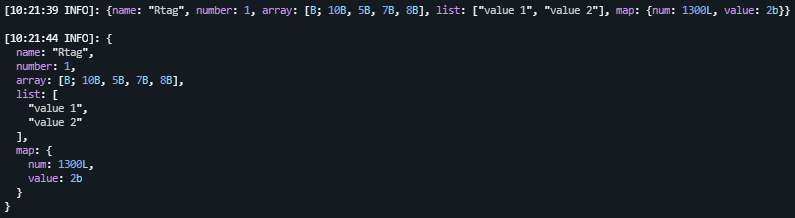
Format any nbt object into single or multiple lines using default, hex or minimessage color palette.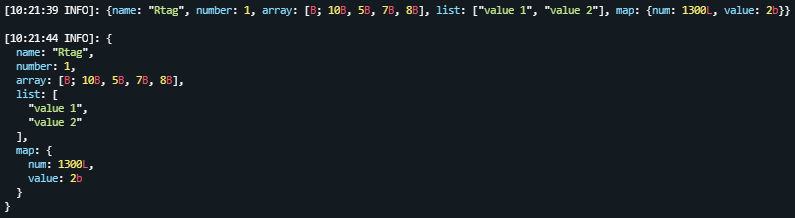
Or use your custom color palette.