Logo
MINECRAFTBIBLE
Items
Items

All game items

Blocks
Blocks

Building blocks

Mobs
Mobs

Creatures & monsters

Biomes
Biomes

World biomes

Structures
Structures

Generated structures

Recipes
Recipes

Crafting guides

Advancements
Advancements

Achievements

Loot Tables
Loot Tables

Drop rates

Tags
Tags

Item groupings

All Versions
View all data →
Capes
Cape ArchiveNEW

Browse rare Minecon capes, OptiFine capes, and custom capes from players worldwide

Browse

Player Database
Player DatabasePopular

Search any player

Skin Browser
Skin Browser

Browse & download skins

Cape Gallery
Cape GalleryNEW

Minecon & OptiFine capes

Seed Vault
Seed Vault

Curated seeds

Learn

Guides
GuidesNew

Tutorials & tips

Blog
Blog

News & updates

Community

Community Hub
Community HubHub

Posts, discussions & more

All Versions
View community →
Seed Analyzer
Seed Analyzer

World seed analysis

Loot Explorer
Loot Explorer

Drop rates

Crafting Calculator
Crafting Calculator

Material planning

Enchant Calculator
Enchant Calculator

Probability math

Redstone Lab
Redstone Lab

Signal timing

Trading Profit
Trading Profit

Villager ROI

All Versions
View all tools →
Mods
Mods

Browse all mods

Plugins
Plugins

Server plugins

Resource Packs
Resource Packs

Textures & sounds

Shaders
Shaders

Visual enhancements

Datapacks
Datapacks

World logic

Scanner
Mod Intelligence

Scan & analyze any mod

All Versions
View all mods →
Loading...
IntroductionIntroductionVersion HistoryVersion HistoryGuidesGuidesBlog & NewsBlog & News
ItemsItemsBlocksBlocksMobsMobsRecipesRecipesBiomesBiomesStructuresStructuresAdvancementsAdvancementsLoot TablesLoot TablesTagsTags
ModsModsPluginsPluginsResource PacksResource PacksShadersShadersDatapacksDatapacks

MinecraftBible

The Ultimate Wiki

Logo
MINECRAFTBIBLE

The ultimate Minecraft reference. Every item, block, mob, and recipe documented with precision.

Community

  • Player Database
  • Skin Browser
  • Cape Gallery
  • Community Hub
  • Seed Vault

Database

  • Items
  • Blocks
  • Mobs
  • Recipes
  • Biomes
  • Structures

Tools

  • Seed Analyzer
  • Mod Intelligence
  • Crafting Calculator
  • Enchant Calculator

Mods & Packs

  • Mods
  • Plugins
  • Resource Packs
  • Shaders
  • Datapacks

© 2026 MinecraftBible. Not affiliated with Mojang or Microsoft.

PrivacyTermsContact
Rotten Flesh 2 Leather
PluginMIT

Rotten Flesh 2 Leather

Provides a way to craft, smelt, cook, or blast your unwanted rotten flesh into leather for Spigot

1.8K
Downloads
3
Followers
3 months ago
Updated
📦
7
Versions
game-mechanicsmobsutilityfoliapaperspigot
Download Latestv1.1.0View on Modrinth

📖About Rotten Flesh 2 Leather

A simple plugin that allows you to turn your unwanted Rotten Flesh into something more useful like Leather!

With added config allowing you to set the recipe for the leather in the crafting table, or even disable the crafting table recipe entirely!

I felt that cooking Rotten Flesh to Leather made more sense so the furnace and the blasting furnace recipes are enabled by default.

However you can easily enable the other two in the config.yml file if you so desire.

Spoiler
###################################
#
# RottenFlesh2Leather Config
# by Tyrannys
#
###################################

#Adds a furnace recipe to convert Rotten Flesh to Leather, This is default: true
furnace-recipe: true

#Adds a blasting furnace recipe to convert Rotten Flesh to Leather, this is default: true
blasting-recipe: true

#Adds a smoker recipe to convert Rotten Flesh to Leather, this is default: false
smoker-recipe: false

#Sets the cooking time required by the furnace, please remember that whatever time you put in will be divided by 2 (effectively halving the time)
#for the smoker/blast furnace if they're enabled
cooking-time: 200

#Sets the experience gained by cooking rotten flesh into leather Default is 0
experience-gain: 0

#Adds a crafting recipe to convert Rotten Flesh to Leather, this is default: false,
#I added this for those that like the original RottenFleshToLeather Plugin who I thought would prefer to have this
crafting-recipe: false

#Lets you change the current crafting recipe that is set, if you change it after logging in please set crafting-recipe to false,
#Restart, set it to true, then restart again, I'm still new to plugins, so I haven't found a way to reset it upon logging into the server if it has changed
#
#Think about it like this
#
# "XXX" ;
# "XXX" ;
# "XXX" ;A standard Crafting Table recipe
# X being the Rotten Flesh that you want to convert into the leather, if you would prefer an easier crafting method such as
# Only one Rotten Flesh to Leather you can do this, which should allow you to set it wherever you want into the crafting table
# Please remember to keep a space in the top and bottom rows or else it will error out the crafting recipe and you won't be able to make it
# " "
# "X"
# " "

crafting-recipe-top: "XXX"
crafting-recipe-mid: "XXX"
crafting-recipe-bot: "XXX"

The default crafting recipe when enabled!
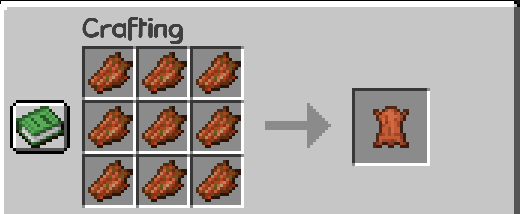
The Default crafting recipe depicting 9 rotten flesh spread out in a crafting table making 1 leather

A crafting recipe that you can easily change it to! feel free to choose your own based on balance!
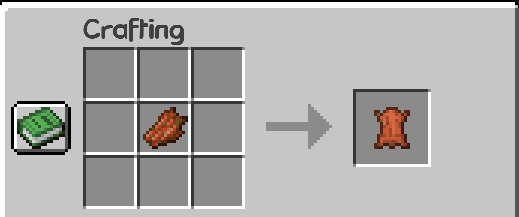
Another way to create leather when the custom crafting config has been changed depicting 1 rotten flesh making 1 leather

By default the furnace recipe is enabled!
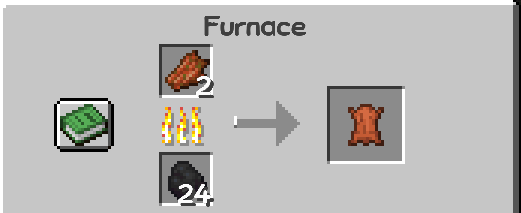
A furnace smelting rotten flesh into leather

By default the blast furnace recipe is enabled!

A blast furnace smelting rotten flesh into leather

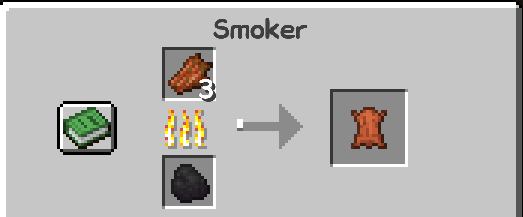
An added smoker recipe when enabled!
A Smoker smelting rotten flesh into leather

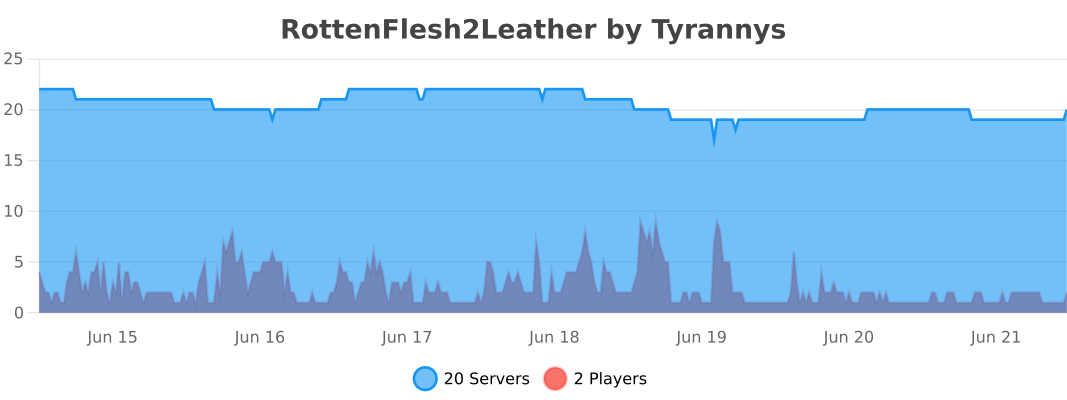
A graph showing the amount of servers and players currently using the plugin

👥 Team & Contributors

Tyrannys
TyrannysOwner

⚙️ Compatibility

Environment
🖥️ Server-side
Loaders
foliapaperspigot
Minecraft Versions
1.211.21.11.21.21.21.31.21.41.21.51.21.61.21.7+7 more

🔗 Links

Modrinth Page