Logo
MINECRAFTBIBLE
Items
Items

All game items

Blocks
Blocks

Building blocks

Mobs
Mobs

Creatures & monsters

Biomes
Biomes

World biomes

Structures
Structures

Generated structures

Recipes
Recipes

Crafting guides

Advancements
Advancements

Achievements

Loot Tables
Loot Tables

Drop rates

Tags
Tags

Item groupings

All Versions
View all data →
Capes
Cape ArchiveNEW

Browse rare Minecon capes, OptiFine capes, and custom capes from players worldwide

Browse

Player Database
Player DatabasePopular

Search any player

Skin Browser
Skin Browser

Browse & download skins

Cape Gallery
Cape GalleryNEW

Minecon & OptiFine capes

Seed Vault
Seed Vault

Curated seeds

Learn

Guides
GuidesNew

Tutorials & tips

Blog
Blog

News & updates

Community

Community Hub
Community HubHub

Posts, discussions & more

All Versions
View community →
Seed Analyzer
Seed Analyzer

World seed analysis

Loot Explorer
Loot Explorer

Drop rates

Crafting Calculator
Crafting Calculator

Material planning

Enchant Calculator
Enchant Calculator

Probability math

Redstone Lab
Redstone Lab

Signal timing

Trading Profit
Trading Profit

Villager ROI

All Versions
View all tools →
Mods
Mods

Browse all mods

Plugins
Plugins

Server plugins

Resource Packs
Resource Packs

Textures & sounds

Shaders
Shaders

Visual enhancements

Datapacks
Datapacks

World logic

Scanner
Mod Intelligence

Scan & analyze any mod

All Versions
View all mods →
Loading...
IntroductionIntroductionVersion HistoryVersion HistoryGuidesGuidesBlog & NewsBlog & News
ItemsItemsBlocksBlocksMobsMobsRecipesRecipesBiomesBiomesStructuresStructuresAdvancementsAdvancementsLoot TablesLoot TablesTagsTags
ModsModsPluginsPluginsResource PacksResource PacksShadersShadersDatapacksDatapacks

MinecraftBible

The Ultimate Wiki

Logo
MINECRAFTBIBLE

The ultimate Minecraft reference. Every item, block, mob, and recipe documented with precision.

Community

  • Skin Browser
  • Cape Gallery
  • Seed Vault
  • Blog
  • Guides

Database

  • Items
  • Blocks
  • Mobs
  • Recipes
  • Biomes
  • Structures

Tools

  • Seed Analyzer
  • Mod Intelligence
  • Crafting Calculator
  • Enchant Calculator

Mods & Packs

  • Mods
  • Plugins
  • Resource Packs
  • Shaders
  • Datapacks

Site & Legal

  • About
  • Authors
  • Editorial Policy
  • Corrections
  • Contact
  • Privacy Policy
  • Terms of Service
  • DMCA
  • Sitemap

© 2026 MinecraftBible. Not affiliated with Mojang or Microsoft.

PrivacyTermsContact
Ropes
PluginLicenseRef-All-Rights-Reserved

Ropes

craft and climb ropes, shoot rope arrows

31
Downloads
1
Followers
4 months ago
Updated
📦
3
Versions
adventureequipmentpaperpurpur
Download Latestv0.1.2View on Modrinth

📖About Ropes

Ropes

A Minecraft Paper plugin that lets you place, shoot, and climb ropes. Get it on Modrinth.

Features

  • Rope Coils - Craftable items that place vertical ropes when used on blocks
  • Rope Arrows - Shoot ropes from a bow to place them at a distance
  • Climbing - Jump to climb ropes, sneak to descend
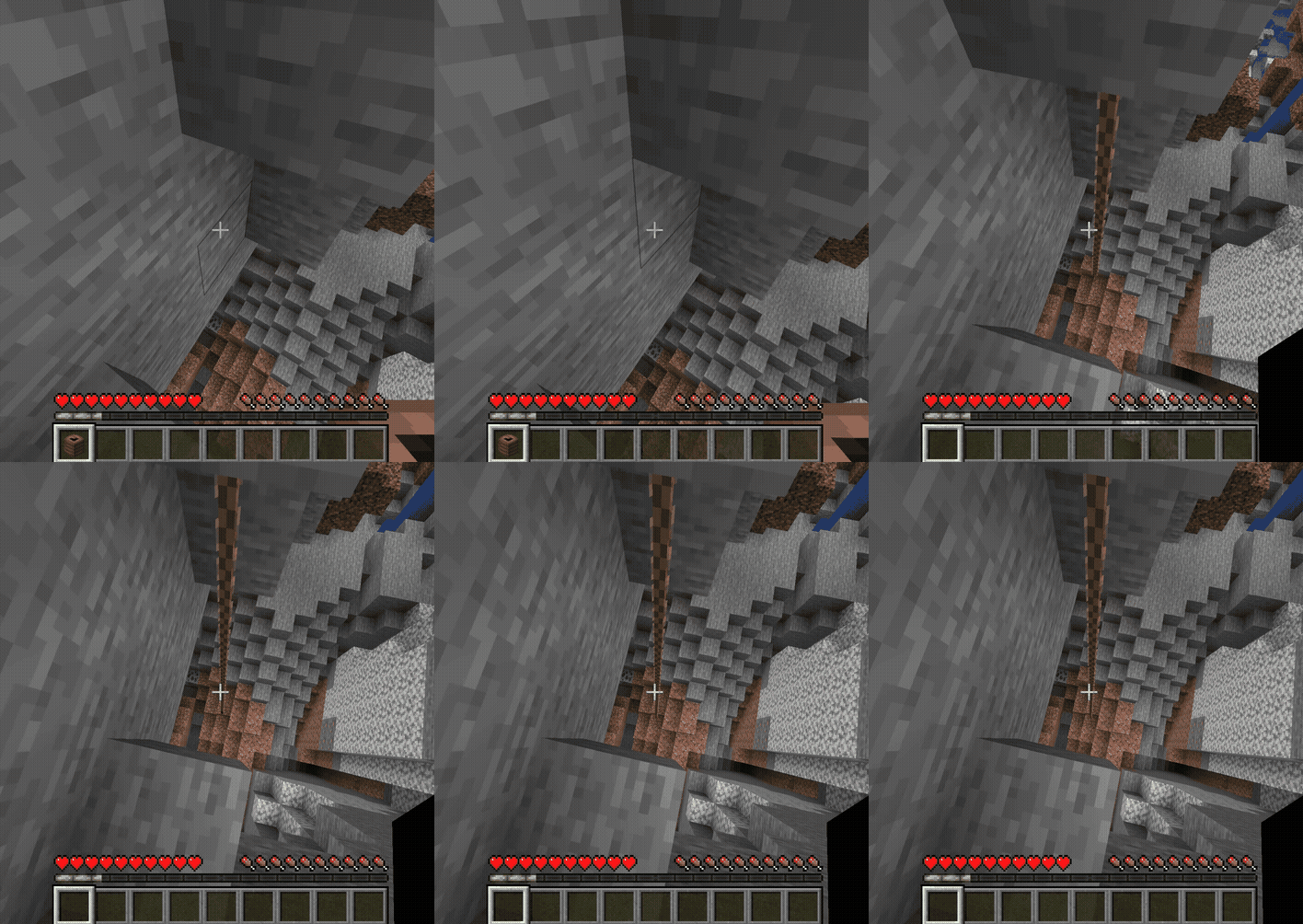
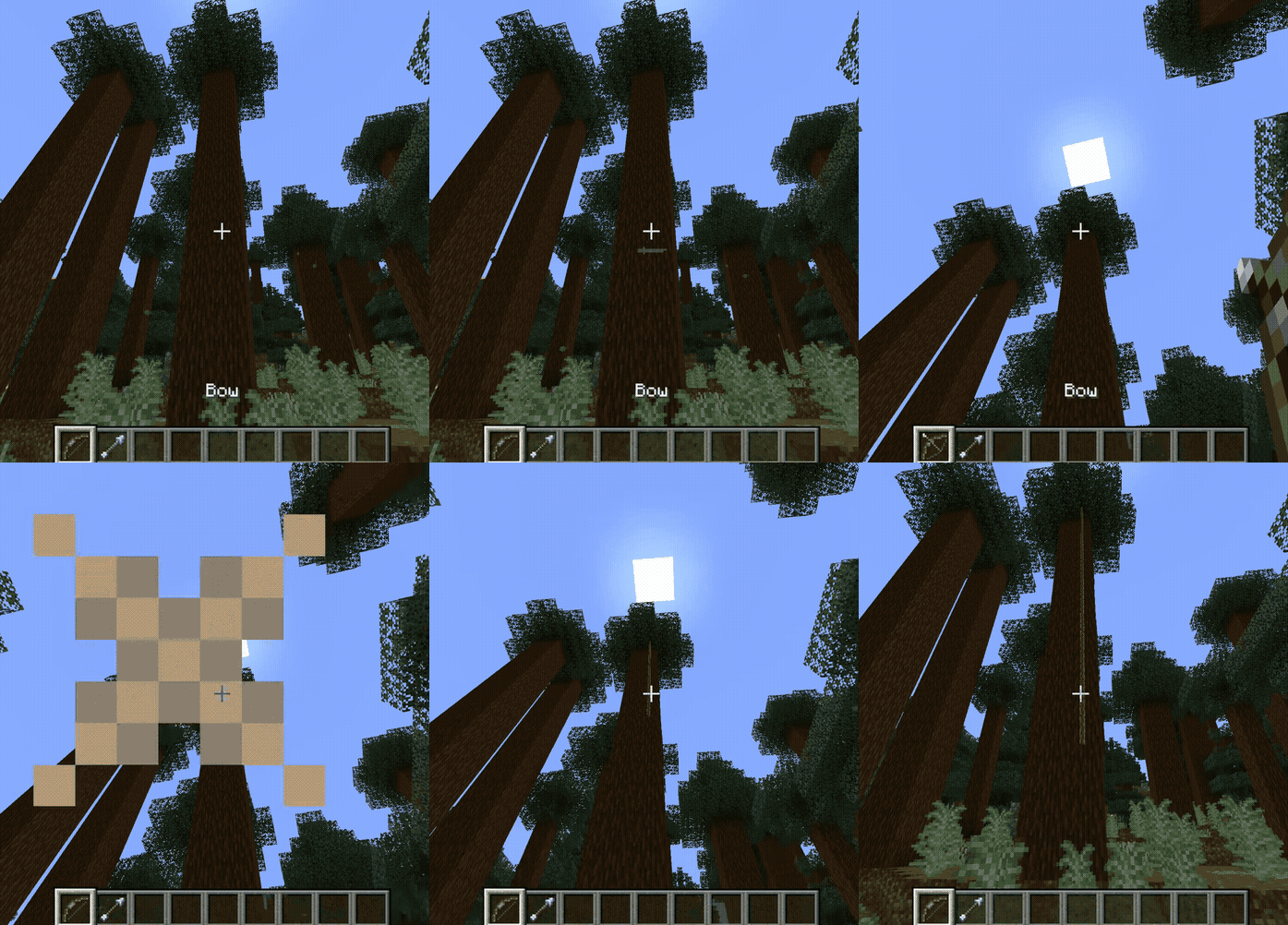
Placing a Rope Coil Shooting a Rope Arrow
Placing a rope coil Shooting a rope arrow

Rope Coils

Right-click with a rope coil to place a rope hanging downward, as long as there is a block above for the rope to attach to. The rope extends down until it hits an obstacle or runs out of length. You can also place a rope on a fence post if there is space for the rope below it. To extend an existing rope, right-click it with another rope coil.

Rope Arrows

Shoot a rope arrow from a bow to place a rope at a distance. The rope will attach where the arrow lands.

Climbing

  • Jump/Spacebar to start climbing
  • Sprint and move to continue climbing or change direction to up when moving down
  • Hold sneak to descend

Breaking Ropes

Left-click a rope to break it and receive rope coils back. Breaking the anchor block at the top destroys the entire rope.

Crafting

Recipe Description
Rope Coil recipe Craft a Rope Coil with 6 string, unshaped. Resulting rope coil length is configurable.
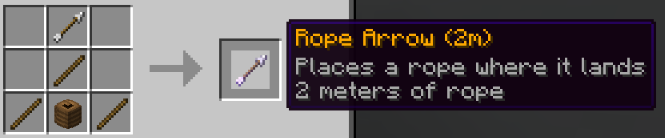
Rope Arrow recipe Craft a Rope Arrow by combining a Rope Coil with an arrow and sticks.
Combining Rope Coils Combine two Rope Coils to add their lengths together (up to 16 blocks, configurable).

Installation

Download the latest release from Modrinth, and place the JAR file in your server's plugins folder. Restart the server.

Commands

Command Description
/ropes help Show available commands
/ropes info Display rope statistics across all loaded chunks
/ropes give {coil,arrow} [length] Give yourself a rope item (OP)
/ropes recipes [player] Unlock rope recipes for yourself or another player (OP)
/ropes reload Reload configuration (OP)
/ropes delete_all confirm Remove all placed ropes (OP)

Configuration

Key options in config.yml:

  • rope-coil.default-length - Default rope length when crafting (default: 2)
  • rope-coil.max-length - Maximum length per coil (default: 16)
  • rope-block.climb-speed - How fast players climb (default: 0.2)
  • recipes.rope-coil.enabled - Enable/disable rope coil crafting
  • recipes.rope-arrow.enabled - Enable/disable rope arrow crafting
  • recipes.unlock-on-advancement - Advancement that unlocks rope recipes (default: minecraft:adventure/ol_betsy). Set to empty string to disable.

Recipe changes require a server restart to take effect.

👥 Team & Contributors

D
def9a2a4Owner

⚙️ Compatibility

Environment
🖥️ Server-side
Loaders
paperpurpur
Minecraft Versions
1.211.21.11.21.21.21.31.21.41.21.51.21.61.21.7+4 more

🔗 Links

Modrinth Page