
MINECRAFTBIBLE
Loading...
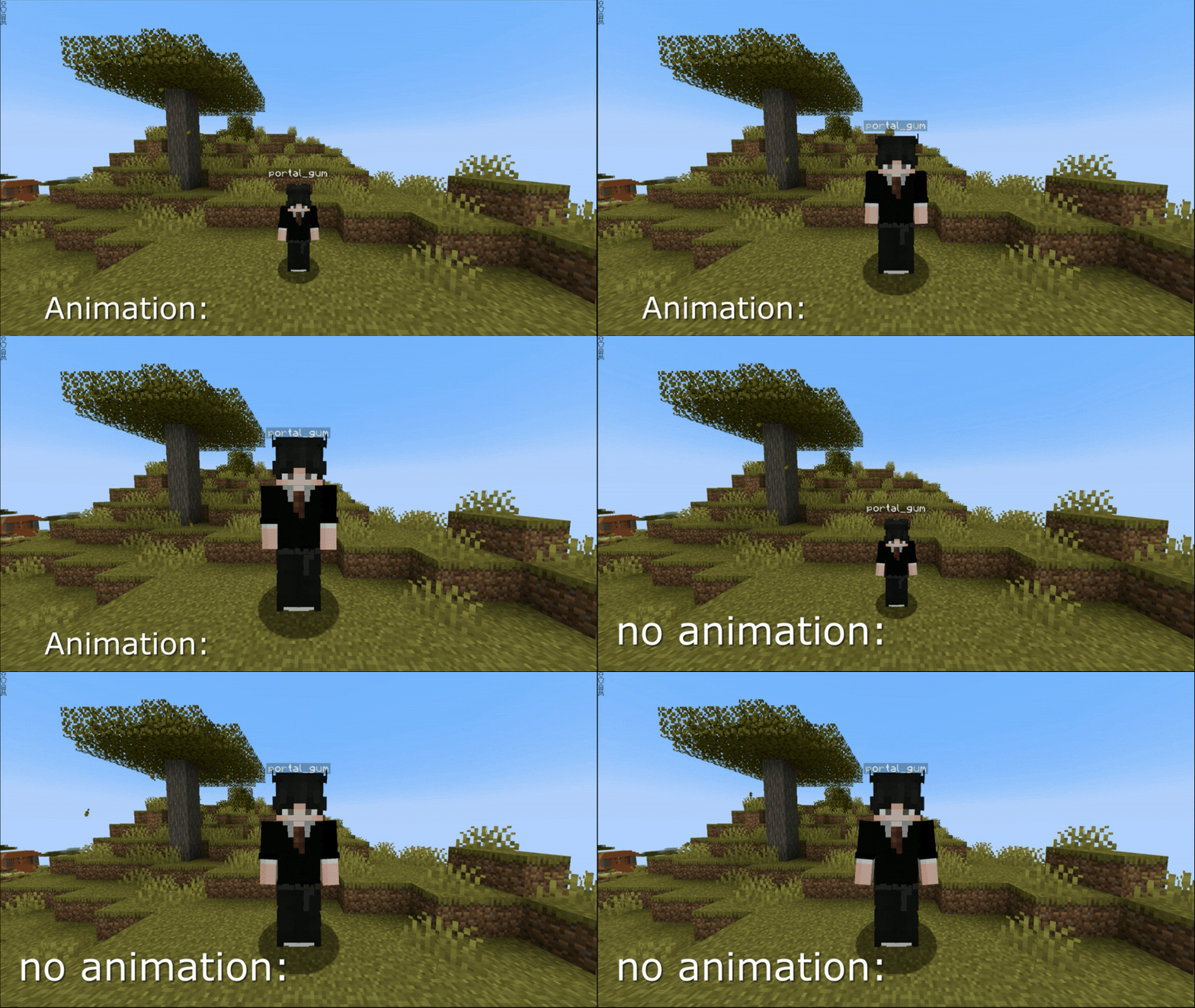

Change player size with a simple /resize command.
Resize is a lightweight, fast, and powerful Minecraft plugin that allows you to change player and mob size with smooth animations, flexible configuration, group-based limits, and advanced integrations.
Perfect for fun servers, PvP, RPG, events, and mini-games.
Command:
/resize <size> [player]
Decimal values are supported (0.6, 1.2, 1.6, etc.).
To reset the size back to normal, type:/resize reset (or simply /resize r).
This will reset your size or the specified player's size back to 1.0.
Command:
/resize mob <size>
To reset a mob’s size back to its default size, type:/resize mob reset (or simply /resize mob r).
To change a mob's size:
Features:
Commands:
/resize info
/resize info <player>
Displays:
You can enable smooth size transitions instead of instant changes:
animation:
  enabled: true
  duration: 1
Makes size changes smooth and visually pleasing (for both players and mobs).
Resize supports LuckPerms integration.
You can define different limits for each group:
group-limits:
  enabled: true
  default:
    min: 0.6
    max: 1.6
    mob_min: 0.5
    mob_max: 2.0
  vip:
    max: 1.4
  titan:
    min: 0.5
    max: 1.6
    mob_max: 3.0
If enabled:
If disabled:
scale values are used⚠ LuckPerms is optional.
Resize includes a custom WorldGuard flag:
/rg flag <region> resize allow|deny
This allows you to:
⚠ WorldGuard is optional and only used if installed.
A fully configurable system that automatically resets player size when:
Perfect for balanced PvP, RPG mechanics, and event gameplay.
You can configure minimum and maximum size values:
scale:
  min: 0.6
  max: 1.6
  mob_min: 0.5
  mob_max: 2.0
These values act as:
Resize supports PlaceholderAPI integration, allowing you to display player and mob size information in scoreboards, tab lists, chat, and other plugins.
⚠ Requires the PlaceholderAPI plugin to be installed.
Available placeholders:
| Placeholder | Description |
|---|---|
%resize_current_size% |
Displays your current size |
%resize_max_size% |
Displays the maximum size you can increase to |
%resize_min_size% |
Displays the minimum size you can decrease to |
%resize_mob_max% |
Displays the maximum size you can set for mobs |
%resize_mob_min% |
Displays the minimum size you can set for mobs |
These placeholders respect:
Administrators can:
/resize infoBuilt-in cooldown system prevents command spam.
Applies to:
/resize/resize mobsave-sizes: true
true — Size is saved after rejoiningfalse — Size resets to 1.0 on join/plugins/Resize/lang/
en.yml
ru.yml
es.yml
de.yml
pl.yml
pt_br.yml
Available languages:
Supports HEX color codes in config and language files.
Reload configuration and language files without restarting the server:
/resize reload
# Resize plugin configuration

# Language: English: en, Русский: ru, Español: es, Português - Brazil: pt_br, Deutsch: de, Polski: pl
lang: en

# Delay for the /resize command (prevents spamming)
cooldown: 5
# Plugin prefix
# HEX colors are supported (format: &#RRGGBB) in config.yml and language files
prefix: "&e&l[&aResize&e&l]&r "

# Whether to save the player's size after reconnecting
save-sizes: true

# Maximum and minimum size
scale:
  # Player limits
  min: 0.6
  max: 1.6

  # Mob limits
  mob_min: 0.5
  mob_max: 2.0

# Maximum distance to change mob size
mob:
  distance: 7

# Animation adds smoothness when changing size
animation:
  enabled: true
  # in seconds
  duration: 1

# Settings for resetting player size when taking or dealing damage
reset-on-damage:
  player:
    # If the player dealt damage to another player
    deal: true
    # If the player received damage from another player
    receive: true
    # If the player dies
    death: true

  mob:
    # If the player dealt damage to a mob
    deal: true
    # If the player received damage from a mob
    receive: true

  other:
    # If the player dealt damage to "other"
    deal: true
    # If the player received damage from "other"
    receive: true
# Should resets apply to admins with resize.admin permission
admin-reset: false

# Group size limits using LuckPerms
# Works only if the LuckPerms plugin is installed
#
# enabled: true  — use group-based limits
# enabled: false — ignore this block and use scale.min and scale.max instead
#
# Group names must EXACTLY match the primary group name in LuckPerms
#
# You can specify only min or only max:
# - if a value is missing, the value from the scale section will be used
group-limits:
  enabled: false
  default:
    min: 0.6
    max: 1.6
    mob_min: 0.5
    mob_max: 2.0
  vip:
    min: 0.2
    mob_max: 3.0
  titan:
    max: 3.0
    mob_min: 0.3

worlds:
  # blacklist / whitelist
  mode: blacklist
  # for example: world_nether, world_the_end
  list:
    - spawn
    - lobby

# Plugin update checker settings
update-checker:
  enabled: true
  # Notify server operators about new versions when they join
  notify-ops: true
| Permission | Description | Default |
|---|---|---|
resize.resize |
Allows using /resize |
true |
resize.resize.other |
Allows changing other players' size | op |
resize.mob |
Allows using /resize mob |
op |
resize.info |
Allows using /resize info |
true |
resize.info.other |
Allows viewing size information of other players | op |
resize.reload |
Allows reloading the plugin configuration | op |
resize.admin |
Full bypass of all restrictions | op |
resize.* |
Grants all Resize permissions | op |
The plugin works perfectly without them.