

PluginLicenseRef-Custom-Personal-Use-and-Non-Commercial-License
Report System
Report System plugin for Velocity server with discord bot integration
36
Downloads
0
Followers
3 months ago
Updated
📦
1
Versions
📖About Report System
🛡️ Report System for Velocity
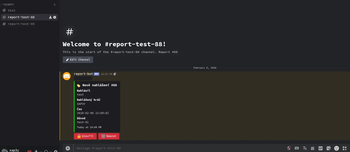
A powerful, high-performance reporting solution for Velocity proxy servers, seamlessly integrated with Discord and MariaDB. This plugin bridges the gap between your Minecraft server and staff team by creating dedicated Discord channels for every report.
🚀 Key Features
- Discord Integration: Automatically creates a unique text channel for every new report.
- Web Transcripts: Generate and host professional chat transcripts (including media/images) when a report is closed.
- Advanced Rate Limiting: Prevent spam with a "Greedy Token" system.
- Fully Customizable: Every message, sound, and permission node can be edited in the
config.yml. - Staff Protection: Optional settings to prevent players from reporting administrators.
- Cross-Server Sync: As a Velocity plugin, it handles reports across your entire network.
🛠️ Installation & Requirements
Pre-requisites
- MariaDB Database: Required for persistent data storage.
- Discord Bot: A registered application on the Discord Developer Portal.
- Discord Server
Setup Guide
- Bot Setup: Create a bot on the Discord portal, reset the token, and copy both the Token and Application ID.
- Discord Layout: Create a category where the bot will spawn report channels and a specific channel for the Audit Log.
- Initial Run: Place the plugin in your Velocity
pluginsfolder and start the server to generate the default configuration. - Configuration: * Input your MariaDB credentials.
- Fill in the
discord-botsection (Token, Guild ID, Category ID, etc.).
- Fill in the
- Restart: Restart the proxy to initialize the bot and database connection.
📝 Transcripts Setup
To enable web-based transcripts for closed reports:
- Generate an API key at space.xap3y.eu.
- In
config.yml, setdiscord-bot.transcripts.enabledtotrue. - Paste your key into
keyandmedia-save-api-key. - (Optional) Enable
save-mediato archive images/videos sent in the Discord report channel.

⌨️ Commands & Permissions
Player Commands
| Command | Description | Permission |
|---|---|---|
/report <player> <reason> |
Submit a new report | Default (or reports.report) |
/reports |
Open the report management list | None |
/reports view-open |
View your own open reports | None |
Staff & Admin Commands
| Command | Description | Permission |
|---|---|---|
/reports reload |
Reload config and language files | reports.reload |
/reports info <id> |
View detailed report data | reports.info |
/reports close <id> |
Close an active report | reports.close |
/reports delete <id> |
Remove report from database | reports.delete |
/reports admin view-open |
View all open reports on the network | reports.admin.view |
/reports admin view-closed |
View all closed reports on the network | reports.admin.view |
/reports admin view-player sent <p> [status] |
View reports a specific player has sent | reports.admin.view |
/reports admin view-player received <p> [status] |
View reports filed against a specific player | reports.admin.view |
/reports admin ban-session <p> |
Block a player from using /report |
reports.admin.ban |
/reports admin unban-session <p> |
Restore a player's ability to report | reports.admin.ban |
Feature request
Create an issue using the issue tracker link and briefly describe what would you like to add
⚙️ Configuration Preview
prefix: "&7[&cReports&7] &r"

require-permission: false # Permission: reports.report

notify-sound: "entity.experience_orb.pickup"
notify-sound-source: "MASTER"
notify-on-join: true
notify-delay-seconds: 5
announce-solved: false # Reply to reporter when their report is closed
max-open-reports: 10 # Max open reports per player, set to 0 for unlimited
reports-per-page: 5 # Number of reports to show per page in the /reports
protect-staff: true # Prevent players from reporting staff members
protect-permission: "reports.protect" # Permission to bypass staff protection

close-comment-required: false # Require a comment when closing a report
min-close-comment-length: 10 # Minimum length for close comment

# Rate limit /report command?
rate-limit: # refillGreedy
    enabled: true
    time-seconds: 180 # Time to refill in seconds
    tokens: 5 # Max reports allowed in the time above
    refill-tokens: 5 # Number of tokens to refill after each time
    can-bypass: true
    bypass-permission: "reports.bypassratelimit"

discord-bot:
    log-startup: true # Log startup to discord audit log channel
    token: "EXAMPLE_TOKEN"
    channel-id: 1111111111111111111 # Audit log channel
    app-id: 1111111111111111111 # Discord app ID
    guild-id: 1111111111111111111 # Discord server ID
    category-id: 1111111111111111111 # Category for report channels
    activity: "ReportSystem v{version}" # Discord presence
    channel-template: "report-{reporter}" # Channel name template. Vars: {reporter}, {target}, {id}
    channel-message: "|| <@&ROLE_ID> ||" # Message to be sent in the report channel
    suppress_notifications: false # Send with @silent

    transcripts:
        enabled: false
        url: "https://call.xap3y.eu/v1/discord/transcript/upload"
        url-get: "https://space.xap3y.eu/mc/report/"
        key: "example_key" # Generate here: https://space.xap3y.eu/mc/report/get-key
        media-save-api-key: "example_key" # Same key as above
        file-save: false # Save a local copy of the transcript file
        save-media: false # Save media files (images,videos,gifs)
        media-save-api: "https://call.xap3y.eu/v1/image/upload/url"
        user-agent: "ReportSystem/1.0"
        media-timeout: 5 # http timeout in seconds for media upload
        res-json-template: "/message/urlSet/rawUrl" # Json template to extract url from space api, dont change