Logo
MINECRAFTBIBLE
Items
Items

All game items

Blocks
Blocks

Building blocks

Mobs
Mobs

Creatures & monsters

Biomes
Biomes

World biomes

Structures
Structures

Generated structures

Recipes
Recipes

Crafting guides

Advancements
Advancements

Achievements

Loot Tables
Loot Tables

Drop rates

Tags
Tags

Item groupings

All Versions
View all data →
Capes
Cape ArchiveNEW

Browse rare Minecon capes, OptiFine capes, and custom capes from players worldwide

Browse

Player Database
Player DatabasePopular

Search any player

Skin Browser
Skin Browser

Browse & download skins

Cape Gallery
Cape GalleryNEW

Minecon & OptiFine capes

Seed Vault
Seed Vault

Curated seeds

Learn

Guides
GuidesNew

Tutorials & tips

Blog
Blog

News & updates

Community

Community Hub
Community HubHub

Posts, discussions & more

All Versions
View community →
Seed Analyzer
Seed Analyzer

World seed analysis

Loot Explorer
Loot Explorer

Drop rates

Crafting Calculator
Crafting Calculator

Material planning

Enchant Calculator
Enchant Calculator

Probability math

Redstone Lab
Redstone Lab

Signal timing

Trading Profit
Trading Profit

Villager ROI

All Versions
View all tools →
Mods
Mods

Browse all mods

Plugins
Plugins

Server plugins

Resource Packs
Resource Packs

Textures & sounds

Shaders
Shaders

Visual enhancements

Datapacks
Datapacks

World logic

Scanner
Mod Intelligence

Scan & analyze any mod

All Versions
View all mods →
Loading...
IntroductionIntroductionVersion HistoryVersion HistoryGuidesGuidesBlog & NewsBlog & News
ItemsItemsBlocksBlocksMobsMobsRecipesRecipesBiomesBiomesStructuresStructuresAdvancementsAdvancementsLoot TablesLoot TablesTagsTags
ModsModsPluginsPluginsResource PacksResource PacksShadersShadersDatapacksDatapacks

MinecraftBible

The Ultimate Wiki

Logo
MINECRAFTBIBLE

The ultimate Minecraft reference. Every item, block, mob, and recipe documented with precision.

Community

  • Skin Browser
  • Cape Gallery
  • Seed Vault
  • Blog
  • Guides

Database

  • Items
  • Blocks
  • Mobs
  • Recipes
  • Biomes
  • Structures

Tools

  • Seed Analyzer
  • Mod Intelligence
  • Crafting Calculator
  • Enchant Calculator

Mods & Packs

  • Mods
  • Plugins
  • Resource Packs
  • Shaders
  • Datapacks

Site & Legal

  • About
  • Authors
  • Editorial Policy
  • Corrections
  • Contact
  • Privacy Policy
  • Terms of Service
  • DMCA
  • Sitemap

© 2026 MinecraftBible. Not affiliated with Mojang or Microsoft.

PrivacyTermsContact
Redcraft-AFKLobby
PluginLicenseRef-All-Rights-Reserved

Redcraft-AFKLobby

AFKLobby automatically moves inactive players to a dedicated AFK area after five minutes of no movement, storing their previous location in a JSON file.

29
Downloads
0
Followers
4 months ago
Updated
📦
1
Versions
game-mechanicsmanagementbukkitpaperpurpurspigot
Download Latestv1.0View on Modrinth

📖About Redcraft-AFKLobby

Overview

AFKLobby is a lightweight and reliable Bukkit/Paper plugin designed to automatically manage inactive players on your server. After five minutes of no movement, players are safely teleported to a dedicated AFK area, keeping your main world clean and preventing unwanted AFK farming or clutter. The plugin requires no complex setup and works instantly after defining an AFK lobby location.

How It Works

When a player becomes inactive, AFKLobby stores their exact position — including world, coordinates, yaw, and pitch — in a clean JSON file. After five minutes of inactivity, the player is moved to the AFK lobby set by an administrator using /setafklobby . This ensures that idle players are kept out of active gameplay areas, farms, or events without disrupting the server experience.

Player Control

Players can individually enable or disable AFK teleportation using /afklobby true or /afklobby false .
If disabled, the plugin completely ignores them, allowing builders, staff members, or players who need to remain still to avoid being teleported. This makes the system flexible and player‑friendly.

Returning From AFK

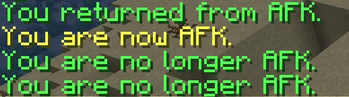
As soon as a player moves again, AFKLobby instantly detects the movement and teleports them back to their previously saved location.
This also works after logging out:
If a player disconnects while inside the AFK lobby, the plugin automatically returns them to their original location when they log back in, ensuring a seamless and intuitive experience.

Data Storage

All plugin data is stored in a single JSON file, including:
• AFK toggle state for each player
• Last known locations
• AFK lobby position
This makes the plugin extremely easy to manage without requiring a traditional configuration file.

Compatibility

AFKLobby is fully compatible with:
• Bukkit
• Paper
• Minecraft version 1.21.9
It is optimized for performance and suitable for both small and large servers.

Why Use AFKLobby?

AFKLobby provides a clean, automated, and player‑friendly AFK system with:
• Zero setup complexity
• Full player control
• Automatic return teleportation
• Safe AFK handling
• Lightweight performance
It’s the perfect solution for servers that want a professional AFK management system without unnecessary overhead.

👥 Team & Contributors

R
Redcrafter-CoderOwner

⚙️ Compatibility

Environment
🖥️ Server-side
Loaders
bukkitpaperpurpurspigot
Minecraft Versions
1.211.21.11.21.21.21.31.21.41.21.51.21.61.21.7+4 more

🔗 Links

Modrinth Page