Logo
MINECRAFTBIBLE
Items
Items

All game items

Blocks
Blocks

Building blocks

Mobs
Mobs

Creatures & monsters

Biomes
Biomes

World biomes

Structures
Structures

Generated structures

Recipes
Recipes

Crafting guides

Advancements
Advancements

Achievements

Loot Tables
Loot Tables

Drop rates

Tags
Tags

Item groupings

All Versions
View all data →
Capes
Cape ArchiveNEW

Browse rare Minecon capes, OptiFine capes, and custom capes from players worldwide

Browse

Player Database
Player DatabasePopular

Search any player

Skin Browser
Skin Browser

Browse & download skins

Cape Gallery
Cape GalleryNEW

Minecon & OptiFine capes

Seed Vault
Seed Vault

Curated seeds

Learn

Guides
GuidesNew

Tutorials & tips

Blog
Blog

News & updates

Community

Community Hub
Community HubHub

Posts, discussions & more

All Versions
View community →
Seed Analyzer
Seed Analyzer

World seed analysis

Loot Explorer
Loot Explorer

Drop rates

Crafting Calculator
Crafting Calculator

Material planning

Enchant Calculator
Enchant Calculator

Probability math

Redstone Lab
Redstone Lab

Signal timing

Trading Profit
Trading Profit

Villager ROI

All Versions
View all tools →
Mods
Mods

Browse all mods

Plugins
Plugins

Server plugins

Resource Packs
Resource Packs

Textures & sounds

Shaders
Shaders

Visual enhancements

Datapacks
Datapacks

World logic

Scanner
Mod Intelligence

Scan & analyze any mod

All Versions
View all mods →
Loading...
IntroductionIntroductionVersion HistoryVersion HistoryGuidesGuidesBlog & NewsBlog & News
ItemsItemsBlocksBlocksMobsMobsRecipesRecipesBiomesBiomesStructuresStructuresAdvancementsAdvancementsLoot TablesLoot TablesTagsTags
ModsModsPluginsPluginsResource PacksResource PacksShadersShadersDatapacksDatapacks

MinecraftBible

The Ultimate Wiki

Logo
MINECRAFTBIBLE

The ultimate Minecraft reference. Every item, block, mob, and recipe documented with precision.

Community

  • Skin Browser
  • Cape Gallery
  • Seed Vault
  • Blog
  • Guides

Database

  • Items
  • Blocks
  • Mobs
  • Recipes
  • Biomes
  • Structures

Tools

  • Seed Analyzer
  • Mod Intelligence
  • Crafting Calculator
  • Enchant Calculator

Mods & Packs

  • Mods
  • Plugins
  • Resource Packs
  • Shaders
  • Datapacks

Site & Legal

  • About
  • Authors
  • Editorial Policy
  • Corrections
  • Contact
  • Privacy Policy
  • Terms of Service
  • DMCA
  • Sitemap

© 2026 MinecraftBible. Not affiliated with Mojang or Microsoft.

PrivacyTermsContact
ReanimateMC
PluginMIT

ReanimateMC

Enable your players to revive their fallen comrades, promoting cooperation and teamwork. Add a new dimension to your gameplay with this unique feature.

4.9K
Downloads
64
Followers
2 months ago
Updated
📦
25
Versions
adventuregame-mechanicssocialbukkitpaperpurpurspigotsponge
Download Latestv1.2.11View on Modrinth

📖About ReanimateMC

New wiki!

https://matissead.github.io/ReanimateMC/

Version
Minecraft
Spigot

ReanimateMC

ReanimateMC Cover

Cover help

Iron Golem Reanimator

Overview

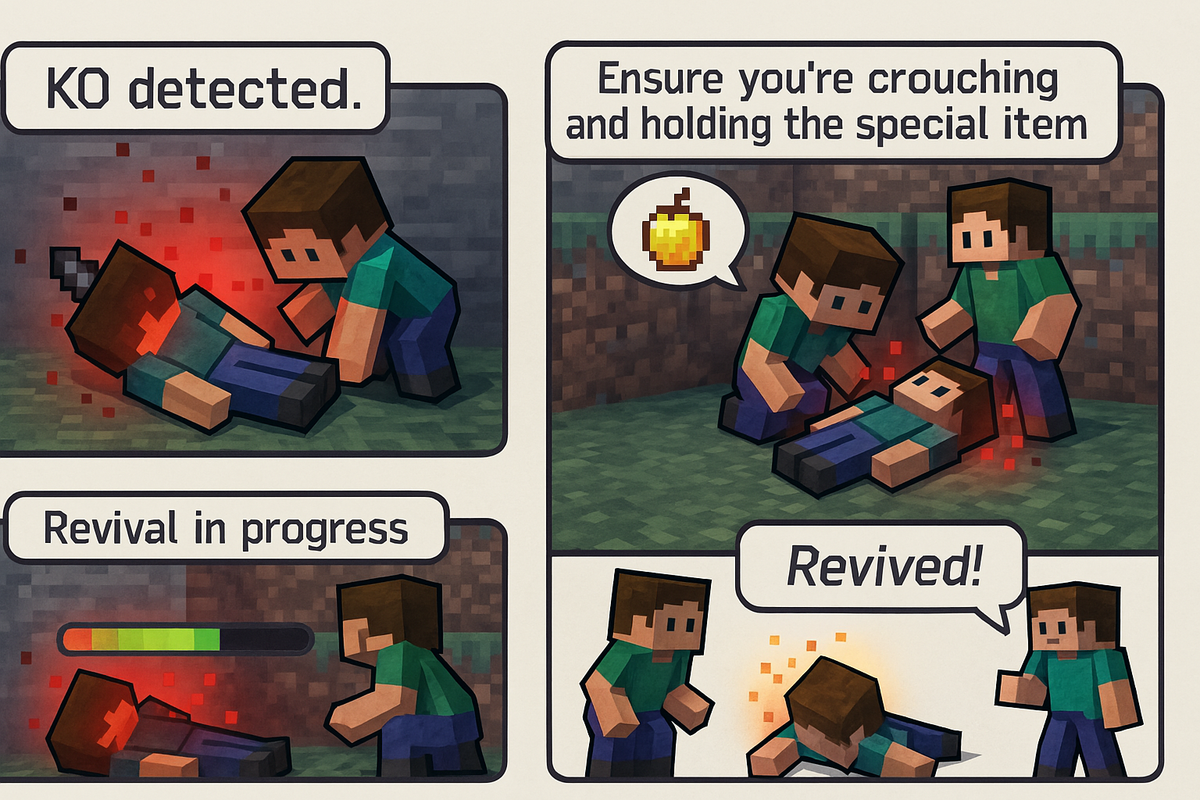
ReanimateMC is a revolutionary plugin that transforms Minecraft’s conventional death system. Instead of a player dying instantly when their health reaches zero, the plugin introduces an intermediary state—KO (knockout). This innovative mechanic allows for dynamic role-play and strategic decision-making by giving players a chance to be revived by teammates or executed by adversaries. Perfect for Hardcore Survival, role-play, or tactical PVP servers, ReanimateMC injects a new level of depth into the gameplay experience.

New Features

  • KO state now persists if a player disconnects.
  • KO players can press the swap-hand key to send a distress signal that places a beacon and alerts allies.

Commands

Spoiler

/reanimatemc reload

  • Permission: reanimatemc.admin

  • Usage: /reanimatemc reload

  • Description: Reloads the plugin’s configuration and language files.


/reanimatemc revive

  • Permission: reanimatemc.revive

  • Usage: /reanimatemc revive <player>

  • Description: Forcefully revives a player who is in the KO state.


/reanimatemc knockout

  • Permission: Typically requires admin privileges (suggested: reanimatemc.admin)

  • Usage: /reanimatemc knockout <player>

  • Description: Forces a player to enter the KO (knockout) state.


/reanimatemc status

  • Permission: No special permission required (accessible to all users)

  • Usage: /reanimatemc status <player>

  • Description: Displays the current state of the player (KO, revived, or normal).


/reanimatemc crawl

  • Permission: No special permission required (command can only be executed by a player in the KO state)

  • Usage: /reanimatemc crawl

  • Description: Toggles the KO player's state between being fully immobilized (prone) and crawling slowly.


/reanimatemc removeGlowingEffect

  • Permission: Operator

  • Usage: /reanimatemc removeGlowingEffect <player>

  • Description: In order to force removing the glowing effect on a plyer

Permissions

Spoiler

reanimatemc.admin

  • Description: Grants access to all administrative commands, including reloading the plugin and managing player states.

reanimatemc.revive

  • Description: Allows players to forcefully revive others who are in the KO state.

reanimatemc.knockout

  • Description: Permits players to force a player into the KO state.

reanimatemc.status

  • Description: Enables players to check the current state of any player (KO, revived, or normal).

reanimatemc.crawl

  • Description: Allows players in the KO state to toggle between being fully immobilized and crawling slowly.

reanimatemc.removeGlowingEffect

  • Description: Grants the ability to forcefully remove the glowing effect from a player, typically used by operators.

Compatibility:

Bukkit, Spigot, Magma, Sponge

Native Version :

1.20.1

Author:

Jachou

Statistics
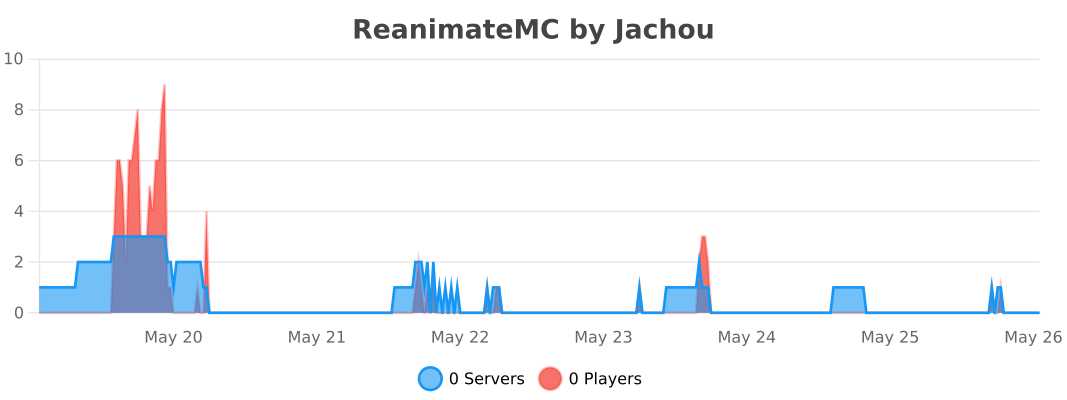
BStats

👥 Team & Contributors

Matisse
MatisseOwner

⚙️ Compatibility

Environment
🖥️ Server-side
Loaders
bukkitpaperpurpurspigotsponge
Minecraft Versions
1.201.20.11.20.21.20.31.20.41.20.51.20.61.21+11 more

🔗 Links

Modrinth Page