Logo
MINECRAFTBIBLE
Items
Items

All game items

Blocks
Blocks

Building blocks

Mobs
Mobs

Creatures & monsters

Biomes
Biomes

World biomes

Structures
Structures

Generated structures

Recipes
Recipes

Crafting guides

Advancements
Advancements

Achievements

Loot Tables
Loot Tables

Drop rates

Tags
Tags

Item groupings

All Versions
View all data →
Capes
Cape ArchiveNEW

Browse rare Minecon capes, OptiFine capes, and custom capes from players worldwide

Browse

Player Database
Player DatabasePopular

Search any player

Skin Browser
Skin Browser

Browse & download skins

Cape Gallery
Cape GalleryNEW

Minecon & OptiFine capes

Seed Vault
Seed Vault

Curated seeds

Learn

Guides
GuidesNew

Tutorials & tips

Blog
Blog

News & updates

Community

Community Hub
Community HubHub

Posts, discussions & more

All Versions
View community →
Seed Analyzer
Seed Analyzer

World seed analysis

Loot Explorer
Loot Explorer

Drop rates

Crafting Calculator
Crafting Calculator

Material planning

Enchant Calculator
Enchant Calculator

Probability math

Redstone Lab
Redstone Lab

Signal timing

Trading Profit
Trading Profit

Villager ROI

All Versions
View all tools →
Mods
Mods

Browse all mods

Plugins
Plugins

Server plugins

Resource Packs
Resource Packs

Textures & sounds

Shaders
Shaders

Visual enhancements

Datapacks
Datapacks

World logic

Scanner
Mod Intelligence

Scan & analyze any mod

All Versions
View all mods →
Loading...
IntroductionIntroductionVersion HistoryVersion HistoryGuidesGuidesBlog & NewsBlog & News
ItemsItemsBlocksBlocksMobsMobsRecipesRecipesBiomesBiomesStructuresStructuresAdvancementsAdvancementsLoot TablesLoot TablesTagsTags
ModsModsPluginsPluginsResource PacksResource PacksShadersShadersDatapacksDatapacks

MinecraftBible

The Ultimate Wiki

Logo
MINECRAFTBIBLE

The ultimate Minecraft reference. Every item, block, mob, and recipe documented with precision.

Community

  • Skin Browser
  • Cape Gallery
  • Seed Vault
  • Blog
  • Guides

Database

  • Items
  • Blocks
  • Mobs
  • Recipes
  • Biomes
  • Structures

Tools

  • Seed Analyzer
  • Mod Intelligence
  • Crafting Calculator
  • Enchant Calculator

Mods & Packs

  • Mods
  • Plugins
  • Resource Packs
  • Shaders
  • Datapacks

Site & Legal

  • About
  • Authors
  • Editorial Policy
  • Corrections
  • Contact
  • Privacy Policy
  • Terms of Service
  • DMCA
  • Sitemap

© 2026 MinecraftBible. Not affiliated with Mojang or Microsoft.

PrivacyTermsContact
Realistic Growth
PluginMIT

Realistic Growth

This plugin allows saplings and plants to replant themselves on the correct ground when they despawn

608
Downloads
11
Followers
7 months ago
Updated
📦
6
Versions
game-mechanicsbukkitfoliapaperpurpurspigot
Download Latestv1.3.6View on Modrinth

📖About Realistic Growth

About

Realistic Growth brings a natural touch to your Minecraft world by allowing saplings, seeds, and plants to replant themselves when they despawn, just like in the real world. This plugin mimics the process where seeds or saplings fall to the ground and grow into plants or trees, provided they are placed on the correct type of soil or ground. When these items despawn, they will replant themselves if the ground beneath them is suitable for growth, just like how seeds naturally germinate in real life.

Supported Software

  • CraftBukkit
  • Spigot
  • Paper
  • Purpur
  • Pufferfish
  • Other server implementations may work, but are not recommended as they may cause compatibility issues.

Features

Self-Replanting Saplings: When saplings or other plants despawn, they will replant themselves on the correct ground, simulating real-world tree growth. If there are more than 4 seedlings in the item stack, if the tree can grow as a 2x2 and if there is enough space on the ground, it will be replanted as a 2x2 tree with a certain probability.
Configurable Planting Chance: The plugin offers full configurability, allowing you to adjust the chance (in percentage) that saplings and plants will replant themselves when they despawn. This adds a layer of realism, as not all seeds or saplings grow in the real world—sometimes they fail to take root. You can set the likelihood of regrowth to match your desired level of realism.
(default is 90%)

Metrics collection

Realistic Growth collects since Version 1.2 anonymous server statistics through bStats, an open-source statistics service for Minecraft software.
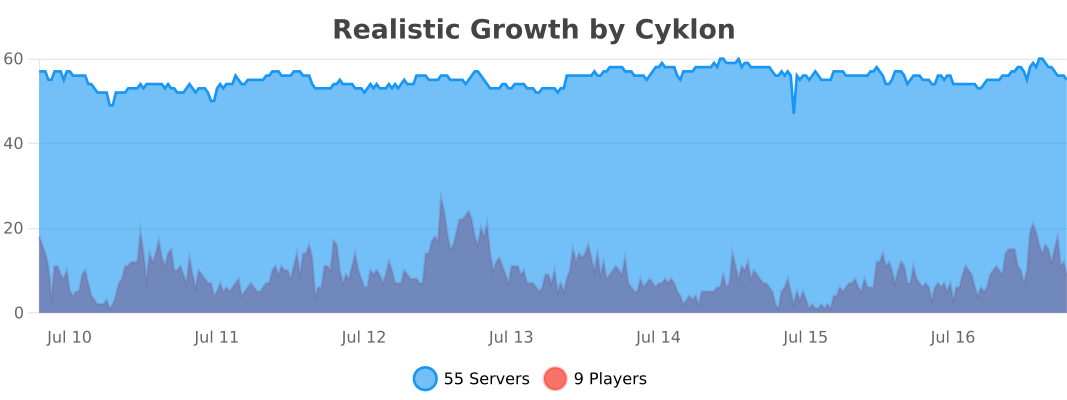
bStats
If you'd like to disable metrics collection via bStats, you can edit the plugins/bStats/config.yml file.

👥 Team & Contributors

cyklon73
cyklon73Owner

⚙️ Compatibility

Environment
🖥️ Server-side
Loaders
bukkitfoliapaperpurpurspigot
Minecraft Versions
1.131.13.11.13.21.141.14.11.14.21.14.31.14.4+37 more

🔗 Links

Modrinth Page