Logo
MINECRAFTBIBLE
Items
Items

All game items

Blocks
Blocks

Building blocks

Mobs
Mobs

Creatures & monsters

Biomes
Biomes

World biomes

Structures
Structures

Generated structures

Recipes
Recipes

Crafting guides

Advancements
Advancements

Achievements

Loot Tables
Loot Tables

Drop rates

Tags
Tags

Item groupings

All Versions
View all data →
Capes
Cape ArchiveNEW

Browse rare Minecon capes, OptiFine capes, and custom capes from players worldwide

Browse

Player Database
Player DatabasePopular

Search any player

Skin Browser
Skin Browser

Browse & download skins

Cape Gallery
Cape GalleryNEW

Minecon & OptiFine capes

Seed Vault
Seed Vault

Curated seeds

Learn

Guides
GuidesNew

Tutorials & tips

Blog
Blog

News & updates

Community

Community Hub
Community HubHub

Posts, discussions & more

All Versions
View community →
Seed Analyzer
Seed Analyzer

World seed analysis

Loot Explorer
Loot Explorer

Drop rates

Crafting Calculator
Crafting Calculator

Material planning

Enchant Calculator
Enchant Calculator

Probability math

Redstone Lab
Redstone Lab

Signal timing

Trading Profit
Trading Profit

Villager ROI

All Versions
View all tools →
Mods
Mods

Browse all mods

Plugins
Plugins

Server plugins

Resource Packs
Resource Packs

Textures & sounds

Shaders
Shaders

Visual enhancements

Datapacks
Datapacks

World logic

Scanner
Mod Intelligence

Scan & analyze any mod

All Versions
View all mods →
Loading...
IntroductionIntroductionVersion HistoryVersion HistoryGuidesGuidesBlog & NewsBlog & News
ItemsItemsBlocksBlocksMobsMobsRecipesRecipesBiomesBiomesStructuresStructuresAdvancementsAdvancementsLoot TablesLoot TablesTagsTags
ModsModsPluginsPluginsResource PacksResource PacksShadersShadersDatapacksDatapacks

MinecraftBible

The Ultimate Wiki

Logo
MINECRAFTBIBLE

The ultimate Minecraft reference. Every item, block, mob, and recipe documented with precision.

Community

  • Skin Browser
  • Cape Gallery
  • Seed Vault
  • Blog
  • Guides

Database

  • Items
  • Blocks
  • Mobs
  • Recipes
  • Biomes
  • Structures

Tools

  • Seed Analyzer
  • Mod Intelligence
  • Crafting Calculator
  • Enchant Calculator

Mods & Packs

  • Mods
  • Plugins
  • Resource Packs
  • Shaders
  • Datapacks

Site & Legal

  • About
  • Authors
  • Editorial Policy
  • Corrections
  • Contact
  • Privacy Policy
  • Terms of Service
  • DMCA
  • Sitemap

© 2026 MinecraftBible. Not affiliated with Mojang or Microsoft.

PrivacyTermsContact
RavenMobs
PluginLicenseRef-All-Rights-Reserved

RavenMobs

Zone-based mob leveling system with economy integration and dynamic stats

33
Downloads
1
Followers
3 months ago
Updated
📦
1
Versions
economymobstechnologybukkitpaperpurpurspigot
Download Latestv1.1.0View on Modrinth

📖About RavenMobs

Short Description

Transform ordinary mobs into a complete RPG system! Mob levels depend on distance from spawn, their health and damage scale with level, and players earn money for every kill.

Why do you need it?

Your players kill mobs too quickly? They got bored? Server economy is idle?

RavenMobs solves these problems with one plugin:

  • ✅ Progression — the farther from spawn, the stronger the mobs
  • ✅ Economy — automatic money rewards for kills via Vault
  • ✅ Balance — high-level mobs are rare but give better rewards
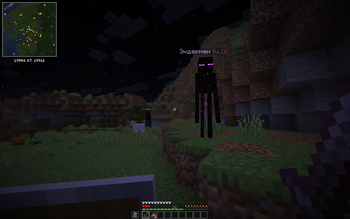
  • ✅ Visuals — levels visible in mob names, HP displayed in BossBar
  • ✅ Performance — optimized plugin that doesn't strain the server

Result: Players explore the world, fight powerful mobs, earn money, and enjoy meaningful progression!

Core Mechanics

When spawning, each hostile mob receives a random level from 1 to maximum. The level depends on distance from point (0,0) — the farther from spawn, the higher the potential level.

Mob stats scale with level:

  • ❤️ Health: base + bonus per level
  • ⚔️ Damage: base + bonus per level
  • ✨ Experience: base × level multiplier
  • 💰 Reward: base value × level

Zone System

You configure zones with different level ranges:

0-2000 blocks    → level 1-5 mobs
2000-5000 blocks → level 1-10 mobs
5000-10000 blocks → level 1-15 mobs
10000+ blocks    → level 10-20 mobs

Economy

  • Vault integration (any economy plugin)
  • Configurable base reward for each mob type
  • For hostile mobs, reward is multiplied by level
  • Players see rewards in ActionBar

Visuals

  • Mob name: Skeleton lv.14 (color depends on level)
  • BossBar: displays current mob HP above the action bar
  • ActionBar: notification when reward is received

Flexible Configuration

  • Rarity factor for high-level mobs
  • Health, damage, and XP bonuses per level
  • Full reward configuration for each mob type
  • BossBar color and style customization
  • All messages support color codes (&)

Example Config

Spoiler
# Main settings
enabled: true
min-level: 1
max-level: 20
level-rarity-factor: 2.0  # 1.0 = uniform, 2.0 = high levels rare

# Per-level stat bonuses
bonus-health-per-level: 4    # +2 hearts
bonus-damage-per-level: 0.2  # +0.2 damage
exp-multiplier-per-level: 0.5  # +50% XP per level

# Zones (distance from 0,0)
zones:
  safe:
    min-level: 1
    max-level: 5
    min-distance: 0
    max-distance: 2000
  medium:
    min-level: 1
    max-level: 10
    min-distance: 2000
    max-distance: 5000
  far:
    min-level: 1
    max-level: 15
    min-distance: 5000
    max-distance: 10000
  extreme:
    min-level: 10
    max-level: 20
    min-distance: 20000
    max-distance: 35000

# BossBar
bossbar:
  enabled: true
  color: RED
  style: SOLID

# Mob rewards
rewards:
  default:
    min: 3.0
    max: 10.0
  ZOMBIE:
    min: 0.5
    max: 1.5
  SKELETON:
    min: 0.8
    max: 2.0
  WITHER:
    min: 5.0
    max: 15.0
  # ... and all other mobs

# Messages
messages:
  reward-received: "&a+{amount}$ &7for killing &f{mob} &elevel {level}"
  plugin-enabled: "&a✔ RavenMobs enabled!"
  # ...

Commands

/rm on	-  Enable the plugin
/rm off	-  Disable the plugin	
/rm reload	-  Reload configuration	
/rm status	-  Show status and settings	
Aliases: /ravenmobs, /rm

👥 Team & Contributors

No authors recorded.

⚙️ Compatibility

Environment
🖥️ Server-side
Loaders
bukkitpaperpurpurspigot
Minecraft Versions
1.191.19.11.19.21.19.31.19.41.201.20.11.20.2+19 more

🔗 Links

Modrinth Page