
RapidLeaf-Fall
RapidLeafFall removes leaves that are no longer connected to a log shortly after the wood is broken — staggered with a small random delay so canopies fade away naturally instead
📖About RapidLeaf-Fall
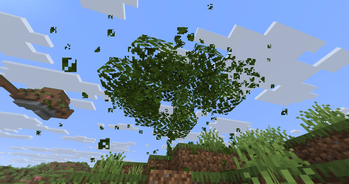
RapidLeafFall makes chopped-down trees disappear the way they should — fast, but smooth. When a player breaks the last log holding up a canopy, the disconnected leaves fade away after a short, slightly random delay instead of lingering for minutes like vanilla. No more floating leaf blocks, and no lag spikes.
It uses only the stable Bukkit/Paper API — no NMS, no reflection, no version-locked internals — so the same build runs across the whole 1.21 line on both Paper and Leaf.
Features
Fast but smooth decay — each leaf is removed after its own random delay, so big trees melt away gradually instead of popping in a single frame.
Zero lag — removals are spread across ticks with a configurable per-tick cap. A whole canopy is never deleted in one tick.
Vanilla-accurate — a leaf only decays when it is genuinely disconnected from a tree (its vanilla distance reaches the decay threshold). Living trees are never touched.
Every leaf type — oak, spruce, birch, jungle, acacia, dark oak, cherry, mangrove, azalea and flowering azalea are all supported through the Bukkit leaves tag, so new leaf types keep working automatically.
Respects player builds — persistent (player-placed) leaves are left alone by default.
Drops or clean removal — drop leaf loot via breakNaturally(), or simply clear the leaves to air.
Multi-world — enable everywhere, or whitelist only the worlds you want.
Protection-friendly — listens at monitor priority and ignores cancelled breaks, so it never fights WorldGuard or other land-protection plugins.
Requirements
Paper or Leaf 1.21.x (targets 1.21.11), running on Java 21+.
Installation
Drop the jar into your server's plugins/ folder and restart. A default config.yml is generated under plugins/RapidLeafFall/. Edit it as you like, then run /rlf reload.
Configuration
Every option lives in plugins/RapidLeafFall/config.yml:
- radius — block radius around a broken log scanned for decaying leaves (default
7). - min-decay-delay / max-decay-delay — each leaf is removed after a random delay in this range, in ticks (defaults
10/60). - blocks-per-tick — safety cap on leaves removed per tick (default
64). - check-diagonal-leaves — propagate decay through diagonal neighbours too (default
true). - ignore-persistent-leaves — never decay player-placed leaves (default
true). - drop-items — drop leaf loot, or clear to air when
false(defaulttrue). - decay-effects — play vanilla break particles and sound on decay (default
false). - enabled-worlds — world whitelist; leave empty to enable everywhere (default
[]). - debug — verbose console logging (default
false).
To flatten the load on very large trees, lower blocks-per-tick or raise max-decay-delay.
Commands and permissions
/rlf reload— reload the configuration./rlf status— show current settings and the pending queue size.
The alias /qld also works. All subcommands require the permission rapidleaffall.admin (default: op).
How it works
A log break fires a block-break event (after protection plugins have had their say). Nearby leaves are scheduled for a check, each with its own random delay. When that check runs, the leaf's vanilla distance is read; if it is no longer supported by a log, the leaf is removed and its neighbours are re-checked. The decay cascades outward exactly like vanilla — just much faster — while the per-tick cap keeps the server smooth.
Made by ZiTr_ · released under the MIT License.