Logo
MINECRAFTBIBLE
Items
Items

All game items

Blocks
Blocks

Building blocks

Mobs
Mobs

Creatures & monsters

Biomes
Biomes

World biomes

Structures
Structures

Generated structures

Recipes
Recipes

Crafting guides

Advancements
Advancements

Achievements

Loot Tables
Loot Tables

Drop rates

Tags
Tags

Item groupings

All Versions
View all data →
Capes
Cape ArchiveNEW

Browse rare Minecon capes, OptiFine capes, and custom capes from players worldwide

Browse

Player Database
Player DatabasePopular

Search any player

Skin Browser
Skin Browser

Browse & download skins

Cape Gallery
Cape GalleryNEW

Minecon & OptiFine capes

Seed Vault
Seed Vault

Curated seeds

Learn

Guides
GuidesNew

Tutorials & tips

Blog
Blog

News & updates

Community

Community Hub
Community HubHub

Posts, discussions & more

All Versions
View community →
Seed Analyzer
Seed Analyzer

World seed analysis

Loot Explorer
Loot Explorer

Drop rates

Crafting Calculator
Crafting Calculator

Material planning

Enchant Calculator
Enchant Calculator

Probability math

Redstone Lab
Redstone Lab

Signal timing

Trading Profit
Trading Profit

Villager ROI

All Versions
View all tools →
Mods
Mods

Browse all mods

Plugins
Plugins

Server plugins

Resource Packs
Resource Packs

Textures & sounds

Shaders
Shaders

Visual enhancements

Datapacks
Datapacks

World logic

Scanner
Mod Intelligence

Scan & analyze any mod

All Versions
View all mods →
Loading...
IntroductionIntroductionVersion HistoryVersion HistoryGuidesGuidesBlog & NewsBlog & News
ItemsItemsBlocksBlocksMobsMobsRecipesRecipesBiomesBiomesStructuresStructuresAdvancementsAdvancementsLoot TablesLoot TablesTagsTags
ModsModsPluginsPluginsResource PacksResource PacksShadersShadersDatapacksDatapacks

MinecraftBible

The Ultimate Wiki

Logo
MINECRAFTBIBLE

The ultimate Minecraft reference. Every item, block, mob, and recipe documented with precision.

Community

  • Skin Browser
  • Cape Gallery
  • Seed Vault
  • Blog
  • Guides

Database

  • Items
  • Blocks
  • Mobs
  • Recipes
  • Biomes
  • Structures

Tools

  • Seed Analyzer
  • Mod Intelligence
  • Crafting Calculator
  • Enchant Calculator

Mods & Packs

  • Mods
  • Plugins
  • Resource Packs
  • Shaders
  • Datapacks

Site & Legal

  • About
  • Authors
  • Editorial Policy
  • Corrections
  • Contact
  • Privacy Policy
  • Terms of Service
  • DMCA
  • Sitemap

© 2026 MinecraftBible. Not affiliated with Mojang or Microsoft.

PrivacyTermsContact
Quiet Unboxing
PluginBSD-3-Clause

Quiet Unboxing

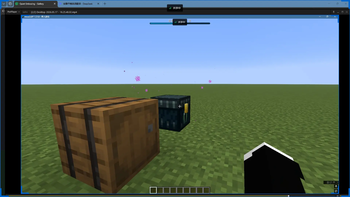
This mod enables silent chest opening while sneaking and holding right-click

62
Downloads
0
Followers
2 months ago
Updated
📦
3
Versions
adventureutilitybukkitfabricneoforgepaperpurpurspigot
Download Latestv1.21.x-R0.1-SNAPSHOTView on Modrinth

📖About Quiet Unboxing

Quietly
Quietly is a server‑side silent container opening mod for Minecraft 1.21.1 ~ 1.21.10, supporting Fabric and NeoForge.

Its goal is simple:

Allow players to start silent container opening by Shift + right-click once

Display opening progress with a Bossbar

Keep container animations

Do not play vanilla container open/close sounds

Do not trigger vanilla CONTAINER_OPEN / CONTAINER_CLOSE sculk sensor events

Features
Server‑side driven – the mod must be installed on the server; client installation is optional

Supports a generic silent opening process for all containers with an inventory GUI

Opening time is calculated based on the number of distinct item types inside the container

Retains animations for chests, barrels, ender chests, shulker boxes, etc.

Silences vanilla container open/close sounds

Blocks vanilla sculk sensor events related to container opening/closing

Built‑in English and Chinese localization

How to Use
Look at a container with an inventory GUI.

Hold Shift.

Right‑click once with your main hand to start silent opening.

Keep sneaking until the Bossbar fills completely.

The container will then open silently.

Current Behavior
Trigger method: Shift + right‑click once with main hand only

Must remain sneaking during the entire opening process

Releasing sneak, moving out of interaction range, or opening another interface will cancel the process

Opening speed formula: 12 + (number of distinct item types) * 4 ticks

"Distinct item types" means unique Item entries in non‑empty slots, not stack count

Supported Containers
Any generic container that provides an inventory GUI

Vanilla containers with specifically handled animation and sound‑muting chains:

Chest / Trapped Chest

Barrel

Ender Chest

Shulker Box

Other GUI blocks (furnace, crafting table, hopper, etc.) also work with the silent opening logic

Compatibility
Minecraft: 1.21.1 ~ 1.21.10

Fabric Loader: 0.19.2

Fabric API: 0.116.12+1.21.1

Java: 21

1.21.11 is not currently supported

👥 Team & Contributors

menglan
menglanOwner
kafei520-CN
kafei520-CN
Member

⚙️ Compatibility

Environment
✅ Client & Server
Loaders
bukkitfabricneoforgepaperpurpurspigot
Minecraft Versions
1.211.21.11.21.21.21.31.21.41.21.51.21.61.21.7+4 more

🔗 Links

Modrinth Page