

QuickShop-Hikari-Dialog
QuickShop-Hikari dialog addon.
📖About QuickShop-Hikari-Dialog
QuickShop-Hikari-Dialog
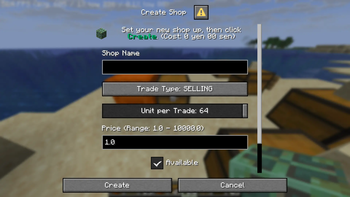
A Paper plugin that replaces QuickShop-Hikari's default shop interactions with dialog UIs.
Requirements
| Dependency | Version |
|---|---|
| Java | 25 or later |
| Paper | 1.21.11 or later |
| QuickShop-Hikari | 6.2.0.11 or later |
Optional dependencies
MiniPlaceholders — Enables audience and global placeholder tags inside translation messages.
Installation
- Place plugin jar in your server's
plugins/folder. - Ensure QuickShop-Hikari is installed and loaded before this
plugin. - Start the server once to generate
plugins/QuickShop-Hikari-Dialog/config.confand the default translation files. - Configure
plugins/QuickShop-Hikari/interaction.ymlas described below, then reload or restart.
QuickShop-Hikari: interaction.yml Setup
QuickShop-Hikari-Dialog registers three behavior identifiers that must be assigned in QuickShop-Hikari'sinteraction.yml.
| Identifier | Description |
|---|---|
SHOP_CREATE_DIALOG |
Opens a dialog to create a new shop by clicking a container or wall sign |
SHOP_EDIT_DIALOG |
Opens a dialog to modify an existing shop |
TRADE_DIALOG |
Opens a dialog to buy from or sell to an existing shop |
Recommended configuration
# plugins/QuickShop-Hikari/interaction.yml

STANDING_LEFT_CLICK_SIGN: TRADE_DIALOG
STANDING_RIGHT_CLICK_SIGN: SHOP_EDIT_DIALOG
STANDING_LEFT_CLICK_SHOPBLOCK: TRADE_DIALOG
STANDING_RIGHT_CLICK_SHOPBLOCK: NONE # reserved for opening the chest
STANDING_LEFT_CLICK_CONTAINER: SHOP_CREATE_DIALOG
STANDING_RIGHT_CLICK_CONTAINER: NONE
You may freely reassign these identifiers to other click actions depending on your server's preferences.
Permissions
| Permission | Description | Default |
|---|---|---|
qshdialog.command.qshdialog.reload |
Reload config and translations | OP |
qshdialog.command.shopdialog.create |
Use the /shopdialog create command |
true |
qshdialog.command.shopdialog.edit |
Use the /shopdialog edit command |
true |
qshdialog.command.tradedialog |
Use the /tradedialog command |
true |
QuickShop-Hikari's own permissions continue to control which dialog inputs are shown to each player.
Custom Placeholder Tags
The following tags are available inside translation messages.
(argument) = Optional
[argument] = Required
Shop placeholders
Available in any message that receives a Shop context (shop create/edit/trade dialogs).
| Tag | Description |
|---|---|
<shop:name> |
Raw shop name (empty string if unset) |
<shop:name_or:[fallback]> |
Shop name or any name |
<shop:owner_name> |
Owner's username |
<shop:owner_balance> |
Owner's current balance (plain number) |
<shop:owner_balance_formatted> |
Owner's current balance, formatted by the economy provider |
<shop:price> |
Shop price (plain number) |
<shop:price_formatted> |
Shop price, formatted by the economy provider |
<shop:trade_type> |
Localised trade type label |
<shop:currency> |
Currency identifier (empty string if using default) |
<shop:stock> |
Current stock count, in trade units |
<shop:space> |
Available container space, in trade units |
<shop:display> |
true / false |
<shop:unlimited_stock> |
true / false |
<shop:product_id> |
Product's namespaced key (e.g. minecraft:diamond) |
<shop:product_name> |
Product's item_name component |
<shop:product_display_name> |
Product's effective display name |
Player placeholders
Available in all messages that receive an audience (i.e. virtually every message).
| Tag | Description |
|---|---|
<player_name> |
Player's name |
<player_display_name> |
Player's display name |
<player_balance> |
Player's current balance |
<player_balance_formatted> |
Player's current balance, formatted by the economy provider |
Shop count
| Tag | Description |
|---|---|
<shop_count:[player]> |
Number of shops the player currently owns |
<shop_count_max:[player]> |
Player's shop limit (-1 if limits are disabled) |
Shop fee
| Tag | Description |
|---|---|
<shop_fee:create:(player)> |
Cost to create a shop |
<shop_fee:create_formatted:(player)> |
Cost to create a shop, formatted by the economy provider |
<shop_fee:change_name:(player)> |
Cost to rename a shop |
<shop_fee:change_name_formatted:(player)> |
Cost to rename a shop, formatted by the economy provider |
<shop_fee:change_price:(player)> |
Cost to change a shop's price |
<shop_fee:change_price_formatted:(player)> |
Cost to change a shop's price, formatted by the economy provider |
Price placeholders
| Tag | Description |
|---|---|
<price:[item_id]:min> |
Minimum allowed price for the given item |
<price:[item_id]:max> |
Maximum allowed price for the given item |
[item_id] is a namespaced item key such as minecraft:diamond. Other tags can be nested inside the argument, for example:
qsh_dialog.shop.create.dialog.input.price=Price (Range: <price:'<shop_product_id>':min> - <price:'<shop_product_id>':max>)
<quickshop:key> / <quickshop:key:arg0:arg1>
Renders a QuickShop-Hikari message by its translation key, with optional arguments.
Each argument is parsed as MiniMessage, so other tags can be nested:
qsh_dialog.trade.purchase.fail.shop_out_of_stock=<quickshop:shop-stock-too-low:'<shop_stock>':'<shop_product_display_name>'>