

PluginCC-BY-NC-ND-4.0
PvP Train Bot
A PvP Train Bot perfect for Crystal PvP or Practise
6.3K
Downloads
13
Followers
2 months ago
Updated
📦
6
Versions
📖About PvP Train Bot
⚔️ TrainBot — PvP Training Bot
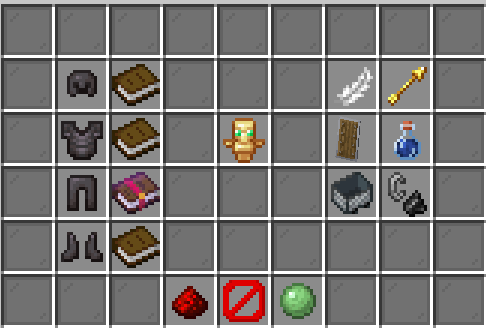
TrainBot lets players spawn a fully customizable PvP training dummy directly in-game.
Configure armor, totems, movement, shield behavior and more — all through a clean GUI, no commands needed.
🎮 Features
🛡️ Armor Configuration
- Switch between Diamond and Netherite for each armor piece individually
- Toggle between Protection IV and Blast Protection IV per piece
- Changes apply to the bot instantly
💀 Totem System
- Set an exact number of totems the bot can pop before dying
- Or set it to Unlimited — the bot will always come back
- Totem count is shown live in the GUI
🛡️ Shield Blocking
- The bot actually holds and uses its shield (real blocking pose via NMS)
- Hitting the bot with an axe breaks the shield for 5 seconds
- Shield blocking sound and knockback cancellation — just like a real player
- Toggle the shield on/off anytime
🏃 Movement Modes
- Following — the bot tracks you and keeps a 2-block distance
- Random Movement — the bot walks around unpredictably like a mob
- Both modes include automatic block-jumping
- Modes are mutually exclusive and toggleable mid-fight
✨ Effects
- Slow Falling — reduces fall speed
- Glowing — visible through walls for better tracking
- Fire Resistance — immune to fire and lava
🔧 Fully Configurable
- Every message and GUI text is editable in
config.yml - Supports &-color codes and formatting codes (
&l,&o, etc.) - Restrict the plugin to specific worlds — with a bypass permission for admins
- Config reloads cleanly without restart
🌍 World Restrictions
- Define a list of allowed worlds in
config.yml - Players without the bypass permission cannot use
/trainor/botoutside allowed worlds - Leave the list empty to allow the bot everywhere
📋 Commands
| Command | Description |
|---|---|
/train |
Opens the TrainBot GUI |
/bot |
Alias for /train |
🔑 Permissions
| Permission | Description | Default |
|---|---|---|
trainbot.use |
Allows using /train and /bot |
op |
trainbot.bypass-world |
Allows using TrainBot in any world | false |
🤖 Bot Behavior
- The bot despawns automatically when you log out
- The bot drops nothing when it dies
- The bot uses a player skin (your own skin by default)
- All settings are saved per player for the session
⚙️ Configuration
# Worlds where /train and /bot are allowed (empty = everywhere)
allowed-worlds:
  - world
  - world_nether

messages:
  wrong-world: "&cYou cannot use the TrainBot in this world."
  # ... all messages fully editable

gui:
  title: "&cTrainBot"
  shield-name: "Shield Blocking"
  shield-desc: "&7Allows the bot to block attacks with a shield."
  # ... every GUI label and description editable
📦 Requirements
- Paper 1.21.9+
- Java 21+
- Citizens Optional
🐛 Bug Reports & Suggestions
Found a bug or have a feature request?
Open an issue on the project page or join the Discord.
Made with ❤️ by oafachBene