Logo
MINECRAFTBIBLE
Items
Items

All game items

Blocks
Blocks

Building blocks

Mobs
Mobs

Creatures & monsters

Biomes
Biomes

World biomes

Structures
Structures

Generated structures

Recipes
Recipes

Crafting guides

Advancements
Advancements

Achievements

Loot Tables
Loot Tables

Drop rates

Tags
Tags

Item groupings

All Versions
View all data →
Capes
Cape ArchiveNEW

Browse rare Minecon capes, OptiFine capes, and custom capes from players worldwide

Browse

Player Database
Player DatabasePopular

Search any player

Skin Browser
Skin Browser

Browse & download skins

Cape Gallery
Cape GalleryNEW

Minecon & OptiFine capes

Seed Vault
Seed Vault

Curated seeds

Learn

Guides
GuidesNew

Tutorials & tips

Blog
Blog

News & updates

Community

Community Hub
Community HubHub

Posts, discussions & more

All Versions
View community →
Seed Analyzer
Seed Analyzer

World seed analysis

Loot Explorer
Loot Explorer

Drop rates

Crafting Calculator
Crafting Calculator

Material planning

Enchant Calculator
Enchant Calculator

Probability math

Redstone Lab
Redstone Lab

Signal timing

Trading Profit
Trading Profit

Villager ROI

All Versions
View all tools →
Mods
Mods

Browse all mods

Plugins
Plugins

Server plugins

Resource Packs
Resource Packs

Textures & sounds

Shaders
Shaders

Visual enhancements

Datapacks
Datapacks

World logic

Scanner
Mod Intelligence

Scan & analyze any mod

All Versions
View all mods →
Loading...
IntroductionIntroductionVersion HistoryVersion HistoryGuidesGuidesBlog & NewsBlog & News
ItemsItemsBlocksBlocksMobsMobsRecipesRecipesBiomesBiomesStructuresStructuresAdvancementsAdvancementsLoot TablesLoot TablesTagsTags
ModsModsPluginsPluginsResource PacksResource PacksShadersShadersDatapacksDatapacks

MinecraftBible

The Ultimate Wiki

Logo
MINECRAFTBIBLE

The ultimate Minecraft reference. Every item, block, mob, and recipe documented with precision.

Community

  • Skin Browser
  • Cape Gallery
  • Seed Vault
  • Blog
  • Guides

Database

  • Items
  • Blocks
  • Mobs
  • Recipes
  • Biomes
  • Structures

Tools

  • Seed Analyzer
  • Mod Intelligence
  • Crafting Calculator
  • Enchant Calculator

Mods & Packs

  • Mods
  • Plugins
  • Resource Packs
  • Shaders
  • Datapacks

Site & Legal

  • About
  • Authors
  • Editorial Policy
  • Corrections
  • Contact
  • Privacy Policy
  • Terms of Service
  • DMCA
  • Sitemap

© 2026 MinecraftBible. Not affiliated with Mojang or Microsoft.

PrivacyTermsContact
Provide Pack Hashes
PluginMIT

Provide Pack Hashes

A plugin for automatic caching of server resourcepack's SHA1 hash. This allows you to not specify hash manually, while letting players join with downloading the pack only once

53
Downloads
0
Followers
8 months ago
Updated
📦
1
Versions
managementutilitypaper
Download Latestv1.0.0View on Modrinth

📖About Provide Pack Hashes

Remember Url Hashes

What It Does

This plugin helps your players avoid re-downloading server resource packs when you already have them.

Why Is This Plugin Needed?

  • Vanilla Minecraft already tries to do this, but if the server doesn't have SHA1 hash manually specified in server.properties, the client downloads the pack every time
  • The plugin stores the previous hash and other resource pack data (based on the url), so the server can send that hash to players
  • If your pack url stays the same between updates, you can easily run a command to update the hash
  • You can even set a new pack URL from console and automatically prepare its hash!

Commands
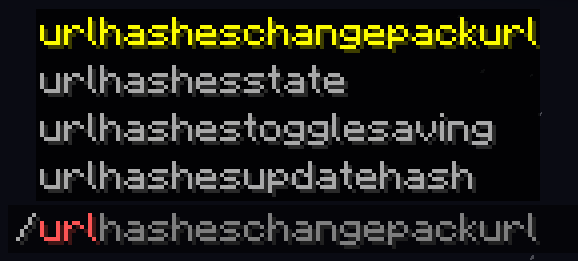
Commands

The plugin keeps track of your server resource pack's Id, URL and SHA-1 hash:
You can check that with /urlhashesstate:

Plugin's Data State

Updating the hash or changing the URL

If you updated the pack's url, the plugin will update the hash automatically, because the URL changed.
But if your link is always the same, you can easily run a command to update the hash whenever you want:

  • /urlHashesUpdateHash to update the SHA-1 hash

Or even tell the plugin to completely change the link to a new version and update the hash:

  • /urlHashesChangePackUrl to change the resource pack link and update hashes
    Note: this command can only be executed from console by default for security reasons

Both will tell you that it started to download the pack to determine it's hash:

Hash Update Or Full Pack URL Change

And everything will always be visible in your console too:

Console On Hash Update Or URL Change

You can tell the plugin to save the data between restarts:

  • /urlhashestogglesaving to toggle data saving

Toggling Saving Data

So when the server restarts or reloads, it won't download the pack again:

Loaded With Saved Data

Note, that with saving and the same link all the time, you'll need to run /urlHashesUpdateHash yourself. Again, only if your link stays the same between updates.

Config Options

You can edit plugin's settings in the config (plugins/config/ProvidePackHashes)
The only exclusive option there at the moment is whether you allow players (with permissions) to change the pack URL, or just console (by default).

Supported Environment

Paper servers (1.21 - 1.21.8)

Alternative approach

You can have the same behaviour on your client, if you play on a server with this issue and you aren't an administrator.
For this, use my Fabric client-side mod: Remember Url Hashes

👥 Team & Contributors

Daylight
DaylightOwner

⚙️ Compatibility

Environment
🖥️ Server-side
Loaders
paper
Minecraft Versions
1.211.21.11.21.21.21.31.21.41.21.51.21.61.21.7+1 more

🔗 Links

Modrinth Page
