Logo
MINECRAFTBIBLE
Items
Items

All game items

Blocks
Blocks

Building blocks

Mobs
Mobs

Creatures & monsters

Biomes
Biomes

World biomes

Structures
Structures

Generated structures

Recipes
Recipes

Crafting guides

Advancements
Advancements

Achievements

Loot Tables
Loot Tables

Drop rates

Tags
Tags

Item groupings

All Versions
View all data →
Capes
Cape ArchiveNEW

Browse rare Minecon capes, OptiFine capes, and custom capes from players worldwide

Browse

Player Database
Player DatabasePopular

Search any player

Skin Browser
Skin Browser

Browse & download skins

Cape Gallery
Cape GalleryNEW

Minecon & OptiFine capes

Seed Vault
Seed Vault

Curated seeds

Learn

Guides
GuidesNew

Tutorials & tips

Blog
Blog

News & updates

Community

Community Hub
Community HubHub

Posts, discussions & more

All Versions
View community →
Seed Analyzer
Seed Analyzer

World seed analysis

Loot Explorer
Loot Explorer

Drop rates

Crafting Calculator
Crafting Calculator

Material planning

Enchant Calculator
Enchant Calculator

Probability math

Redstone Lab
Redstone Lab

Signal timing

Trading Profit
Trading Profit

Villager ROI

All Versions
View all tools →
Mods
Mods

Browse all mods

Plugins
Plugins

Server plugins

Resource Packs
Resource Packs

Textures & sounds

Shaders
Shaders

Visual enhancements

Datapacks
Datapacks

World logic

Scanner
Mod Intelligence

Scan & analyze any mod

All Versions
View all mods →
Loading...
IntroductionIntroductionVersion HistoryVersion HistoryGuidesGuidesBlog & NewsBlog & News
ItemsItemsBlocksBlocksMobsMobsRecipesRecipesBiomesBiomesStructuresStructuresAdvancementsAdvancementsLoot TablesLoot TablesTagsTags
ModsModsPluginsPluginsResource PacksResource PacksShadersShadersDatapacksDatapacks

MinecraftBible

The Ultimate Wiki

Logo
MINECRAFTBIBLE

The ultimate Minecraft reference. Every item, block, mob, and recipe documented with precision.

Community

  • Skin Browser
  • Cape Gallery
  • Seed Vault
  • Blog
  • Guides

Database

  • Items
  • Blocks
  • Mobs
  • Recipes
  • Biomes
  • Structures

Tools

  • Seed Analyzer
  • Mod Intelligence
  • Crafting Calculator
  • Enchant Calculator

Mods & Packs

  • Mods
  • Plugins
  • Resource Packs
  • Shaders
  • Datapacks

Site & Legal

  • About
  • Authors
  • Editorial Policy
  • Corrections
  • Contact
  • Privacy Policy
  • Terms of Service
  • DMCA
  • Sitemap

© 2026 MinecraftBible. Not affiliated with Mojang or Microsoft.

PrivacyTermsContact
Potion Disabler
PluginLicenseRef-All-Rights-Reserved

Potion Disabler

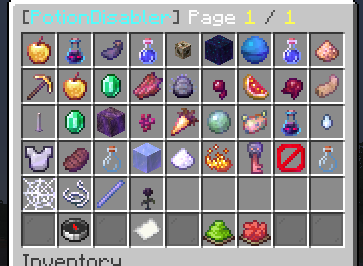
A simple, lightweight QoL plugin that lets server admins completely disable specific potion effects using an easy in-game GUI.

78
Downloads
0
Followers
3 months ago
Updated
📦
1
Versions
game-mechanicsmanagementutilitypaperpurpurspigot
Download Latestv1.0.0View on Modrinth

📖About Potion Disabler

PotionDisabler

A simple, lightweight QoL plugin that lets server admins completely disable specific potion effects using an easy in-game GUI.

Ever needed to disable Invisibility, Strength, or the new 1.21 effects for a PvP event, but didn't want to mess with complex config files? This plugin handles it instantly. If an effect is disabled, players simply won't get it from drinking potions, splash potions, lingering clouds, or tipped arrows.

Features

  • In-Game GUI: Type /pd to open a clean menu showing every potion effect in the game.
  • Toggle with a Click: Click any effect in the GUI to disable or enable it instantly. No reloads required.
  • Built-in Search: Looking for a specific effect? Use the GUI search button to find it quickly instead of scrolling through pages.
  • Complete Coverage: Blocks effects from normal potions, splash potions, lingering clouds, tipped arrows, and even beacons/conduits.
  • Modern API: Built specifically for 1.21.x, fully supporting the newest effects (Wind Charged, Weaving, Oozing, Infested).

Commands & Permissions

  • /potiondisabler (Alias: /pd) - Opens the main GUI.
  • /potiondisabler search <effect> - Search for an effect directly.
  • Permission: potiondisabler.admin (Required to use the commands and GUI).

GUI

How it works

When you disable an effect in the GUI, the plugin intercepts any event where a player would receive that specific effect and cancels it. Mobs are unaffected, meaning your server's PvE balance remains exactly the same.

Supported Versions: 1.21.x (Paper/Purpur/Spigot)

All Rights Reserved.

👥 Team & Contributors

Z
zeusdagoatOwner

⚙️ Compatibility

Environment
🖥️ Server-side
Loaders
paperpurpurspigot
Minecraft Versions
1.211.21.11.21.21.21.31.21.41.21.51.21.61.21.7+4 more

🔗 Links

Modrinth Page