

PluginsVIS
Plugins Visualizer. Create Ranks, multi worlds, Or edit the world without struggling with commands
📖About PluginsVIS
PluginVisualizer
Stop editing YAML. Start clicking buttons.
PluginVisualizer turns your most complex plugin configs into visual inventory GUIs — no commands, no text files, no guessing. Just open a menu, click what you want, and it's done.
🎯 What It Does
Every server admin knows the pain: you want to set up ranks, format chat, configure the tab list — but that means editing 3 different plugins, 5 different config files, and praying you didn't break the YAML indentation. PluginVisualizer eliminates all of that.
Every change is made through Minecraft inventory menus. Click a color to set a prefix. Toggle a switch to show a rank in chat. Pick a template and it's applied instantly. No reload commands needed.
✨ Features
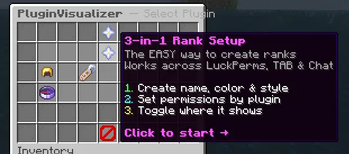
⭐ 3-in-1 Rank Setup — The Easy Way
The flagship feature. Create a complete rank across LuckPerms + TAB + EssentialsX Chat in one flow:
- Create Rank — Pick a name, choose a color, select a bracket style, set the weight. See a live preview of how it looks in chat and tab before you commit.
- Set Permissions — Browse 6 categories of common permissions (Movement, Teleport, Admin, WorldEdit, Chat, Economy). Toggle them on/off. Add custom permissions too.
- Display Settings — Choose exactly where your rank shows up: Chat, TAB List, Nametag (above head), Below Name. Toggle each independently. Copy your prefix everywhere with one click.
No more creating a group in LuckPerms, then opening TAB's config, then editing Essentials' chat format. One flow, one click, everything configured.
👑 LuckPerms GUI
Full visual management for your permissions plugin:
- Browse all groups with pagination
- Color picker — 16 wool colors to set group prefix color
- Style presets — 12 bracket/symbol styles (square
[...], pipe|...|, curly{...}, star★...★, crown♛...♛, and more) - Weight adjuster — Click to ±1, shift-click to ±10
- Manage permissions — browse, toggle, add from categories, add custom
- Add/remove players with a clean two-column layout (IN group / NOT in group)
📋 TAB GUI
Visual configuration for TAB's tab list and nametags:
- Browse all TAB groups with prefix previews
- Toggle display locations — Tab List, Nametag, Below Name, Tab Suffix — each independently
- Copy Tab → All — One click to apply your tab prefix everywhere
- 18 style templates — Pre-made prefix templates organized by color (red, gold, green, blue, purple, neutral). One-click apply.
- Manage group membership with two-column player layout
- Auto-reloads TAB after every change
💬 EssentialsX Chat GUI
Fix your chat formatting without touching config.yml:
- Live chat preview — See exactly how messages will look before saving
- 8 format presets — Ranked, Colored Groups, Clean, Minimal, Fancy, Bracketed, Staff, Simple. Pick one and go.
- Per-group format overrides — Different chat styles for different ranks
- Nickname management — Set, change, or remove player nicknames from the side panel
- Direct config.yml editing — Reads and writes Essentials' config in real time
🪓 WorldEdit GUI
Visual command panel for WorldEdit:
- World Border — Set size, center, warning distance, damage amount
- Selection — Get wand, set positions, expand/contract
- Clipboard — Copy, paste, rotate, flip
- Generation — Sphere, hollow sphere, cylinder
- Utility — Undo, redo, replace, fill, drain
🌍 Multiverse GUI
World management without commands:
- Browse all worlds with pagination
- Create worlds — Step-by-step wizard: name → environment → world type → seed → generator
- Manage worlds — Teleport, set spawn, toggle PvP, set difficulty, set alias, toggle animals/monsters
- Delete with confirmation (must type "DELETE")
🔧 Supported Plugins
| Plugin | Features |
|---|---|
| LuckPerms | Groups, permissions, players, colors, styles, weight |
| TAB | Tab list, nametags, below name, suffixes, templates |
| EssentialsX Chat | Chat format, group formats, nicknames, presets |
| WorldEdit | Commands, selections, clipboard, generation |
| Multiverse-Core | Worlds, creation wizard, world settings |
All plugins are soft dependencies — missing plugins show as grayed out in the menu and won't cause errors.
📖 How To Use
- Type
/pvisor/pluginvisualizerto open the main menu - Click any plugin to configure it
- Use the ⭐ Rank Setup button for the 3-in-1 rank creator
- All changes are applied instantly — no reload needed
Permission: pluginvisualizer.use (granted to ops by default)
🛠️ Technical Details
- Server Software: Spigot / Paper (1.16+)
- Java Version: 17+
- No external dependencies — works with just the plugins you already have
- Triple-fallback click detection — GUIs work reliably even with other inventory plugins
- Chat input system — When text input is needed, you type in chat (no sign editors or external tools)
- Direct API + Config integration — Uses LuckPerms API for real-time data, reads/writes TAB & Essentials configs directly with auto-reload
❓ FAQ
Q: Do I need all 5 plugins installed?
A: No. Only install what you use. Unsupported plugins appear grayed out in the menu.
Q: Will this conflict with other GUI plugins?
A: Unlikely. PluginVisualizer uses triple-fallback click detection for maximum compatibility.
Q: Can I undo changes?
A: Most changes can be reversed through the GUI. LuckPerms changes can also be undone via LP's own audit log. For TAB and EssentialsX, keep backups of your config files.
Q: Does it work on Bedrock?
A: It works with Geyser/Floodgate, but the GUI experience is optimized for Java Edition clients.
📝 Commands & Permissions
| Command | Description | Permission |
|---|---|---|
/pvis |
Open the main menu | pluginvisualizer.use |
/pluginvisualizer |
Open the main menu | pluginvisualizer.use |
PluginVisualizer — Because config files belong in the past.