


Plugin Portal
In-game plugin downloader and updater using the Polymart, SpigotMC, Modrinth & Hangar marketplaces.
📖About Plugin Portal
Plugin Portal is an in-game plugin downloader and updater using the Polymart, SpigotMC, Modrinth & Hangar marketplaces. View resource data, install and update plugins all from the comfort of your Minecraft chatbar.
FEATURES
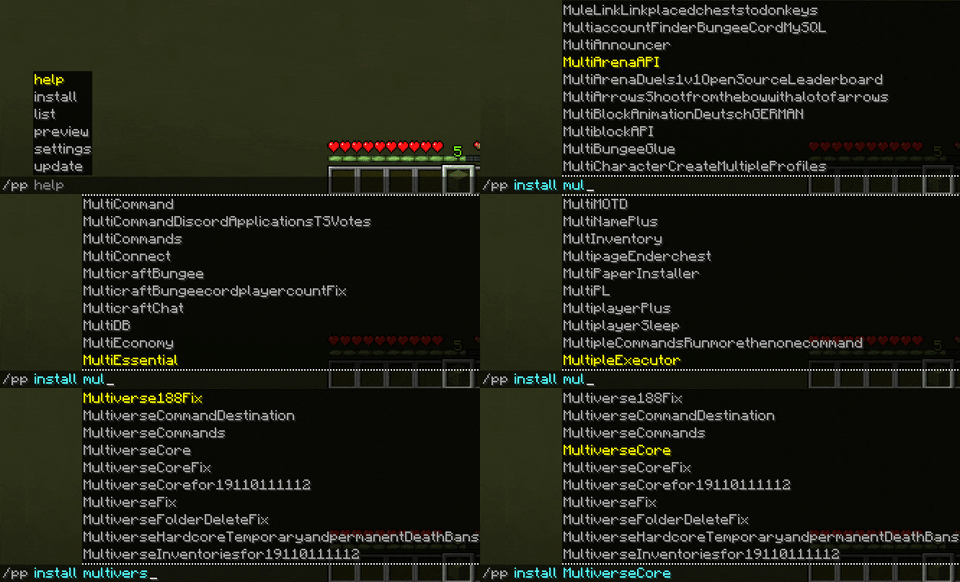
- Direct Install: You can install your plugins from Polymart, Spigot, Modrinth and Hangar directly from in-game with a single command!
- Plugin List: We scanned over 100,000 plugins to download from three marketplaces! You can just start typing and search among this huge list.
- Plugin Previewing: Check if the plugin is the correct one. With /pp view command you can view the resource icon, description, stats and ratings in-game so you can be sure.
- Cross Version Compatibility: We are compatible with every version from 1.8+ and supported on all major server jars, including Folia!
- No Inactive Plugins: We've automatically filtered out all inactive/deprecated/abandoned plugins for you so you don't accidently download something that doesn't work anymore. (Don't worry - you can still do this if you must)
- Self Updating: Of course Plugin Portal is able to update itself within itself! Still no need to leave that comfortable chatbar.
...and many more! After something more? Scroll down to see what Premium offers.
SCREENSHOTS
Here's how it looks to install a plugin from our 100,000+ directory:
Here's how it looks to view a plugin in-game:

Want to update your plugins without even opening your browser?

COMMANDS & PERMISSIONS
/pp view <name|id> [platform] [-byId] - pluginportal.view
Shows a preview of the plugin (as shown above) using all data we scanned from the chosen marketplace. Will include the resource image, description, stats and ratings so you can install the correct plugin.
/pp install <name|id> [platform] [-byId] - pluginportal.manage.install
The heart of Plugin Portal: install a plugin from a marketplace. Specify the plugin name or ID that you wish to download and Plugin Portal will beam that jar onto your server. It can then be updated or deleted.
/pp update <name|id> [-byId] - pluginportal.maintain.update
Update a plugin from the same source that it was installed from. For example, if you installed WorldEdit, and WorldEdit has been updated, you can run this command to download the newest version onto your server.
/pp uninstall/delete <name|id> [-byId] - pluginportal.manage.uninstall
Delete a plugin from your server.
/pp list - pluginportal.view
List all plugins installed by Plugin Portal. Note: If you are trying to have plugins recognized which weren't installed with Plugin Portal, our Premium version offers this feature (scroll down).
/pp help - pluginportal.view
Display the help message with the above list of commands.
/pp dump - pluginportal.dump
Dump the plugin portal log to mclo.gs
PREMIUM
Want to supercharge your server right from the start? Grab a copy of Plugin Portal Premium.
Features include:
- Plugin Recognition: Added a plugin from outside of Plugin Portal? Adding Plugin Portal to your server with dozens of jars already on it? They'll be automatically identified, updatable and deletable (if available on a supported marketplace).
- Malware Detection: We'll run every download through malware detection designed for Minecraft plugins.
- Automatic Updates: Never see a plugin outdated message again. Plugin Portal will automatically update your plugins!
- Custom Adapters: For when authors use external URLs like GitHub or Jenkins, we have custom adapters to serve you their jars.
- Install Specific Versions: Need a specific version of a plugin? Use the version flag to view and download versions.
- Backups: Broke something? Rollback your plugins to a save point.
- Priority Version Release
- Priority Support
SUPPORT
If you need support with the plugin, please come and join our Discord over at:
We have a loving community of developers who are more than happy to assist in your issues and take your suggestions. ❤️
CONTRIBUTE
You are welcome to contribute to Plugin Portal as we have open sourced the code. Head over to our GitHub repository here:
https://github.com/flytegg/plugin-portal
If you are a developer, you are welcome to create PRs which we will review periodically. If not, please create an issue.
If you have no GitHub knowledge, then you are welcome to join our Discord server (https://flyte.gg/discord) where you can create suggestions to be voted on by the community.
Thank you, and enjoy our project. ❤️