

PluginListPlus
A more readable plugin list with customizable aesthetic themes and styles.
📖About PluginListPlus
A clean, styled replacement for /plugins, /pl, and /plist.
A more readable plugin list with aesthetic themes, multiple display styles, GUI tools, and privacy controls.
◆ 5 Display Styles ◆ 10 Themes ◆ GUI / Chat Config ◆ GUI / Book List ◆ Private Mode
PluginListPlus replaces the default Minecraft plugin list with a cleaner, more polished, and more customizable version for server owners who want something better than the default /plugins output.
It is built for servers that want plugin information to look intentional instead of messy, plain, or exposed in a way that does not fit the server.
▌ Display Styles
◆ Compact
Fits the full plugin list into as few lines as possible. Best for quick checks, smaller screens, and servers that want a clean chat-based layout without wasting space.
◆ Grouped
Splits enabled and disabled plugins into separate groups, making it easier to check plugin status at a glance.
◆ Boxed
Shows one plugin per line inside a clean framed layout. This style is useful when readability matters more than compact spacing.
◆ Categorized
Sorts plugins by Paper, Bukkit, and status-based categories for a more organized server overview.
◆ Detailed
Shows versions, authors, badges, and extra plugin information.
This style is more experimental and is not recommended for every setup, but it is useful for deeper plugin inspection.
▌ Themes
PluginListPlus includes multiple built-in themes so the plugin list can better match your server style.
| Theme | Style |
|---|---|
| Gold | Clean, warm, premium |
| Crimson | Dark red, bold, sharp |
| Emerald | Green, clean, stable |
| Sunset | Orange, warm, energetic |
| Ocean | Blue, fresh, readable |
| Galaxy | Purple, modern, stylized |
| Cherry | Pink/red, bright, polished |
| Arctic | Light blue, cold, minimal |
| Neon | Bright green, high contrast |
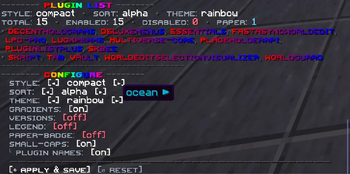
| Rainbow | Colorful, playful, standout |
▌ Admin Tools
◆ Interactive Config Panel
Change the active style, theme, sorting mode, badges, versions, legend, and gradients directly in-game.
◆ Inventory GUI
Configure the plugin visually without needing to manually type every command.
◆ Book View
Open the plugin list in a paginated written book format for a cleaner in-game reading experience.
◆ Inventory Browser
Browse plugins one at a time through a clean paginated inventory interface.
◆ Private Mode
Hide plugin information from players and replace it with a custom denial message.
◆ Startup Error Lookup
Check the last startup error for any disabled plugin directly in-game.
▌ Commands
| Command | Description |
|---|---|
/pluginlist |
Shows the saved plugin list layout. |
/pluginlist config |
Opens the interactive config panel. |
/pluginlist gui |
Opens the GUI setup menu. |
/pluginlist browse |
Opens the paginated inventory browser. |
/pluginlist book |
Opens the written book view. |
/pluginlist error [plugin] |
Shows the last startup error for that plugin. |
▌ Installation
1. Place the .jar file into your server’s plugins folder.
2. Restart your server.
3. Run /pluginlist and choose the style you want to use.
PluginListPlus gives your plugin list a cleaner layout, better readability, and a style that actually fits your server.