Logo
MINECRAFTBIBLE
Items
Items

All game items

Blocks
Blocks

Building blocks

Mobs
Mobs

Creatures & monsters

Biomes
Biomes

World biomes

Structures
Structures

Generated structures

Recipes
Recipes

Crafting guides

Advancements
Advancements

Achievements

Loot Tables
Loot Tables

Drop rates

Tags
Tags

Item groupings

All Versions
View all data →
Capes
Cape ArchiveNEW

Browse rare Minecon capes, OptiFine capes, and custom capes from players worldwide

Browse

Player Database
Player DatabasePopular

Search any player

Skin Browser
Skin Browser

Browse & download skins

Cape Gallery
Cape GalleryNEW

Minecon & OptiFine capes

Seed Vault
Seed Vault

Curated seeds

Learn

Guides
GuidesNew

Tutorials & tips

Blog
Blog

News & updates

Community

Community Hub
Community HubHub

Posts, discussions & more

All Versions
View community →
Seed Analyzer
Seed Analyzer

World seed analysis

Loot Explorer
Loot Explorer

Drop rates

Crafting Calculator
Crafting Calculator

Material planning

Enchant Calculator
Enchant Calculator

Probability math

Redstone Lab
Redstone Lab

Signal timing

Trading Profit
Trading Profit

Villager ROI

All Versions
View all tools →
Mods
Mods

Browse all mods

Plugins
Plugins

Server plugins

Resource Packs
Resource Packs

Textures & sounds

Shaders
Shaders

Visual enhancements

Datapacks
Datapacks

World logic

Scanner
Mod Intelligence

Scan & analyze any mod

All Versions
View all mods →
Loading...
IntroductionIntroductionVersion HistoryVersion HistoryGuidesGuidesBlog & NewsBlog & News
ItemsItemsBlocksBlocksMobsMobsRecipesRecipesBiomesBiomesStructuresStructuresAdvancementsAdvancementsLoot TablesLoot TablesTagsTags
ModsModsPluginsPluginsResource PacksResource PacksShadersShadersDatapacksDatapacks

MinecraftBible

The Ultimate Wiki

Logo
MINECRAFTBIBLE

The ultimate Minecraft reference. Every item, block, mob, and recipe documented with precision.

Community

  • Player Database
  • Skin Browser
  • Cape Gallery
  • Community Hub
  • Seed Vault

Database

  • Items
  • Blocks
  • Mobs
  • Recipes
  • Biomes
  • Structures

Tools

  • Seed Analyzer
  • Mod Intelligence
  • Crafting Calculator
  • Enchant Calculator

Mods & Packs

  • Mods
  • Plugins
  • Resource Packs
  • Shaders
  • Datapacks

© 2026 MinecraftBible. Not affiliated with Mojang or Microsoft.

PrivacyTermsContact
PlayerDataRollback
PluginMIT

PlayerDataRollback

Can I rollback player data? Sure!

714
Downloads
4
Followers
1 years ago
Updated
📦
10
Versions
managementstoragebukkitpaperpurpurspigot
Download Latestv2.1.6-GAView on Modrinth

📖About PlayerDataRollback

PlayerDataRollback​

Overview

Losing player data unexpectedly is incredibly frustrating, and finding a reliable solution can be difficult. That's why I created PlayerDataRollback—a plugin designed to automatically back up and restore player data, giving you peace of mind.

The plugin automatically creates a backup every time the server starts. You can also manually back up, restore, and manage backups with simple commands.

Backups are saved in plugins/PlayerDataRollback/Backups

Features

Automatically backs up player data on server startup.
Manually create, rollback, and remove player data backups.
Filter backups by specific time periods such as days, months, or years.
Restore individual player data or all players at once.
Supports multi-language (English, Chinese Simplified, Chinese Traditional, and German).
Paginated display of backup lists.
Kicks all players when rolling back all data to avoid conflicts.

Commands

Backup Management
/pld backup create - Create a backup of all player data.

/pld list (xd/xm/xy) - List backups filtered by time (days/months/years ago).

/pld page - Navigate through the list of backups (used after /pld list).
Rollback

/pld rollback - Rollback a player's data to a specific backup.

/pld rollbackall - Rollback all player data from a specified time period or backup (this will kick all online players).

Backup Removal

/pld backup remove - Delete a specific backup.

/pld backup removeall <xd/xm/xy> - Delete all backups from a specified time period (days/months/years ago).

Multi-language Support

The plugin supports multiple languages:

English (en_US)

Chinese (Simplified) (zh_CN)

Chinese (Traditional) (zh_TW)

German (de_DE)

Translations are applied automatically based on the server's locale.

Installation

Download the latest version of PlayerDataRollback from SpigotMC.

Place the .jar file into the plugins folder.

Restart the server to generate the configuration and necessary files.

Backups will be automatically created on each server startup, or use the commands for manual control.

Example Usage

Create a backup: /pld backup create myBackup

Rollback a player's data: /pld rollback Steve myBackup

Rollback all player data from 7 days ago: /pld rollbackall 7d

List backups from the last 3 months: /pld list 3m

Support

If you encounter any issues or have suggestions for new features, feel free to reach out via SpigotMC or open a issue on plugin's github repository.

bStats
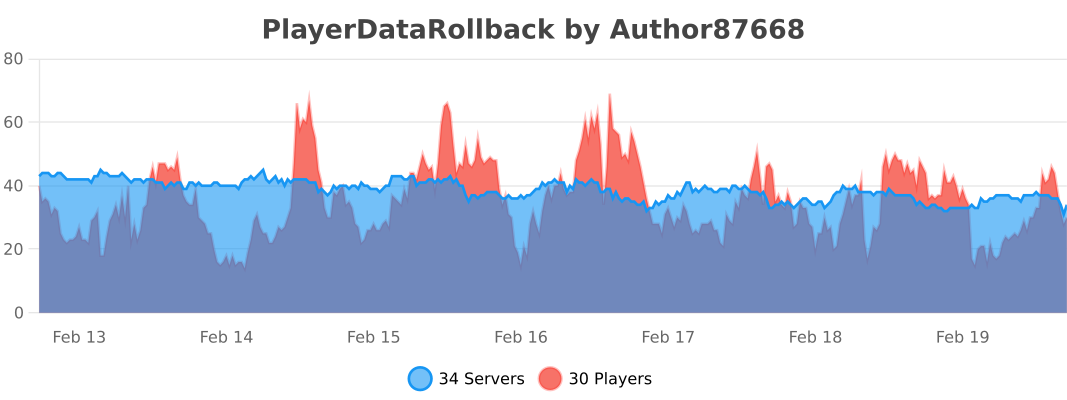
bStats

👥 Team & Contributors

Author87668
Author87668Owner

⚙️ Compatibility

Environment
🖥️ Server-side
Loaders
bukkitpaperpurpurspigot
Minecraft Versions
1.81.8.11.8.21.8.31.8.41.8.51.8.61.8.7+55 more

🔗 Links

Modrinth Page