Logo
MINECRAFTBIBLE
Items
Items

All game items

Blocks
Blocks

Building blocks

Mobs
Mobs

Creatures & monsters

Biomes
Biomes

World biomes

Structures
Structures

Generated structures

Recipes
Recipes

Crafting guides

Advancements
Advancements

Achievements

Loot Tables
Loot Tables

Drop rates

Tags
Tags

Item groupings

All Versions
View all data →
Capes
Cape ArchiveNEW

Browse rare Minecon capes, OptiFine capes, and custom capes from players worldwide

Browse

Player Database
Player DatabasePopular

Search any player

Skin Browser
Skin Browser

Browse & download skins

Cape Gallery
Cape GalleryNEW

Minecon & OptiFine capes

Seed Vault
Seed Vault

Curated seeds

Learn

Guides
GuidesNew

Tutorials & tips

Blog
Blog

News & updates

Community

Community Hub
Community HubHub

Posts, discussions & more

All Versions
View community →
Seed Analyzer
Seed Analyzer

World seed analysis

Loot Explorer
Loot Explorer

Drop rates

Crafting Calculator
Crafting Calculator

Material planning

Enchant Calculator
Enchant Calculator

Probability math

Redstone Lab
Redstone Lab

Signal timing

Trading Profit
Trading Profit

Villager ROI

All Versions
View all tools →
Mods
Mods

Browse all mods

Plugins
Plugins

Server plugins

Resource Packs
Resource Packs

Textures & sounds

Shaders
Shaders

Visual enhancements

Datapacks
Datapacks

World logic

Scanner
Mod Intelligence

Scan & analyze any mod

All Versions
View all mods →
Loading...
IntroductionIntroductionVersion HistoryVersion HistoryGuidesGuidesBlog & NewsBlog & News
ItemsItemsBlocksBlocksMobsMobsRecipesRecipesBiomesBiomesStructuresStructuresAdvancementsAdvancementsLoot TablesLoot TablesTagsTags
ModsModsPluginsPluginsResource PacksResource PacksShadersShadersDatapacksDatapacks

MinecraftBible

The Ultimate Wiki

Logo
MINECRAFTBIBLE

The ultimate Minecraft reference. Every item, block, mob, and recipe documented with precision.

Community

  • Player Database
  • Skin Browser
  • Cape Gallery
  • Community Hub
  • Seed Vault

Database

  • Items
  • Blocks
  • Mobs
  • Recipes
  • Biomes
  • Structures

Tools

  • Seed Analyzer
  • Mod Intelligence
  • Crafting Calculator
  • Enchant Calculator

Mods & Packs

  • Mods
  • Plugins
  • Resource Packs
  • Shaders
  • Datapacks

© 2026 MinecraftBible. Not affiliated with Mojang or Microsoft.

PrivacyTermsContact
Plantimals
PluginCC-BY-4.0

Plantimals

Plant and grow animals like vegetables.

125
Downloads
3
Followers
2 years ago
Updated
📦
1
Versions
foodgame-mechanicsmobsbukkitpaperpurpurspigot
Download Latestv1.0View on Modrinth

📖About Plantimals

Plantimals

Paper 1.20.4
Java 17+

Plantimals Logo

Meet Plantimals, a straightforward Minecraft plugin that adds a unique twist to farming gameplay. With Plantimals, players have the ability to "plant" various meat items such as Raw Porkchop, Raw Mutton, Raw Rabbit, Raw Chicken, and Raw Beef directly onto farmland. These items visually represent as they lay on the ground, simulating a planting process.

After a predefined duration, which can be individually configured for each type of meat, the corresponding animal will spawn from where the item was planted.

The plugin's configuration allows for customization of several aspects, including the type of particles for each animal, the time it takes for them to "grow," and the option to require players to sneak while planting.

Plantimals offers a novel approach to interacting with the Minecraft environment, blending familiar mechanics with a touch of whimsy. Whether you're looking to add a bit of magic to your farm or simply want a new way to spawn animals, Plantimals provides a simple yet engaging solution.
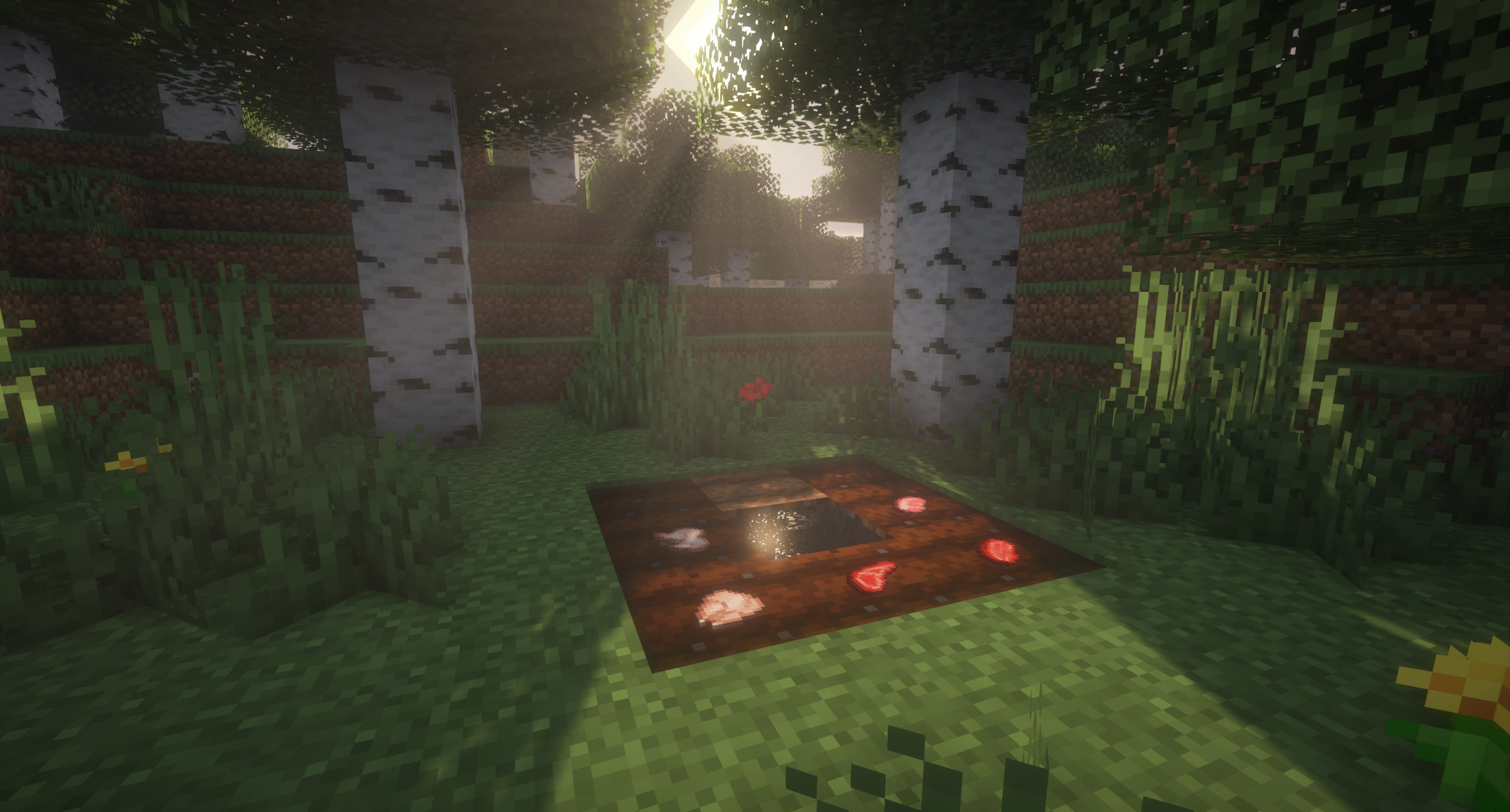
This image is a screenshot from Minecraft. It shows a section of farmland with dark brown soil, that has been watered and is ready for planting. On this soil, there are various items that are different types of meat, as if they were planted there like potatoes. In the middle of the farmland is a single block of water, shimmering with light reflections. The farm is set in a forest clearing with birch trees, grass, flowers, and a couple of red mushrooms with white spots. The scene is bathed in the soft light of sunrise, creating a serene atmosphere.

Available Plantimals

  • Pig
  • Sheep
  • Rabbit
  • Chicken
  • Cow

How to use

To sow a plantimal, simply hold the corresponding raw meat item in your main hand and right-click on a farmland. Depending on the configuration, you may have to sneak (by default) and the farmland requires a certain skill level.

Configuration Options

This plugin introduces specific conditions under which animals can spawn. Below are the configurable options available in config.yml, allowing you to tailor the spawning mechanism to your liking:

  • onlyActiveWhenSneaking: Determines whether the spawning mechanism is active.

    • true - The mechanism is only active when the player is sneaking.
    • false - The mechanism is always active, regardless of the player's stance.
  • requiredMoistureLevel: Sets the minimum moisture level of farmland required for the mechanism to trigger.

    • 0 to 7 - Farmland moisture level, where 0 is dry and 7 is fully hydrated.
    • Example: 1 indicates that the farmland must be slightly moist.
  • ticksTill[Animal]Spawns: Specifies the waiting period in ticks before an animal spawns once the conditions are met. Replace [Animal] with the specific animal name (Pig, Sheep, Rabbit, Chicken, Cow).

    • 6000 - Equivalent to 5 minutes.

Example Configuration:

onlyActiveWhenSneaking: true
requiredMoistureLevel: 1
ticksTillPigSpawns: 300
ticksTillSheepSpawns: 300
ticksTillRabbitSpawns: 300
ticksTillChickenSpawns: 300
ticksTillCowSpawns: 300

Permissions

The only permission this plugin has is plantimals.use. It allows players to plant Plantimals.

Support: Discord

Original concept by MisguidedAngel98.

Want to support me?

Buy me a coffee

👥 Team & Contributors

Aljosha
AljoshaOwner

⚙️ Compatibility

Environment
🖥️ Server-side
Loaders
bukkitpaperpurpurspigot
Minecraft Versions
1.201.20.11.20.21.20.31.20.4

🔗 Links

Modrinth Page