Logo
MINECRAFTBIBLE
Items
Items

All game items

Blocks
Blocks

Building blocks

Mobs
Mobs

Creatures & monsters

Biomes
Biomes

World biomes

Structures
Structures

Generated structures

Recipes
Recipes

Crafting guides

Advancements
Advancements

Achievements

Loot Tables
Loot Tables

Drop rates

Tags
Tags

Item groupings

All Versions
View all data →
Capes
Cape ArchiveNEW

Browse rare Minecon capes, OptiFine capes, and custom capes from players worldwide

Browse

Player Database
Player DatabasePopular

Search any player

Skin Browser
Skin Browser

Browse & download skins

Cape Gallery
Cape GalleryNEW

Minecon & OptiFine capes

Seed Vault
Seed Vault

Curated seeds

Learn

Guides
GuidesNew

Tutorials & tips

Blog
Blog

News & updates

Community

Community Hub
Community HubHub

Posts, discussions & more

All Versions
View community →
Seed Analyzer
Seed Analyzer

World seed analysis

Loot Explorer
Loot Explorer

Drop rates

Crafting Calculator
Crafting Calculator

Material planning

Enchant Calculator
Enchant Calculator

Probability math

Redstone Lab
Redstone Lab

Signal timing

Trading Profit
Trading Profit

Villager ROI

All Versions
View all tools →
Mods
Mods

Browse all mods

Plugins
Plugins

Server plugins

Resource Packs
Resource Packs

Textures & sounds

Shaders
Shaders

Visual enhancements

Datapacks
Datapacks

World logic

Scanner
Mod Intelligence

Scan & analyze any mod

All Versions
View all mods →
Loading...
IntroductionIntroductionVersion HistoryVersion HistoryGuidesGuidesBlog & NewsBlog & News
ItemsItemsBlocksBlocksMobsMobsRecipesRecipesBiomesBiomesStructuresStructuresAdvancementsAdvancementsLoot TablesLoot TablesTagsTags
ModsModsPluginsPluginsResource PacksResource PacksShadersShadersDatapacksDatapacks

MinecraftBible

The Ultimate Wiki

Logo
MINECRAFTBIBLE

The ultimate Minecraft reference. Every item, block, mob, and recipe documented with precision.

Community

  • Skin Browser
  • Cape Gallery
  • Seed Vault
  • Blog
  • Guides

Database

  • Items
  • Blocks
  • Mobs
  • Recipes
  • Biomes
  • Structures

Tools

  • Seed Analyzer
  • Mod Intelligence
  • Crafting Calculator
  • Enchant Calculator

Mods & Packs

  • Mods
  • Plugins
  • Resource Packs
  • Shaders
  • Datapacks

Site & Legal

  • About
  • Authors
  • Editorial Policy
  • Corrections
  • Contact
  • Privacy Policy
  • Terms of Service
  • DMCA
  • Sitemap

© 2026 MinecraftBible. Not affiliated with Mojang or Microsoft.

PrivacyTermsContact
Pepe's Forge
PluginMIT

Pepe's Forge

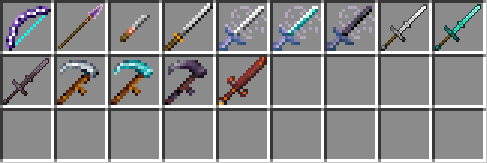
Plugin adding custom weapons & tools with unique mechanics: Katana, Scythe, Greatsword, Chisel, Bow, Spear, and Shield.
123
Downloads
0
Followers
1 months ago
Updated
📦
3
Versions
adventureequipmentgame-mechanicsbukkitfoliapaperpurpurspigot
Download Latestv1.2.0View on Modrinth

📖About Pepe's Forge

Pepe's Forge

Pepe's Forge is a lightweight, vanilla-friendly Minecraft server plugin that introduces unique custom weapons and specialized tools.

Items

⚔️ Custom Weapons & Tools

Every item in Pepe's Forge introduces a unique mechanic or utility, shifting how players fight and farm. Click on any item below to expand its details:

🪚 Chisel – Block Cycler

Tool for builders. Right-click to cycle supported blocks through their decorative variants (Sneak + right-click to cycle backward).

🌾 Scythes (Iron/Dia/Neth) – Area Harvest

The ultimate farming tool. Automatically harvests and replants ripe crops in an area (from 3x3 up to 7x7 depending on tier) in a single click.

🌬️ Wind Blades (Iron/Dia/Neth) – Speed & Dash

High-mobility weapons. Grants a passive speed boost while held, speed bursts on hit, and a right-click dash ability (5-second cooldown).

🏰 Greatswords (Iron/Dia/Neth) – Two-Handed Rhythm

A heavy two-handed sword. Time your swings rhythmically to build momentum, unlocking wide sweeping attacks, bonus damage to nearby enemies, and a frontal shield deflection. Requires your off-hand to be empty.

🗡️ Katana – Parry & Reflect

A high-skill defensive sword. Right-click at the perfect moment to block incoming melee attacks and reflect arrows or other projectiles back at attackers. Requires your off-hand to be empty.

🏹 Crescent Bow – Spread Volley

A moon-themed bow that fires a 3-arrow horizontal spread volley while consuming only 1 arrow. Deals less damage during the day, but gains +2 bonus damage under the open night sky.

🔱 Crescent Spear – Rapid Combo Strikes

A combo weapon. Land hits to charge your spear; at 100%, your next attack triggers 3 rapid follow-up strikes. Deals bonus damage under the open night sky.

☀️ Solar Shield – Sun-Charged Counter

A legendary defensive shield. Automatically charges up to 3 times while held in direct sunlight. Blocking a hit consumes a charge to ignite your attacker and blind them with a solar flashbang.

🩸 Crimson Sword – Combat Progression & Lifesteal

A legendary sword that levels up through combat. Feeding on enemies increases its damage, grants passive lifesteal, and unlocks a blood-draining aura.


📌 All custom weapons, tools, and mechanics are designed to strictly respect land claims and anti-grief protections.

📂 Looking for Crafting Recipes and Command IDs?
Check out the comprehensive ITEMS.md guide on GitHub for full technical details!


💾 Installation

  1. Download the latest pepeforge-X.Y.Z.jar.
  2. Drop it into your server's plugins/ folder.
  3. Restart the server to generate configurations.
  4. Set up the Resource Pack (see below) and play!

🎨 Resource Pack & Language

Since version 1.2.0, Pepe's Forge uses Minecraft's modern model system. It is compatible with most Minecraft plugin server engines (Paper, Purpur, Spigot, Folia, etc.) on version 1.21.11+.

  • Mandatory Resource Pack: Players must have the resource pack loaded. Because custom items use a dedicated visual namespace, they will render as purple-black missing texture cubes without it.
  • 📥 Download Resource Pack: Get the resource pack ZIP from the latest release assets on Modrinth or GitHub.
  • Paper / Purpur / Folia (Client-side translation): Item names and descriptions automatically match each player's Minecraft client language. Note: If you do not have the resource pack loaded on Paper, text will show up as raw translation keys (like item.pepeforge.katana.name).
  • Spigot / CraftBukkit (Server-side translation): Item names and descriptions will display directly in the server's default language (defined in configurations), even if a player does not have the resource pack loaded.

🔄 Updates & Configuration

  • Updates are safe: When updating from older versions, all existing items in chests and inventories will be automatically updated on the fly.
  • Configurable: Edit plugins/PepeForge/config.yml to toggle specific items, disable recipes, or customize language settings.

💻 Commands

Command Description Permission Default
/pepeforge items Opens an in-game GUI menu to preview all items. pepeforge.items OP
/pepeforge give <item> <player> Gives a specific custom item to a player. pepeforge.give OP
/pepeforge setlevel <level> Sets the level of the Crimson Sword in hand. pepeforge.setlevel OP

❓ FAQ

Q: Will my items break when I update the plugin?
A: No! The plugin automatically modernizes existing items on the fly.

Q: Does client-side translation work on Spigot?
A: No. Spigot and CraftBukkit do not support client-side translations. For these platforms, item names will display in the server's default language.

Q: Does the Resource Pack conflict with other texture packs?
A: No. Because our pack uses the modern model system, it completely avoids overwriting vanilla items. This makes it highly compatible with other texture packs!


🛠️ Support & Community

While all items are thoroughly tested, issues may still occur.

  • Found a bug? Please report it on our GitHub Issue Tracker.
  • 💡 Suggestions & Feedback: Share your ideas in Pepe's Forge on Discord.
  • 💬 Community & Support: Join us on Discord: https://discord.gg/uPbSacDx4k

Every suggestion and bug report helps improve Pepe's Forge.

👥 Team & Contributors

PepeThePlatypus
PepeThePlatypusOwner

⚙️ Compatibility

Environment
🖥️ Server-side
Loaders
bukkitfoliapaperpurpurspigot
Minecraft Versions
1.21.1126.126.1.126.1.2

🔗 Links

Modrinth Page