

PayBot
Hệ Thống Nạp Tiền Từ Bank, Card Vào Minecraft :0
📖About PayBot






Tải phiên bản dành cho các modloader (Forge, Fabric, Quilt,...) tại đây
Support | Auto System | Turtorial | Set Up
📢 Thông báo (Announcement):
Để có hệ thống nạp tự động (cả nạp thẻ và nạp bank) vui lòng add bot Discord (link bên trên) vào server Discord, sau đó dùng /connect và /sepay để setup bot (vừa phải setup bot vừa phải setup plugin/mod mới có thể kết nối), sau đó dùng /id và dùng lệnh bot thả ra trong server Minecraft để có hệ thống nạp tự động! (Cần hỗ trợ liên hệ server bên trên)
- ✅ Bukkit/Paper/Purpur và Fabric đều đã hỗ trợ đầy đủ (Fabric hỗ trợ 1 phần) (Forge/Quilt đang xem xét cho tương lai). Fabric đã 80% hoàn thành. Nếu muốn test thì có thể tải trực tiếp, nhưng vui lòng đọc changelog trước khi cài vào server
- ✅ Vừa có bản cập nhật lớn: sửa lỗi kết nối bot, lỗi đăng ký SePay/web đổi thẻ, chống spam request lên Discord Bot (mấy server cũ spam lắm vc hết credit Ngrok nhanh cực :V), và đơn giản hoá cấu hình SePay — giờ chỉ cần dán 1 API Token, không cần tự tay cấu hình webhook nữa.
Vietnamese:
📡 Công khai dữ liệu chia sẻ (Data Disclosure)
Plugin/Mod Paybot và Discord Bot này gửi các dữ liệu sau đến máy chủ bên thứ ba để xử lý giao dịch:
Dữ liệu gửi từ Plugin/Mod → Discord Bot (dịch vụ mở rộng, chỉ khi đã /connect):
- Tên người chơi (player_name) — để xác định ai đã thực hiện giao dịch
- Định danh server (server_id) — để bot nhận diện đúng server gửi yêu cầu
- URL callback của plugin/mod (tuỳ chọn) — nếu server tự mở port công khai được, bot sẽ gửi trả kết quả giao dịch trực tiếp về server (nhanh hơn, không qua bước trung gian); nếu không mở được thì plugin/mod tự hỏi lại bot khi cần (không gửi định kỳ "phòng hờ" nữa)
- Thông tin thẻ cào (chỉ khi dùng /napthe): nhà mạng (telco), mệnh giá (denom), mã thẻ (card_code), số serial thẻ (card_serial)
- Số tiền giao dịch (chỉ khi dùng /napbank): giá trị người chơi nhập vào
- Trạng thái online của 1 người chơi cụ thể — chỉ hỏi đúng lúc cần (khi người chơi đó dùng
/napbankhoặc/napthetừ Discord, để biết route đúng server) — không còn gửi danh sách toàn bộ người chơi định kỳ như trước
Dữ liệu gửi từ Discord Bot → Dịch vụ bên thứ ba:
- SePay — nhận IPN webhook xác nhận giao dịch ngân hàng/ví điện tử (tuỳ chọn); ngoài ra bot/plugin/mod còn tự đọc lịch sử giao dịch qua SePay API (dùng API Token do admin tự tạo tại my.sepay.vn) để tự xác minh thanh toán mà không bắt buộc phải cấu hình webhook
- TheSieuRe — xử lý đổi thẻ cào sang tiền; nhận: partner_id, partner_key, telco, mệnh giá, mã thẻ, serial thẻ, request_id
- GachThePro — xử lý đổi thẻ cào sang tiền (nhà cung cấp thay thế); nhận dữ liệu tương tự TheSieuRe
- GachTheFast — sẽ được hỗ trợ trong phiên bản tới; dữ liệu gửi đi sẽ được cập nhật khi tích hợp hoàn tất
Không có dữ liệu nào được gửi đi khi admin chưa cấu hình plugin/mod qua /SePaySetup hoặc /CardSetup. Người chơi không tự động kết nối với bất kỳ máy chủ từ xa nào.
⚠️ Lưu ý kỹ thuật: Plugin/Mod mở một HTTP server nội bộ trên port 25580 (mặc định, đổi được trong
config.yml) để nhận callback từ bot Discord và webhook từ SePay. Admin cần đảm bảo port này được mở trên firewall của server nếu muốn dùng đường truyền nhanh (callback trực tiếp) — không mở port này vẫn dùng được bình thường, hệ thống tự chuyển sang cách hỏi-khi-cần thay thế.
Mọi request giữa plugin/mod và bot đều được xác thực bằng API Key riêng — không cấu hình đúng key thì bot sẽ từ chối request.
📌 Mô tả Plugin/Mod
Yêu cầu server Minecraft sử dụng Purpur, Paper, Folia (gần như mọi fork khác của PaperMC) hoặc Fabric, từ 1.20+ (riêng Bukkit/Paper có lớp tương thích ngược, chạy được từ 1.12 trở lên ở hầu hết tính năng).
Tính năng:
🟢 Lệnh người chơi (mặc định mọi người dùng được)
- /napbank — Nạp tiền qua chuyển khoản ngân hàng: mở giao diện GUI hiển thị mã QR VietQR, nội dung chuyển khoản và hướng dẫn chi tiết. Hỗ trợ toàn bộ ngân hàng/ví điện tử Việt Nam qua SePay
- /napthe — Nạp thẻ cào: mở GUI chọn nhà mạng (Viettel, Mobifone, Vinaphone, Zing, Gate, Garena, Vcoin, Appota), rồi nhập mã thẻ và serial. Xử lý qua TheSieuRe, GachThePro và các nhà cung cấp khác
- /ok — Xác nhận gửi thẻ cào lên hệ thống sau khi đã nhập đủ thông tin (dùng kèm
/naptheở chế độ text, thay thế cho nút bấm trong GUI) - /rewardclaim [confirm] — Xem trước và nhận phần thưởng đang chờ (đơn được duyệt khi bạn đang offline). Gõ không có tham số để xem trước đơn cũ nhất, gõ
confirmđể xác nhận nhận thưởng - /paybotplaceholder — Mở bảng thống kê nạp tiền trực tiếp trong game (tổng số tiền đã nạp, top người nạp nhiều nhất, …) — không cần cài PlaceholderAPI
- /paybotowner <mã> — Đăng nhập quyền owner bằng mã một lần (100 ký tự) lấy từ lệnh
/ownerlogintrên Discord. Session có hiệu lực 30 phút. Dùng/paybotowner logoutđể đăng xuất sớm,/paybotowner statusđể xem thời gian còn lại
🔧 Lệnh admin — Thiết lập (yêu cầu quyền naptien.admin, mặc định OP)
- /sepaysetup — Cấu hình SePay: chỉ cần dán duy nhất API Token từ my.sepay.vn — plugin tự xác thực token, tự lấy danh sách ngân hàng/số tài khoản đã liên kết, không cần nhập tay. Có hướng dẫn từng bước tích hợp sẵn
- /cardsetup — Wizard cấu hình trung gian gạch thẻ (chọn TheSieuRe / GachThePro / …) và nhập API key, bao gồm cả việc xem và chỉnh mệnh giá thưởng tương ứng
- /cardapisetup — Mở GUI nhanh để chọn hoặc đổi site API gạch thẻ đang dùng (TheSieuRe / GachThePro)
- /chinhsuamenhgianap — Mở GUI chỉnh sửa danh sách mệnh giá và lệnh thưởng tương ứng cho từng mệnh giá (hỗ trợ tối đa 10 lệnh/mệnh giá, áp dụng riêng cho thẻ và bank)
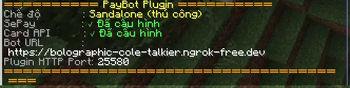
- /PayBotSetup — Xem tổng quan trạng thái cấu hình hiện tại: SePay (ngân hàng, số tài khoản), Card API (site đang dùng), port webhook, chế độ hoạt động (Standalone hay Bot)
📋 Lệnh admin — Quản lý đơn nạp (yêu cầu quyền naptien.admin)
- /bankcheck [player] — Xem danh sách đơn ngân hàng dưới dạng GUI. Không có tham số → xem tất cả; thêm tên player → lọc theo người chơi đó
- /cardcheck [player] — Xem danh sách đơn thẻ cào dưới dạng GUI. Không có tham số → xem tất cả; thêm tên player → lọc theo người chơi đó
- /topuplist all — Xem toàn bộ đơn đang chờ (cả bank lẫn thẻ) trong một GUI duy nhất; cho phép duyệt thưởng trực tiếp từ đây (chỉ ở Standalone mode)
- /approve <invoice_id> — Duyệt và cấp thưởng thủ công cho một đơn nạp cụ thể bằng ID đơn (chỉ dùng ở Standalone mode — khi chưa kết nối Discord bot). Nếu người chơi đang offline, thưởng sẽ được lưu lại và trao tự động khi họ vào lại
🔗 Lệnh admin — Kết nối Discord Bot (yêu cầu quyền naptien.admin)
- /connect discord <guild_id> — Kết nối plugin với Discord bot bằng guild ID (lấy guild ID bằng lệnh
/idtrong Discord của hệ thống tự động), yêu cầu setup bằng lệnh/Sepayvà lệnh/connectsau khi add bot trước khi có thể kết nối! - /disconnect [--force] — Gửi yêu cầu ngắt kết nối đến Discord bot, chờ bot xác nhận rồi xoá cấu hình. Thêm
--forceđể xoá cấu hình cục bộ ngay lập tức mà không cần liên hệ bot - /confirm — Xác nhận hoàn tất quá trình ngắt kết nối sau khi bot đã phản hồi (dùng sau
/disconnect) - /naptienid — Xem thông tin định danh của server: server-id, guild-id đang kết nối, URL bot, port webhook và chế độ hoạt động hiện tại
🧪 Lệnh admin — Debug / Test (yêu cầu OP)
- /testnapbank [mệnh giá] — Mở UI nạp bank như bình thường, nhưng khi chọn mệnh giá sẽ giả lập giao dịch thành công ngay (không tạo QR thật, không gọi SePay). Dùng để kiểm tra chuỗi reward và hiệu ứng (pháo hoa, âm thanh, thông báo) hoạt động đúng
- /testnapthe [nhà mạng] [mệnh giá] — Mở UI nạp thẻ như bình thường, nhưng khi chọn mệnh giá sẽ giả lập gạch thẻ thành công ngay (không hỏi mã thẻ/serial, không gọi API thật). Dùng để kiểm tra chuỗi reward và hiệu ứng
- /muapaybot — Hiển thị thông tin và link mua plugin PayBot (Modrinth, Spigot, Hangar) — link có thể click trực tiếp trong chat (1.16+)
👑 Lệnh Owner (chỉ dùng được khi đang trong phiên /paybotowner hợp lệ)
- /disablepaybot — Chặn vĩnh viễn PayBot trên server này theo địa chỉ IP máy chủ thật. Hiệu lực ngay cả khi admin xoá plugin, đổi port hoặc cài lại bản mới — mọi lần khởi động tiếp theo trên cùng máy đó sẽ bị nhận diện và tự ngừng
- /enablepaybot — Gỡ chặn PayBot (xoá IP khỏi danh sách chặn của BanGuard) và kích hoạt lại toàn bộ tính năng ngay lập tức, không cần reload hay restart server
Plugin/mod giúp admin server tự động xử lý donate, cấu hình lệnh thưởng riêng, số tiền tương ứng cho từng mệnh giá, và tuỳ biến được nội dung chuyển khoản (tiền tố, độ dài, định dạng mã đơn) để khớp với hệ thống quản lý riêng của từng server.
Reward chờ xử lý được tự động giao ngay khi đủ điều kiện (không cần lệnh thủ công), kèm cơ chế chống giao trùng.
🤖 Discord Bot (Dịch vụ Tự động hóa — Tùy chọn)
Bot Discord hoạt động như một lớp trung gian giữa plugin/mod Minecraft và các nhà cung cấp thanh toán, giúp tự động hóa toàn bộ quy trình xử lý giao dịch. Không thay đổi kết cấu plugin/mod!
Cách Bot hoạt động:
- Nhận yêu cầu giao dịch từ plugin/mod qua HTTP (nạp thẻ hoặc nạp bank)
- Gửi thông tin thẻ cào đến TheSieuRe/GachThePro để đổi; nhận kết quả và cập nhật trạng thái
- Nhận IPN webhook từ SePay khi người chơi chuyển khoản thành công, và/hoặc tự đọc lịch sử giao dịch qua SePay API để xác minh thanh toán dù webhook không khả dụng
- Gửi lệnh thưởng về plugin/mod ngay khi giao dịch hoàn tất (ưu tiên gửi thẳng nếu server cho phép, tự chuyển sang cách hỏi-lại nếu không)
- Lưu hàng đợi reward offline — nếu server Minecraft tạm offline, bot giữ reward lại và tự động trao khi server kết nối lại
- Gửi thông báo giao dịch về Discord (webhook) để admin theo dõi
- Xác minh người chơi có đang online không đúng lúc cần (lúc họ nạp từ Discord) để đảm bảo reward trao đúng người, đúng lúc
Dữ liệu Bot lưu trữ nội bộ: cấu hình guild Discord, lịch sử giao dịch thẻ/bank, hàng đợi reward chờ xử lý, thông tin license, danh sách server kết nối.
Plugin/mod này không trực tiếp xử lý thanh toán. Tất cả các giao dịch tài chính đều được xử lý độc quyền bởi các dịch vụ bên thứ ba được liệt kê trong phần Tiết lộ dữ liệu ở trên.
Quy trình: Người chơi sử dụng /napbank hoặc /napthe → plugin/mod lưu các thông tin (chi tiết ở trên) và gửi đến SePay/TheSieuRe,... → Sau khi xác nhận đơn hàng, admin hoặc bot Discord tự động thực thi lệnh thưởng đã được cấu hình sẵn.
Để setup bot, liên hệ qua Discord: Shiroz (therealshiroz)
Quyền Sử Dụng
Bạn, với tư cách là người dùng, có thể làm những điều sau với plugin/mod này mà không cần xin phép tôi:
- Bạn có thể tạo video hoặc chụp ảnh màn hình và đăng tải chúng ở bất cứ đâu bạn muốn, tôi chỉ yêu cầu bạn ghi chú plugin/mod này là gì và cho mọi người biết nơi để tải nó.
- Bạn có thể sử dụng plugin/mod này như một phần phụ thuộc của plugin/mod khác, miễn là bạn ghi công và liên kết trở lại trang này.
Bạn, với tư cách là người dùng, KHÔNG được phép làm những điều sau với plugin/mod này:
- Bạn không được phép phân phối lại hoặc tải lên lại plugin/mod này khi không được cho phép!
- Bạn không được phép dịch ngược mã hoặc sửa đổi để chạy chung được với plugin/mod khác, trường hợp đặc biệt có thể được cho phép tuỳ theo yêu cầu!
Links:
English:
📡 Data Disclosure
This plugin/mod and its companion Discord Bot transmit the following data to third-party servers for transaction processing:
Data sent from Plugin/Mod → Discord Bot (extended automation service, only after /connect):
- Player username (player_name) — to identify who initiated the transaction
- Server identifier (server_id) — so the bot can route requests to the correct server
- Plugin/mod callback URL (optional) — if the server can expose a public port, the bot pushes results straight back to it (faster); otherwise the plugin/mod asks the bot only when actually needed (no more periodic "just in case" reporting)
- Prepaid card details (only when using /napthe): carrier (telco), denomination (denom), card code (card_code), card serial (card_serial)
- Transaction amount (only when using /napbank): the value entered by the player
- Online status of one specific player — queried only at the moment it's needed (when that player runs
/napbankor/napthefrom Discord, to route the request to the right server) — no longer sends the full online-player list on a timer
Data sent from Discord Bot → Third-party services:
- SePay — receives IPN webhooks confirming bank/e-wallet transactions (optional); the bot/plugin/mod can also actively read transaction history via the SePay API (using an admin-issued API Token) to verify payments without requiring webhook setup
- TheSieuRe — handles prepaid card exchange; receives: partner_id, partner_key, carrier, denomination, card code, card serial, request_id
- GachThePro — handles prepaid card exchange (alternative provider); receives the same data as TheSieuRe
- GachTheFast — support coming in a future update; data transmitted will be documented here upon integration
No data is transmitted until the server admin configures the plugin/mod via /SePaySetup or /CardSetup. Players are not automatically connected to any remote server.
⚠️ Technical note: This plugin/mod opens an internal HTTP server on port 25580 (default, configurable in
config.yml) to receive callbacks from the Discord Bot and webhooks from SePay. Opening this port is optional — if it isn't reachable, the system automatically falls back to an ask-when-needed model instead. Every request between plugin/mod and bot is authenticated with a dedicated API key; a mismatched key is rejected.
📌 Plugin/Mod Description
Requires a Minecraft server running Purpur, Paper, Folia (and almost all other PaperMC forks), or Fabric, 1.20+ (Bukkit/Paper additionally ships a backward-compatibility layer that runs most features down to 1.12).
Features:
🟢 Player Commands (available to all players by default)
- /napbank — Deposit via bank transfer: opens a GUI displaying a VietQR code, transfer content, and step-by-step instructions. Supports all Vietnamese banks and e-wallets via SePay
- /napthe — Prepaid card top-up: opens a GUI to select carrier (Viettel, Mobifone, Vinaphone, Zing, Gate, Garena, Vcoin, Appota), then enter the card code and serial. Processed via TheSieuRe, GachThePro, and other providers
- /ok — Confirm and submit a prepaid card after entering all details (used with
/napthein text mode as an alternative to the GUI button) - /rewardclaim [confirm] — View and claim pending rewards (orders approved while you were offline). Run without arguments to preview the oldest pending reward; add
confirmto claim it - /paybotplaceholder — Open an in-game statistics panel showing total deposits, top depositors, and more — no PlaceholderAPI installation required
- /paybotowner <code> — Log in as owner using a one-time 100-character code from the
/ownerloginDiscord command. Session lasts 30 minutes. Use/paybotowner logoutto end the session early,/paybotowner statusto check remaining time
🔧 Admin Commands — Setup (requires naptien.admin permission, OP by default)
- /sepaysetup — Configure SePay: paste a single API Token from my.sepay.vn — the plugin auto-validates the token and auto-fetches your linked bank accounts, no manual input needed. Includes a built-in step-by-step guide
- /cardsetup — Step-by-step wizard to configure the card exchange provider (TheSieuRe / GachThePro / …), enter your API key, and review denomination reward settings
- /cardapisetup — Quick GUI to select or change the active card exchange site (TheSieuRe / GachThePro)
- /chinhsuamenhgianap — Open the denomination reward editor GUI: configure reward commands per denomination (up to 10 commands per denomination, configured separately for card and bank)
- /PayBotSetup — View a status overview of the current configuration: SePay (bank name, account number), Card API (active provider), webhook port, and current operating mode (Standalone or Bot-connected)
📋 Admin Commands — Order Management (requires naptien.admin permission)
- /bankcheck [player] — View bank transfer orders in a GUI. No argument = view all orders; add a player name to filter by that player
- /cardcheck [player] — View prepaid card orders in a GUI. No argument = view all orders; add a player name to filter by that player
- /topuplist all — View all pending orders (both bank and card) in a single GUI; allows approving rewards directly from here (Standalone mode only)
- /approve <invoice_id> — Manually approve and deliver a reward for a specific order by its ID (Standalone mode only — when not connected to the Discord bot). If the player is offline, the reward is saved and delivered automatically when they log back in
🔗 Admin Commands — Discord Bot Connection (requires naptien.admin permission)
- /connect discord <guild_id> — Connect the plugin to the Discord bot using the guild ID (retrieve the guild ID with the
/idcommand in the automation system's Discord), requires setup using the/Sepayand/connectcommands after adding the bot before a connection can be established! - /disconnect [--force] — Send a disconnect request to the Discord bot and wait for confirmation before clearing local config. Add
--forceto immediately clear the local config without contacting the bot - /confirm — Confirm the disconnect process after the bot has responded (use after
/disconnect) - /naptienid — Display the server's identity information: server-id, connected guild-id, bot URL, webhook port, and current operating mode
🧪 Admin Commands — Debug / Test (requires OP)
- /testnapbank [amount] — Opens the bank deposit UI as normal, but simulates a successful transaction immediately upon selecting a denomination (no real QR generated, no SePay calls made). Use to verify that reward commands and effects (fireworks, sounds, messages) are working correctly
- /testnapthe [carrier] [denomination] — Opens the card top-up UI as normal, but simulates a successful card exchange immediately upon selecting a denomination (no card code/serial required, no real API calls made). Use to verify reward commands and effects
- /muapaybot — Display purchase information and links for PayBot (Modrinth, Spigot, Hangar) — links are clickable directly in chat (1.16+)
👑 Owner Commands (only usable during an active /paybotowner session)
- /disablepaybot — Permanently block PayBot on this server by the machine's real public IP address. This persists even if the admin removes the plugin, changes the port, or reinstalls a new version — any future startup on the same machine will be detected and automatically halted
- /enablepaybot — Unblock PayBot (removes this machine's IP from BanGuard's block list) and immediately re-activates all features without requiring a server reload or restart
The plugin/mod lets server admins automate donation handling, configure custom reward commands and amounts per denomination, and customize the bank transfer content format (prefix, length, character set) to match each server's own tracking system.
Pending rewards are delivered automatically as soon as conditions are met (no manual command needed), with built-in double-delivery protection.
🤖 Discord Bot (Extended Automation Service — Optional)
The Discord Bot acts as a middleware layer between the Minecraft plugin/mod and payment providers, fully automating the transaction workflow.
How the Bot works:
- Receives transaction requests from the plugin/mod over HTTP (card top-up or bank transfer)
- Forwards card data to TheSieuRe/GachThePro for processing; receives results and updates transaction status
- Receives IPN webhooks from SePay when a player completes a bank transfer, and/or actively polls the SePay API to verify payments even when a webhook isn't set up
- Sends reward commands back to the plugin/mod as soon as a transaction is confirmed (pushes directly when possible, falls back to an ask-when-needed model otherwise)
- Maintains an offline reward queue — if the Minecraft server is temporarily offline, the bot holds rewards and delivers them automatically when the server reconnects
- Sends transaction notifications to Discord (webhook) for admin monitoring
- Verifies a player's online status exactly when needed (when they top up from Discord) to ensure rewards reach the right player at the right time
Data stored internally by the Bot: Discord guild configuration, card/bank transaction history, pending reward queue, license information, connected server list.
This plugin/mod does not directly process payments. All financial transactions are processed exclusively by the third-party services listed in the Data Disclosure section above.
Process: Players use /napbank or /napthe → the plugin/mod saves the relevant information (detailed above) and sends it to SePay/TheSieuRe,... → Once the transaction is confirmed, the admin or Discord Bot automatically executes the preconfigured reward command.
For bot setup and support, contact via Discord: Shiroz (therealshiroz)
Rights of Use
You as the user may do the following with this plugin/mod without asking my permission.
- You may create videos or take screenshots and post them anywhere you please, I just ask that you note what the plugin/mod is and let people know where to get it.
- You can use this plugin/mod as a dependency on another plugin/mod, as long as you give credit and link back to this page.
You as the user, may NOT do the following with the plugin/mod.
- You cannot redistribute or re-upload this plugin/mod without permission!
- You are not allowed to reverse engineer or modify the code to run in conjunction with other plugins/mods; exceptional cases may be permitted depending on requirements!
Links:
Tags:
Paybot
Mod nạp tiền
Plugin nạp tiền
Minecraft
Free
An toàn
Bảo mật thông tin người dùng