Logo
MINECRAFTBIBLE
Items
Items

All game items

Blocks
Blocks

Building blocks

Mobs
Mobs

Creatures & monsters

Biomes
Biomes

World biomes

Structures
Structures

Generated structures

Recipes
Recipes

Crafting guides

Advancements
Advancements

Achievements

Loot Tables
Loot Tables

Drop rates

Tags
Tags

Item groupings

All Versions
View all data →
Capes
Cape ArchiveNEW

Browse rare Minecon capes, OptiFine capes, and custom capes from players worldwide

Browse

Player Database
Player DatabasePopular

Search any player

Skin Browser
Skin Browser

Browse & download skins

Cape Gallery
Cape GalleryNEW

Minecon & OptiFine capes

Seed Vault
Seed Vault

Curated seeds

Learn

Guides
GuidesNew

Tutorials & tips

Blog
Blog

News & updates

Community

Community Hub
Community HubHub

Posts, discussions & more

All Versions
View community →
Seed Analyzer
Seed Analyzer

World seed analysis

Loot Explorer
Loot Explorer

Drop rates

Crafting Calculator
Crafting Calculator

Material planning

Enchant Calculator
Enchant Calculator

Probability math

Redstone Lab
Redstone Lab

Signal timing

Trading Profit
Trading Profit

Villager ROI

All Versions
View all tools →
Mods
Mods

Browse all mods

Plugins
Plugins

Server plugins

Resource Packs
Resource Packs

Textures & sounds

Shaders
Shaders

Visual enhancements

Datapacks
Datapacks

World logic

Scanner
Mod Intelligence

Scan & analyze any mod

All Versions
View all mods →
Loading...
IntroductionIntroductionVersion HistoryVersion HistoryGuidesGuidesBlog & NewsBlog & News
ItemsItemsBlocksBlocksMobsMobsRecipesRecipesBiomesBiomesStructuresStructuresAdvancementsAdvancementsLoot TablesLoot TablesTagsTags
ModsModsPluginsPluginsResource PacksResource PacksShadersShadersDatapacksDatapacks

MinecraftBible

The Ultimate Wiki

Logo
MINECRAFTBIBLE

The ultimate Minecraft reference. Every item, block, mob, and recipe documented with precision.

Community

  • Skin Browser
  • Cape Gallery
  • Seed Vault
  • Blog
  • Guides

Database

  • Items
  • Blocks
  • Mobs
  • Recipes
  • Biomes
  • Structures

Tools

  • Seed Analyzer
  • Mod Intelligence
  • Crafting Calculator
  • Enchant Calculator

Mods & Packs

  • Mods
  • Plugins
  • Resource Packs
  • Shaders
  • Datapacks

Site & Legal

  • About
  • Authors
  • Editorial Policy
  • Corrections
  • Contact
  • Privacy Policy
  • Terms of Service
  • DMCA
  • Sitemap

© 2026 MinecraftBible. Not affiliated with Mojang or Microsoft.

PrivacyTermsContact
Password Protect
PluginMIT

Password Protect

Third Party Whitelist + a password lock for users. Fully offline compatable!

7
Downloads
0
Followers
4 months ago
Updated
📦
1
Versions
managementsocialutilitypaperpurpurspigot
Download Latestv1.0.0View on Modrinth

📖About Password Protect

PasswordProtect

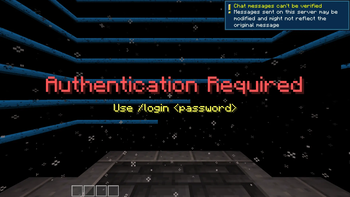
PasswordProtect is a lightweight Minecraft server security plugin that adds an extra layer of protection by requiring players to authenticate with a password before they can interact with the world. It's designed for private servers, development servers, and communities that want stronger access control without relying solely on the standard Minecraft authentication system.

Features

  • 🔒 Player password authentication – Players can register a password and must log in before they can play.
  • 🔑 Password management – Players can set a password on first login and change it whenever needed.
  • 📋 Built-in whitelist support – Easily manage who is allowed to join your server.
  • 🛡️ Administrative controls – Configure password protection, manage the whitelist, and reload the plugin through simple commands.
  • ⚡ Bypass permissions – Allow trusted staff or automated accounts to skip password authentication.
  • 🎮 Designed for modern servers – Built for Bukkit, Spigot, and Paper servers running Minecraft 1.21.1+.

Commands

Command Description
/passwordprotect (/pp, /protect) Main administration command for managing the plugin.
/setpassword <password> Register your password.
/changepassword <current_password> <new_password> Change your existing password.
/login <password> Log in after joining the server.
/whitelist Alternative command for managing the whitelist.

Permissions

Permission Description
passwordprotect.admin Grants access to all administrative commands.
passwordprotect.whitelist Allows management of the plugin's whitelist.
passwordprotect.bypass Allows players to bypass password authentication.

Why use PasswordProtect?

PasswordProtect provides an extra layer of security for servers where controlling player access matters. Whether you're hosting a private SMP, a development or testing server, or a community that wants password-based authentication alongside Minecraft's normal login system, PasswordProtect offers a simple, lightweight solution with integrated whitelist management and permission-based administration.

👥 Team & Contributors

LuigiVortex
LuigiVortexOwner

⚙️ Compatibility

Environment
🖥️ Server-side
Loaders
paperpurpurspigot
Minecraft Versions
1.21.101.21.11

🔗 Links

Modrinth Page