

PluginLicenseRef-All-Rights-Reserved
Overclock ClearLag
🌟Ultimate Server Optimization & Lag Control System🌟,💎Advanced Performance plugin for High-Load Minecraft Servers💎
317
Downloads
3
Followers
2 months ago
Updated
📦
9
Versions
📖About Overclock ClearLag
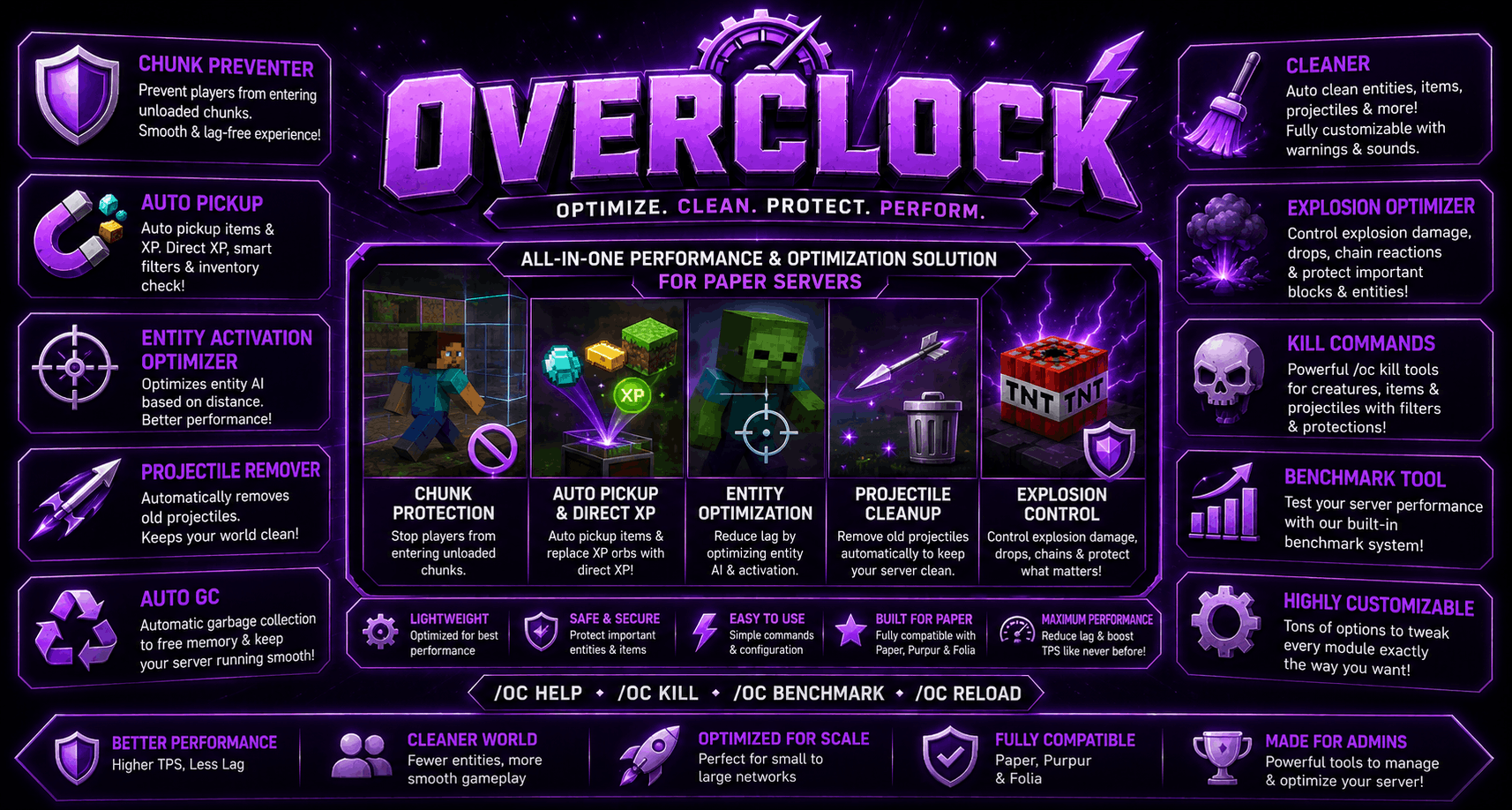
💎Overclock plugin (By GoldwarGlory)
- 💎Helps reduce entity clutter on busy servers.
- 💎Provides quick visibility into server load without external tools.
- 💎Modular design — use only the features you need.
- 💎Designed to be lightweight and safe for production servers.
🤩Features of Overclock
- 🤩Entity Cleaner
- ✅Automatically or manually clears dropped items, projectiles, and selected entity types.
- ✅Protects important entities like: Tamed mobs, Named mobs, Villager and other mob types.
- ✅Supports: Per-world exclusions, Item, mob, and projectile whitelists, Warning messages.
- ✅countdowns before cleanup, Fully configurable cleanup intervals and messages.
- 🤩Live Stats Bar
- ✅Displays real-time server statistics using a BossBar.
- ✅Shows: TPS, MSPT, Loaded chunks, Total entities, Memory usage
- ✅Bar color changes based on current server load to give a quick visual overview.
- 🤩Benchmark Utility
- ✅Provides optional in-game performance tests for: CPU & Memory
- ✅Tests run asynchronously to avoid blocking the main server thread.
- ✅Results are approximate and intended for relative comparison only, not as real hardware benchmarks.
- 🤩Garbage Collection Tool
- ✅Includes a command to request Java garbage collection.
- ✅Useful for testing or observing memory behavior.
- ✅Actual memory management depends on the JVM and cannot be fully controlled by plugins.
🌟Modules of Overclock
- 🌟UnloadedChunksPreventer: Prevents players to moving into unloaded chunks
- 🌟AutoPickup: Reduce ground entities and improve performance while improving QoL.
- 🌟ExplosionOptimizer: Keep explosions fun without killing server performance.
- 🌟CleanerModule: Automatically cleans unnecessary entities and server clutter.
- 🌟AutoGC Module: Automatically runs Force or Soft GC.
- 🌟ProjectileCleaner: Automatically removes grounded projectiles
- 🌟EntityActivationOptimizer: Removes AI of far entities
➡️How to install overclock
- ➡️Download
Overclock.jar - ➡️Place it in the
pluginsfolder - ➡️Restart the server
- ➡️Use
/oc helpto view available commands
💖 Need help? or report bugs
- ❤️Join my Discord server for updates, support, and suggestions
- ❤️My Discord Server: https://discord.gg/qwXHuyJbvX
- ❤️MY Modrinth Profile: https://modrinth.com/user/GoldwarGlory
name: Overclock
main: com.goldwar.overclock.Overclock
version: 1.0.4
api-version: 1.20.1
author: GoldwarGlory
description: Optimize your server
website: https://modrinth.com/plugin/overclock-plugin

commands:
  overclock:
    description: The main command for the plugin.
    usage: /overclock
    permission: overclock.admin
    aliases:
      - oc
      - overc
      - oclock

permissions:
  overclock.admin:
    default: op
Tools:
  prefix: "<gradient:#FFD700:#FFA500>[Overclock]</gradient> " # Prefix used in plugin messages. Supports MiniMessage formatting.
  benchmark-duration: 30 # Duration in seconds used by /overclock benchmark.
  track-updates: true # if false: update checks are skipped by the current join listener; if true: OP update alerts can be sent.

  kill:
    creatures:
      clear-renamed: false # if true: /oc kill creatures can remove renamed creatures; if false: renamed creatures are protected.
      clear-pets: false # if true: /oc kill creatures can remove tamed mobs and pets; if false: tamed mobs are protected.
      dont-clear: # Creature entity type names that /oc kill creatures will never remove.
        - VILLAGER
        - BABY_VILLAGER
        - WANDERING_TRADER
        - IRON_GOLEM
        - SNOWMAN
        - ALLAY
        - BREEZE
        - SNIFFER
        - PILLAGER
        - VINDICATOR
        - RAVAGER
        - WITCH
        - EVOKER
    items:
      clear-renamed: false # if true: /oc kill items can remove renamed dropped items; if false: renamed items are protected.
      dont-clear: # Item material names that /oc kill items will never remove.
        - NETHERITE_INGOT
        - DIAMOND
    projectiles:
      clear-renamed: true # if true: /oc kill projectiles can remove renamed projectiles; if false: renamed projectiles are protected.
      dont-clear: # Projectile entity type names that /oc kill projectiles will never remove.
        - TRIDENT

Modules:
  ChunkPreventer:
    enabled: true # MASTER TOGGLE of this module
    send-msg: true # if true: sends the configured message when unloaded chunk movement is blocked.
    msg: "<prefix><red>This chunk is not loaded yet, please wait</red>" # Message sent when a player is stopped from entering an unloaded chunk. Supports MiniMessage and <prefix>.

  auto-pickup:
    enabled: true # MASTER TOGGLE of this module

    direct-xp:
      directxp-onbreak: true # if true: block break XP is sent directly to the player instead of dropping XP orbs.
      directxp-onkill: true # if true: mob kill XP is sent directly to the killer instead of dropping XP orbs.
      xp-multiplier: 1.0 # Multiplier applied to direct XP before giving it to the player. Example: 2.0 gives double XP.
      ignore-creative-mode: true # if true: direct XP is not given to players in creative mode.

    blocks-break:
      enabled: true # if true: block drops are placed directly into the player's inventory.
      ignore-silk-touch: false # if true: AutoPickup is skipped when the tool has Silk Touch.
      ignore-fortune: false # if true: currently no effect; AutoPickupService does not read this setting.
      ignore-creative-mode: true # if true: block AutoPickup is skipped for players in creative mode.
      invert: false # if true: only blocks in the list use AutoPickup; if false: blocks in the list are skipped.
      list: # Block material names used by the block invert filter. Example: BEACON.
        - BEACON
        - ENDER_CHEST

    mobs-kill:
      enabled: true # if true: mob drops are placed directly into the killer's inventory.
      ignore-creative-mode: true # if true: mob AutoPickup is skipped for players in creative mode.
      invert: false # if true: only mobs in the list use AutoPickup; if false: mobs in the list are skipped.
      list: # Mob entity type names used by the mob invert filter. Example: WARDEN.
        - WARDEN
        - DRAGON

    disabled-directdrops-worlds: # World names where AutoPickup item drops are disabled.
      - example-world-1
      - example-world-2

    disabled-directxp-worlds: # World names where direct XP is disabled.
      - example-world-1
      - example-world-2

    messages:
      inventory-full: "<prefix><red>Your inventory is full!" # Message sent when AutoPickup cannot fit all drops in the player's inventory. Supports MiniMessage and <prefix>.

  EntityActivationOptimizer:
    enabled: true # MASTER TOGGLE of this module
    task-interval-ticks: 40 # How often entity activation checks run. Value is in server ticks.
    activation-range: 32 # Entities inside this range from players stay active; outside it they can be optimized.
    disable-ai: true # if true: far entities have AI disabled; if false: module tracks range but does not change AI.

    excluded-entities: # Entity type names that should never be optimized.
      - VILLAGER
      - ENDER_DRAGON
      - WITHER
      - ARMOR_STAND

    disabled-worlds: # World names where entity activation optimizer will not run.
      - spawn
      - example_world

  ProjectileRemover:
    enabled: true # MASTER TOGGLE of this module
    task-interval-ticks: 40 # How often projectile cleanup runs. Value is in server ticks.
    max-lifetime-ticks: 500 # Maximum age before active projectiles are removed. Value is in ticks.
    max-lifetime-ticks-after-hitting: 200 # Maximum age after a projectile has hit something. Value is in ticks.
    excluded-projectiles: # Projectile entity type names that should never be removed.
      - TRIDENT
      - ENDER_PEARL
    disabled-worlds: # World names where projectile cleanup will not run.
      - example1
      - example2


  auto-gc:
    enabled: true # MASTER TOGGLE of this module
    interval: 10 # Time in minutes between automatic garbage collection runs.
    debug: false # if true: logs how much memory was freed after each AutoGC run.
    force-GC: false # if true: uses force GC with finalization; if false: uses a soft GC request.

  cleaner:
    auto-clean: true # MASTER TOGGLE of this module
    clean-interval: 5 # Time in minutes between automatic cleanups.
    warns-before-cleanup: [300, 150, 30, 15, 5, 4, 3, 2, 1] # Warning times in seconds before cleanup. Values are sorted high to low.

    messages-settings:
      announce-in:
        chat: true # if true: sends cleanup warning and complete messages in chat.
        actionbar: true # if true: sends cleanup warning messages in the actionbar.
        title&subtitle: false # if true: sends cleanup warning and complete messages as title/subtitle.

      warnings:
        enabled: true # if true: sends pre-cleanup warnings at the configured warning times.
        message: "<prefix><yellow>Entity cleanup in <gold><bold>%time%</bold></gold> seconds!</yellow>" # Warning chat/actionbar text. Supports MiniMessage, <prefix>, and %time%.
        title: "<gradient:#00c6ff:#0072ff><bold>CLEANER</bold></gradient>" # Warning title text. Supports MiniMessage and %time%.
        subtitle: "<yellow>Cleaning in <gold><bold>%time%s</bold></gold></yellow>" # Warning subtitle text. Supports MiniMessage and %time%.
        sound: true # if true: plays a warning sound with each cleanup warning.

    clear-complete:
      message: "<prefix><green>Removed <aqua><bold><count></bold></aqua> entities! <gray>Server optimized</gray>" # Message sent after cleanup finishes. Supports MiniMessage, <prefix>, and <count>/%count%.
      title: "<gradient:#00ff87:#60efff><bold>CLEANUP COMPLETE</bold></gradient>" # Title shown after cleanup finishes. Supports MiniMessage and <count>/%count%.
      subtitle: "<gray>Removed <aqua><bold><count></bold></aqua> entities</gray>" # Subtitle shown after cleanup finishes. Supports MiniMessage and <count>/%count%.
      sound: true # if true: plays a level-up sound after cleanup finishes.

    entities:
      dropped-items: true # if true: cleaner removes dropped item entities unless excluded.
      projectiles: true # if true: cleaner removes projectile entities unless excluded.
      mobs: true # if true: cleaner removes non-player living mobs unless excluded or protected.

    skip-named-entities: true # if true: cleaner keeps entities with custom names.
    skip-tamed-mobs: true # if true: cleaner keeps tamed mobs and pets.
    skip-experience-orbs: false # if true: cleaner keeps XP orbs; if false: XP orbs are removed.

    excluded-worlds: # World names where cleaner will not remove entities.
      - creative_world
      - spawn_world

    excluded-dropped-items: # Dropped item material names cleaner should keep.
      - MACE
      - TRIAL_KEY
      - OMINOUS_TRIAL_KEY
      - BREEZE_ROD
      - HEAVY_CORE
      - ELYTRA
      - NETHERITE_INGOT
      - NETHERITE_SCRAP
      - ENCHANTED_GOLDEN_APPLE
      - TOTEM_OF_UNDYING
      - DRAGON_EGG
      - BEACON
      - NETHER_STAR
      - TRIDENT

    excluded-mob: # Mob entity type names cleaner should keep.
      - VILLAGER
      - BABY_VILLAGER
      - WANDERING_TRADER
      - IRON_GOLEM
      - SNOWMAN
      - ALLAY
      - BREEZE
      - SNIFFER
      - PILLAGER
      - VINDICATOR
      - RAVAGER
      - WITCH
      - EVOKER
      - ELDER_GUARDIAN

    excluded-projectiles: # Projectile entity type names cleaner should keep.
      - TRIDENT

  explosion:
    enabled: true # MASTER TOGGLE of this module
    clear-blasts-blocklist-above: -5 # Explosion block damage is cleared above this Y level. Use 320 to disable this Y-limit check.
    clear-blasts-drops: false # if true: blocks broken by explosions will not drop items.

    disabled-worlds: # World names where explosion optimization rules are disabled.
      - example-1
      - example-2

    skip-list: # Block material names protected from explosion block damage.
      - CHEST
      - TRAP_CHEST
      - DRAGON_EGG
      - DRAGON_HEAD

    invert: true # if true: only entities in blast-damage-on take TNT/crystal damage; if false: listed entities are protected.
    blast-damage-on: # Entity type names used by the explosion damage invert filter. Example: PLAYER.
      - PLAYER
      - DRAGON
      - WITHER

    tnt-chain: false # if true: TNT can trigger other TNT; if false: TNT chain explosions are cancelled.
    crystal-chain: false # if true: crystals can trigger other crystals; if false: crystal chain explosions are cancelled.