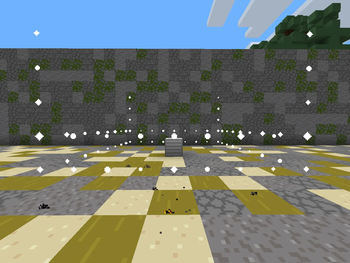
🛡️ OutBlockRegion — Ultimate Region Protection System
The most advanced region protection plugin for Minecraft. Beautiful particle effects, raid alert system, member management, and complete customization for your server's land protection experience.













🛡️ About OutBlockRegion
OutBlockRegion is not just another protection plugin — it's a complete region protection system for your Minecraft server. Unlike standard plugins that simply block interactions, OutBlockRegion delivers a professional experience with beautiful particle effects, raid alert systems, and unparalleled customization options.
Whether you're running a small survival server with friends or a large factions network with hundreds of players, OutBlockRegion adapts to your needs with its flexible configuration system, member management, and comprehensive protection features.
✨ Feature Showcase
🏠 Core Protection Features
| Feature |
Description |
| Region Creation |
Place special blocks to create protected regions with configurable radius |
| Member Management |
Add/remove members to your region with simple commands |
| Block Protection |
Prevent breaking, placing, and interacting with blocks in protected regions |
| Explosion Protection |
Regions are protected from explosions (TNT, creepers, withers) |
| Region List |
View all your regions with coordinates and radius |
| Region Removal |
Break the region block to remove protection |
🚨 Raid Alert System
| Feature |
Description |
| Raid Module |
Special item that can be applied to any region block |
| Block Counter |
Tracks broken blocks within protected regions |
| Raid Alert |
Automatic alert when configurable number of blocks are broken |
| ActionBar Notifications |
Real-time alerts displayed in ActionBar |
| Sound Alerts |
Configurable sounds during raid alerts |
| Duration Settings |
Customizable alert duration (default: 6 seconds) |
👥 Member Management
| Feature |
Description |
| Add Members |
/org add <player> - Add players to your region |
| Remove Members |
/org remove <player> - Remove players from your region |
| Region List |
/org list - View all your regions |
| Owner Protection |
Only region owners can manage members |
💥 Explosion Protection
| Feature |
Description |
| TNT Protection |
TNT explosions don't damage protected blocks |
| Creeper Protection |
Creeper explosions are blocked in regions |
| Wither Protection |
Wither explosions don't affect protected areas |
| Region Block Removal |
Region blocks are removed when destroyed by explosions |
🔊 Audio & Visual
| Feature |
Description |
| Region Creation Effects |
Particle borders and activation sounds when placing region |
| Region Destruction Effects |
Lava and smoke particles when removing regions |
| Module Activation Sound |
Customizable sound when activating raid module |
| Raid Alert Sounds |
Configurable sounds during raid alerts |
| Particle Borders |
Visual region borders with END_ROD particles |
👑 Admin Features
| Feature |
Description |
| Raid Module Give |
/raidmodule - Give raid module items to players |
| Config Reload |
Reload configuration without restart |
| Permission Control |
Full permission system for commands |
| Message Customization |
All messages configurable in config.yml |
📥 Installation Guide
| Step |
Action |
| 1️⃣ |
Download — Get the latest .jar from Modrinth |
| 2️⃣ |
Install — Place the JAR into your server's plugins/ folder |
| 3️⃣ |
Restart — Restart your server (or use /reload if you must) |
| 4️⃣ |
Configure — Edit plugins/OutBlockRegion/config.yml to your liking |
| 5️⃣ |
Enjoy! — Players can now protect their land with regions |
⚠️ Important: A full server restart is strongly recommended over /reload for optimal performance and to avoid any plugin conflicts.
📊 bStats Metrics
OutBlockRegion uses bStats to collect anonymous usage statistics. This helps us improve the plugin based on real usage data.
🎮 Commands & Permissions
👤 Player Commands
| Command |
Description |
Permission |
Default |
/org add <player> |
Add a member to your region |
outblockguard.use |
✅ All players |
/org remove <player> |
Remove a member from your region |
outblockguard.use |
✅ All players |
/org list |
List all your regions |
outblockguard.use |
✅ All players |
/org help |
Show help menu |
outblockguard.use |
✅ All players |
/region |
Alias for main command |
outblockguard.use |
✅ All players |
/rg |
Alias for main command |
outblockguard.use |
✅ All players |
👑 Admin Commands
| Command |
Description |
Permission |
Default |
/raidmodule |
Get raid alert module item |
outblockguard.admin |
❌ Ops only |
/rm |
Alias for raidmodule |
outblockguard.admin |
❌ Ops only |
🔑 Permissions
| Permission |
Description |
Default |
outblockguard.use |
Use basic plugin commands |
✅ All players |
outblockguard.admin |
Admin commands (raidmodule) |
❌ Ops only |
outblockguard.bypass |
Bypass all region restrictions |
❌ Ops only |
⚙️ Configuration Deep Dive
📁 Core Configuration
# OutBlockRegion Config

# Region blocks configuration
blocks:
  gold_block:
    material: GOLD_BLOCK
    radius: 5
    name: "&6&lЗолотой регион"
  diamond_block:
    material: DIAMOND_BLOCK
    radius: 10
    name: "&b&lАлмазный регион"
  emerald_block:
    material: EMERALD_BLOCK
    radius: 15
    name: "&a&lИзумрудный регион"
  netherite_block:
    material: NETHERITE_BLOCK
    radius: 20
    name: "&8&lНезеритовый регион"

# Raid module configuration
raid-module:
  item:
    material: ENDER_EYE
    name: "&5&lМодуль рейд-оповещения"
    lore:
      - "&7Примени на блок привата"
      - "&7Чтобы активировать защиту"
      - ""
      - "&eПКМ + SHIFT по блоку привата"

  activation:
    sound: BLOCK_BEACON_ACTIVATE
    volume: 1.0
    pitch: 1.0
    message: "&a✅ Модуль рейд-оповещения активирован!"

  raid-alert:
    trigger-blocks: 10
    duration-seconds: 6
    sounds-per-second: 2
    sound: ENTITY_ARROW_HIT_PLAYER
    volume: 0.5
    pitch: 1.0
    actionbar-text: "&l&4! &eВАШ ПРИВАТ РЕЙДЯТ &l&4!"

# Messages
messages:
  region-created: "&a✅ Регион &f%region% &aсоздан! Радиус: %radius% блоков"
  region-destroyed: "&c❌ Регион уничтожен!"
  region-overlap: "&c❌ Здесь уже есть регион!"
  cannot-place-block: "&c❌ Вы не можете ставить блоки в этом регионе!"
  cannot-break-region: "&c❌ Вы не можете ломать блок привата!"
  cannot-interact: "&c❌ У вас нет прав на взаимодействие!"
  cannot-place-crystal: "&c❌ Нельзя ставить кристаллы в чужом регионе!"
  region-enter: "&e🏠 Вы вошли в регион игрока &f%owner%"
  region-leave: "&e🚪 Вы покинули регион"
  no-region: "&c❌ Вы не находитесь в регионе!"
  not-owner: "&c❌ Только владелец может управлять регионом!"
  player-not-found: "&c❌ Игрок не найден!"
  member-added: "&a✅ Игрок %player% добавлен в регион!"
  member-removed: "&c❌ Игрок %player% удален из региона!"
  member-already-added: "&e⚠ Игрок уже добавлен в регион!"
  member-not-found: "&c❌ Игрок не является участником региона!"
  no-regions: "&e⚠ У вас нет регионов!"
  region-list-header: "&6=== Ваши регионы ==="
  region-list-format: "&e• &fX: %x% Y: %y% Z: %z% &7(радиус: %radius%)"
  must-be-player: "&c❌ Эта команда только для игроков!"