Logo
MINECRAFTBIBLE
Items
Items

All game items

Blocks
Blocks

Building blocks

Mobs
Mobs

Creatures & monsters

Biomes
Biomes

World biomes

Structures
Structures

Generated structures

Recipes
Recipes

Crafting guides

Advancements
Advancements

Achievements

Loot Tables
Loot Tables

Drop rates

Tags
Tags

Item groupings

All Versions
View all data →
Capes
Cape ArchiveNEW

Browse rare Minecon capes, OptiFine capes, and custom capes from players worldwide

Browse

Player Database
Player DatabasePopular

Search any player

Skin Browser
Skin Browser

Browse & download skins

Cape Gallery
Cape GalleryNEW

Minecon & OptiFine capes

Seed Vault
Seed Vault

Curated seeds

Learn

Guides
GuidesNew

Tutorials & tips

Blog
Blog

News & updates

Community

Community Hub
Community HubHub

Posts, discussions & more

All Versions
View community →
Seed Analyzer
Seed Analyzer

World seed analysis

Loot Explorer
Loot Explorer

Drop rates

Crafting Calculator
Crafting Calculator

Material planning

Enchant Calculator
Enchant Calculator

Probability math

Redstone Lab
Redstone Lab

Signal timing

Trading Profit
Trading Profit

Villager ROI

All Versions
View all tools →
Mods
Mods

Browse all mods

Plugins
Plugins

Server plugins

Resource Packs
Resource Packs

Textures & sounds

Shaders
Shaders

Visual enhancements

Datapacks
Datapacks

World logic

Scanner
Mod Intelligence

Scan & analyze any mod

All Versions
View all mods →
Loading...
IntroductionIntroductionVersion HistoryVersion HistoryGuidesGuidesBlog & NewsBlog & News
ItemsItemsBlocksBlocksMobsMobsRecipesRecipesBiomesBiomesStructuresStructuresAdvancementsAdvancementsLoot TablesLoot TablesTagsTags
ModsModsPluginsPluginsResource PacksResource PacksShadersShadersDatapacksDatapacks

MinecraftBible

The Ultimate Wiki

Logo
MINECRAFTBIBLE

The ultimate Minecraft reference. Every item, block, mob, and recipe documented with precision.

Community

  • Skin Browser
  • Cape Gallery
  • Seed Vault
  • Blog
  • Guides

Database

  • Items
  • Blocks
  • Mobs
  • Recipes
  • Biomes
  • Structures

Tools

  • Seed Analyzer
  • Mod Intelligence
  • Crafting Calculator
  • Enchant Calculator

Mods & Packs

  • Mods
  • Plugins
  • Resource Packs
  • Shaders
  • Datapacks

Site & Legal

  • About
  • Authors
  • Editorial Policy
  • Corrections
  • Contact
  • Privacy Policy
  • Terms of Service
  • DMCA
  • Sitemap

© 2026 MinecraftBible. Not affiliated with Mojang or Microsoft.

PrivacyTermsContact
OreAcle
PluginLicenseRef-All-Rights-Reserved

OreAcle

A lightweight and configurable chat games plugin for Spigot/Paper 1.12.2 servers.

8
Downloads
0
Followers
1 months ago
Updated
📦
1
Versions
minigamesocialutilitybukkitpaperspigot
Download Latestv1.0.0View on Modrinth

📖About OreAcle

OreAcle

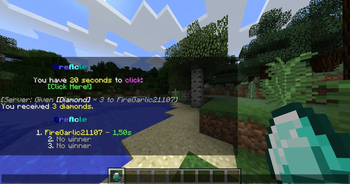
OreAcle is a lightweight and configurable chat-games plugin for Spigot-compatible Minecraft servers.

It automatically starts small chat games in the server chat. Players can answer directly in chat or interact with clickable and hoverable chat components, depending on the game type. Each round can have up to three winners with separate rewards for each placement.

Features

  • Automatic timed chat games
  • Manual start, stop, and reload commands
  • Up to 3 winners per round
  • Per-placement rewards
  • Points, wins, fastest answer, and stats tracking
  • Leaderboards for points, wins, and fastest answers
  • Configurable messages, title, prefix, words, trivia questions, rewards, and timings
  • ClickHere game with hidden random 8-character alphanumeric one-round tokens
  • Hover game using legacy Spigot chat components
  • Lightweight <center> support for configured chat lines
  • Final round summaries

Game Types

OreAcle currently includes the following game types:

  • reaction - type the displayed word
  • unscramble - unscramble the displayed word
  • unreverse - type the original word from a reversed display
  • reverse - reverse the displayed word
  • fillout - complete the word with missing letters
  • random - type a generated random string
  • math - solve a math equation
  • variable - solve for x using configurable symbols
  • trivia - answer a trivia question
  • clickhere - click the chat component
  • hover - hover the chat component and type the shown answer

Compatibility

  • Minecraft: 1.12.2
  • Server software: Spigot / Paper compatible
  • Java: Java 8
  • Client-side install required: No

OreAcle intentionally avoids modern Minecraft APIs and Paper-only APIs, making it suitable for legacy Spigot-compatible servers.

Commands

Main command:

/chatgames

Alias:

/cg
Command Description
/chatgames help Shows command help
/chatgames start <type> Starts a specific game
/chatgames stop Stops the active game
/chatgames reload Reloads config and data files. If a game is currently active, it is silently ended.
/chatgames reset <player> Resets a player's OreAcle stats
/chatgames top Shows the points leaderboard
/chatgames wins Shows the wins leaderboard
/chatgames fastest Shows the fastest answers leaderboard
/chatgames stats [player] Shows stats for yourself or another player

Permissions

Permission Default Description
chatgames.admin OP Start, stop, reload, and reset
chatgames.top Everyone View the points leaderboard
chatgames.wins Everyone View the wins leaderboard
chatgames.fastest Everyone View the fastest answers leaderboard
chatgames.stats Everyone View player stats
chatgames.play Everyone Participate when play permission is required

Configuration

OreAcle generates multiple configuration files:

File Purpose
config.yml Main settings, timings, enabled games, and game options
messages.yml Chat formatting and user-facing messages
words.yml Word pools for word-based games
trivia.yml Trivia questions and accepted answers
rewards.yml Placement reward actions
data.yml Stored player stats and count of rounds with at least one winner

By default, OreAcle starts one automatic game every 30 minutes and each round lasts 20 seconds.

auto-start-enabled: true
auto-start-interval-seconds: 1800
round-duration-seconds: 20

Rewards

Rewards are configured per placement in rewards.yml.

Supported reward actions include:

[console] eco give %player% 150
[player] say hello
[message] &fYou received &e150 coins&f.
[broadcast] &e%player% won a ChatGame!

Common placeholders:

%player%
%uuid%
%place%
%time%
%time_ms%
%answer%
%points%
%prefix%
%title%
%word%
%question%
%equation%
%puzzle%

Message Formatting

OreAcle uses classic Minecraft color codes with &.

The default title is:

chatgames-title: "&1&lO&9&lre&b&lAc&3&lle"

The normal prefix is:

prefix: "&8[&1&lO&9&lre&b&lAc&3&lle&8]"

Both the title and prefix are configurable.

Configured game messages can optionally use <center> for lightweight chat centering.

Installation

  1. Download the plugin jar.
  2. Place it into your server's plugins/ folder.
  3. Start or restart the server.
  4. Edit the generated files in plugins/OreAcle/.
  5. Run /chatgames reload after changing the configuration.

Notes

  • ClickHere tokens are random 8-character alphanumeric internal one-round tokens.
  • Old ClickHere buttons stop working once the active round changes or ends.
  • ClickHere does not reveal its internal token as an answer.
  • Duplicate winners are silent by default.
  • Individual winner broadcasts are disabled by default.
  • Final results are shown in the main round summary.
  • Existing server configs are not overwritten automatically when new options are added.

👥 Team & Contributors

FireGarlic21107
FireGarlic21107Owner

⚙️ Compatibility

Environment
🖥️ Server-side
Loaders
bukkitpaperspigot
Minecraft Versions
1.12.2

🔗 Links

Modrinth Page