

OrdersPro
The Professional Buy Order & Contract System for Minecraft Servers
📖About OrdersPro
📦 OrdersPro
The Professional Buy Order & Contract System for Minecraft Servers
Not an auction house. Not a shop. A job board.
Players post what they need, workers get paid to deliver it.
OrdersPro is a fully-featured reverse marketplace plugin. Buyers post Buy Orders — "I need 5,000 Diamonds at $10 each" — and workers browse the market, accept contracts, and earn money by fulfilling them. Every transaction is backed by escrow, trust scoring, and financial penalties to keep both sides accountable.
Built from the ground up for performance, reliability, and a polished player experience.
🎯 How It Works
| Role | What They Do |
|---|---|
| Buyer | Posts a buy order with item, quantity, price per unit, and funds escrowed upfront |
| Worker | Browses the market, accepts a contract, delivers items in sessions to earn payout |
Unlike auction houses where sellers list items, OrdersPro flips the model — buyers drive demand, workers fulfill it. Perfect for large economies where players need bulk materials and don't want to farm them themselves.
✨ Features
🏪 Market Board
- Scrollable, paginated market showing all open buy orders
- Sort by Highest Price/Unit or Newest First with a single click
- Each order card shows buyer, quantity needed, unit price, total value, and time remaining
- Collection bin glows when you have items ready to pick up
📝 Order Creation
- Hybrid creation flow — hold an item to skip the material picker entirely
- Scrollable material picker GUI with live chat search filter for empty-hand creation
- Chat-based quantity and price input with full validation (min/max bounds from config)
- Confirmation GUI with full cost breakdown — escrow, tax, total charge, and live balance check
- Price warning system — if your price is 300%+ above market average, the confirm button turns red and requires a second click
🤝 Private Orders
/order create @PlayerNamesends a directed contract to a specific player- Target sees it in their dashboard and can accept or decline
- Same financial rules as public orders — full escrow, tax, penalties
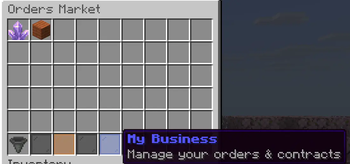
📊 My Business Dashboard
- View all your posted orders with live progress bars, worker name, and time remaining
- Nudge your worker if they've gone inactive
- Cancel orders with proper penalty enforcement — blocked if worker is past 50% delivery
- View and manage your active worker contract
- Accept or decline incoming private orders
📬 Delivery System
- Workers open a Delivery GUI with +/− quantity selectors
- Minimum deposit per session = 10% of total order (configurable)
- Live inventory preview shows exactly which item stacks will be consumed
- Auto-completes the order and pays out instantly when fully delivered
🗃️ Collection Bin
- Items from completed orders go to a safe collection bin — never dropped on the ground
- Collect All button moves everything to your inventory atomically
- Overflow drops safely at your feet — nothing is ever lost
📜 Order History
- Last 20 completed, cancelled, or expired orders per player
- Shows role (Buyer/Worker), counterparty, outcome, amount earned/spent, and date
- Fully read-only — an immutable ledger
⚖️ Financial System
| Event | Result |
|---|---|
| Post order | Escrow + posting tax locked upfront |
| Cancel (no worker) | Full escrow returned, tax lost |
| Cancel (worker < 50%) | Worker paid pro-rata × 1.5x bonus from escrow |
| Cancel (worker > 50%) | ❌ Blocked — cannot cancel |
| Order completed | Full escrow paid to worker |
| Worker abandons | 10% fine from worker → buyer, trust strike added |
| Order expires (no worker) | Full escrow returned to buyer |
| Order expires (worker failed) | Fine from worker → buyer, partial pay for delivered items |
🛡️ Trust System
- Workers accumulate strikes for abandoning or failing contracts
- Configurable max strikes before cooldown kicks in
- Configurable cooldown duration
- Strike decay — old strikes are ignored after a configurable number of days
- Players on cooldown see remaining time in their dashboard
🔄 Admin Tools
/order reload— reloads config.yml and refreshes the in-memory order cache from the database- All financial constants fully configurable — no hardcoded values
- SQLite storage with WAL mode for performance and crash safety
- Startup/shutdown logging with full order persistence on server stop
🎮 Commands
| Command | Description | Permission |
|---|---|---|
/order |
Open the market board | orderspro.use |
/order create |
Post a new buy order | orderspro.use |
/order create @<player> |
Send a private order to a player | orderspro.use |
/order dashboard |
Open My Business (your orders & contracts) | orderspro.use |
/order history |
View your last 20 orders | orderspro.use |
/order reload |
Reload config and order cache | orderspro.admin |
Aliases: /orders, /market, /contract, /contracts
🔐 Permissions
| Permission | Default | Description |
|---|---|---|
orderspro.use |
Everyone | Access the market, dashboard, history |
orderspro.create |
Everyone | Post buy orders |
orderspro.work |
Everyone | Accept and fulfill contracts |
orderspro.private |
Everyone | Send and receive private orders |
orderspro.admin |
OP | All admin features (inherits all above) |
orderspro.admin.reload |
OP | Run /order reload |
orderspro.admin.inspect |
OP | Inspect any player's orders (future) |
⚙️ Configuration
settings:
  currency-symbol: "$"
  expiration-check-interval-seconds: 30  # How often expired orders are processed

orders:
  duration-hours: 48          # How long orders stay on the market
  max-active-orders: 5        # Max orders a buyer can have posted at once
  min-quantity: 1
  max-quantity: 100000
  min-price-per-unit: 0.01
  max-price-per-unit: 1000000.0
  price-warning-multiplier: 3.0  # Warn if price is 300%+ above market average

economy:
  tax-rate: 0.05              # 5% posting tax (non-refundable)
  min-deposit-fraction: 0.10  # Worker must deposit at least 10% per session

  failure:
    fine-percentage: 0.10     # Worker fined 10% of order value on expiry
    payout-modifier: 0.50     # Worker gets 50% of delivered value on failure

  cancellation:
    worker-payout-modifier: 1.50      # Worker gets 150% of pro-rata on buyer cancel
    cancellation-block-threshold: 0.50 # Buyer can't cancel after 50% delivered

trust:
  max-strikes-before-cooldown: 3
  cooldown-duration-hours: 24
  strike-decay-days: 30       # Strikes older than 30 days are ignored

timer:
  inactivity-nudge-threshold-hours: 1  # Hours before buyer can nudge worker
  nudge-cooldown-minutes: 30           # Cooldown between nudges
📦 Requirements
- Minecraft: 1.21+
- Server: Paper, Spigot, or Purpur
- Dependencies: Vault + any economy plugin (EssentialsX, CMI, etc.)
- Storage: SQLite (built-in, no setup required)
🗺️ Roadmap
- Admin inspect command — view any player's orders and trust score
- Price negotiation system
- Order watchlist — get notified when new orders for your favourite materials are posted
- PlaceholderAPI support
- Multi-language support
Donate (optional)
If you enjoy my work and want to support development:
Donate via PayPal 💖
💬 Official Support & Community
Need help with this plugin?
Join the official Marbzy Discord server for:
- 🛠 Direct plugin support (ticket system)
- 🐛 Bug reports
- 💡 Feature suggestions
- 🧪 Beta testing access
- 📢 Update announcements
Developed by Marbzy