
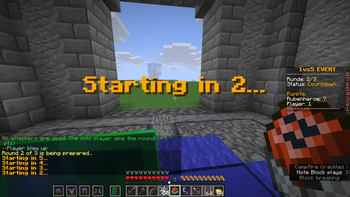

One vs Team
A Minecraft 1.21 PvP plugin where a solo player fights a team of attackers over multiple rounds, featuring kits, points, spectators, and multi-language support.
📖About One vs Team
1vs5 — Minecraft Plugin
A PvP event plugin for Minecraft 1.21 (Paper/Spigot) in which one solo player fights against a team of attackers across multiple rounds. Includes a point system, kit management, spectator support, and a multi-language system.
Requirements
- Paper / Spigot 1.21
- Two worlds on the server:
lobbyandfightworld_backup(the backup is copied automatically before each round)
Installation
- Drop the
.jarinto yourplugins/folder. - Start the server once — the plugin creates its config files automatically.
- Set up your worlds (see below).
- Configure
config.ymlto your liking.
World Setup
| World | Purpose |
|---|---|
lobby |
Waiting area — PvP, block breaking and placing are disabled here |
fightworld_backup |
The original arena — copied before every round, never modified directly |
fightworld |
Generated automatically from the backup before each round |
The coordinates for solo and attacker spawns are configured in config.yml.
Configuration (config.yml)
language: "en"          # Language: "en", "de", or any custom language file

# Lobby Settings
lobby:
  world: "lobby"
  spawn:
    x: 0.5
    y: 3.0
    z: 0.5
    yaw: 0.0
    pitch: 0.0

# Fightworld Settings
fightworld:
  world: "fightworld"
  solo_spawn:
    x: 20667.5
    y: 148.0
    z: 15615.5
  attackers_spawn:
    x: 20803.5
    y: 148.0
    z: 15615.5

game:
  default_rounds: 3         # Number of rounds per match
  countdown_seconds: 5      # Countdown before each round starts
  post_round_delay_seconds: 5  # Pause between rounds
Commands
All admin commands require operator permissions (/op).
Admin — /1vs5 <subcommand>
| Subcommand | Description |
|---|---|
setsolo <player> |
Set the solo player |
addattacker <player> |
Add a player to the attacker team |
removeattacker <player> |
Remove a player from the attacker team |
rounds <number> |
Set the number of rounds |
| `savekit [true | false]` |
setkit <name> |
Select a kit for the next match |
deletekit <name> |
Delete a saved kit |
toggledrops |
Toggle whether players drop items on death |
start |
Start the match |
stop |
Abort the running match |
points |
Show the current leaderboard in chat |
resetleaderboard |
Reset all points |
history |
Show past match results |
reload |
Reload config.yml and the language file |
Players — /spectatefight
Teleports you to the fight world in spectator mode. Cannot be used by active participants.
Point System
| Event | Points |
|---|---|
| Attacker kills the solo player | +10 pts (killer only) |
| Attacker survives the round | +5 pts (all surviving attackers except the killer) |
| Solo player kills an attacker | +1 pt per kill |
| Solo player wins the round (all attackers eliminated) | +7 pts |
| Attacker dies | Points equal to the number of attackers already eliminated before them |
Kit System
Kits save the inventory (items, armor, offhand) of the player who runs savekit. After the name of the kit you can optionally specify true or false to enable or disable natural health regeneration. By default it is enabled.
Kits are stored in plugins/1vs5/kits/<name>.yml.
Language System
The plugin supports multiple languages. The active language is set via language: in config.yml.
Language files are located in plugins/1vs5/languages/. The bundled languages are en.yml and de.yml.
Adding a new language:
- Create a new file, e.g.
plugins/1vs5/languages/fr.yml. - Copy the contents of
en.ymlinto it and translate all values. - Set
language: "fr"inconfig.yml. - Run
/1vs5 reloador restart the server.
No code changes are needed to add new languages.
Friendly Fire Rules
- Melee attacks, projectiles, and explosions between attackers are cancelled.
- The solo player can damage and be damaged by all attackers.
- Friendly fire in the lobby is always disabled for all players.
Combat Logging
If a participant disconnects during an active round, they are marked as a combat logger. Their inventory is cleared and the round continues as if they had died. When they reconnect, they receive a warning message.
Data & Files
| File | Contents |
|---|---|
plugins/1vs5/config.yml |
Main configuration |
plugins/1vs5/kits/ |
Saved kit files |
plugins/1vs5/history.yml |
Match history with timestamps and results |
plugins/1vs5/languages/ |
Language files |