


OgiPlayerStats
All-rounder gui for displaying user statistics
📖About OgiPlayerStats

OgiPlayerStats
A modern, powerful, and 100% free player statistics GUI for Minecraft servers.
Built with performance and versatility in mind.


📖 Table of Contents
- A Note From The Developer
- About the Plugin
- ✨ Key Features
- 🚀 Installation
- ⚙️ Configuration
- 📝 Commands & Permissions
- 🧩 PlaceholderAPI Integration
- 🤝 Contributing
- 🐛 Bug Reports
💬 A Note From The Developer
I was tired of seeing essential, high-quality server plugins locked behind a paywall. I believe powerful tools should be accessible to everyone in the Minecraft community. That's why I created OgiPlayerStats—to provide a premium, feature-rich experience for free. I hope you enjoy it!
🌟 About the Plugin
OgiPlayerStats provides a beautiful and intuitive in-game menu to display player statistics. Unlike other stat plugins, it's built from the ground up to be 100% configurable via a simple config.yml file. You can display anything from vanilla Minecraft stats (PLAYER_KILLS, DIAMONDS_MINED) to custom data from other plugins like Vault or EssentialsX using the powerful PlaceholderAPI integration.
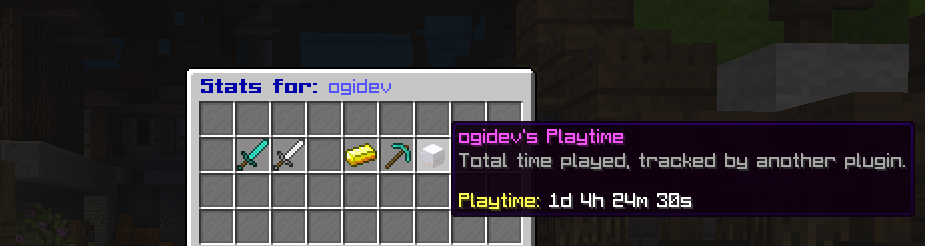
An example of the default stats GUI.
✨ Key Features
- Completely Free & Open Source: No premium versions, no hidden costs. All features are available to everyone.
- Fully Configurable GUI: Control the title, size, items, names, lore, and slot for every stat.
- Extensive Stat Support: Track any vanilla statistic, including those with subtypes (Blocks, Entities).
- Powerful PlaceholderAPI Integration:
- Import: Display placeholders from any other PAPI-enabled plugin.
- Export: Creates dynamic placeholders for every stat you configure (e.g.,
%ogiplayerstats_player_kills%).
- Dynamic Item Skins: Use
PLAYER_HEADmaterial with askull-ownerto display player-specific skins. - Optimized Performance: Lightweight and designed to ensure minimal server impact.
- Universal Compatibility: A single JAR file supports all server versions from 1.16.5 to 1.21+.
🚀 Installation
- Download the latest release from the Releases Page, SpigotMC, or Modrinth.
- Place the
OgiPlayerStats-X.X.X.jarfile into your server's/pluginsdirectory. - (Optional but Recommended) Install PlaceholderAPI to unlock the full potential of the plugin.
- Restart your server. The default configuration file will be generated at
/plugins/OgiPlayerStats/config.yml.
⚙️ Configuration
All configuration is handled in the config.yml file. You can add, remove, or modify any stat in the displayed-stats list.
🚀 Installation
- Download the latest release from the Releases Page, SpigotMC, or Modrinth.
- Place the
OgiPlayerStats-X.X.X.jarfile into your server's/pluginsdirectory. - (Optional but Recommended) Install PlaceholderAPI to unlock the full potential of the plugin.
- Restart your server. The default configuration file will be generated at
/plugins/OgiPlayerStats/config.yml.
⚙️ Configuration
All configuration is handled in the config.yml file. You can add, remove, or modify any stat in the displayed-stats list.
Adding a Built-in Stat
To display a statistic native to Minecraft, use the statistic key. For stats that need a subtype (like breaking a specific block), also include type and sub-type.
- slot: 14
  material: "DIAMOND_PICKAXE"
  name: "&bDiamonds Mined"
  lore:
    - "&7Diamond ore blocks broken."
    - ""
    - "&aValue: &f{value}"
  statistic: "MINE_BLOCK"
  type: "BLOCK"
  sub-type: "DIAMOND_ORE"
Adding a PlaceholderAPI Stat
To display a value from another plugin, simply use the placeholder key instead of statistic. The {value} in the lore will be replaced by the placeholder's output.
- slot: 13
  material: "GOLD_INGOT"
  name: "&ePlayer Balance"
  lore:
    - "&7Your current balance."
    - ""
    - "&aValue: &f{value}"
  placeholder: "%vault_eco_balance_formatted%"
To display a statistic native to Minecraft, use the statistic key. For stats that need a subtype (like breaking a specific block), also include type and sub-type.
For a full list of available statistics and material names, please refer to the Spigot Javadocs.
📝 Commands & Permissions
| Command | Permission | Description |
|---|---|---|
/stats [player] |
ogiplayerstats.view / ogiplayerstats.view.others |
View your own or another player's statistics. |
/stats reload |
ogiplayerstats.reload |
Reloads the plugin's configuration file. |
🧩 PlaceholderAPI Integration
OgiPlayerStats automatically generates its own placeholders based on the name field of each stat in your configuration. The name is converted to lowercase, stripped of color codes, and spaces are replaced with underscores.
Example:
A stat with name: "&bPlayer Kills" becomes %ogiplayerstats_player_kills%.
A stat with name: "&ePlayer Balance" becomes %ogiplayerstats_player_balance%.
You can use these placeholders in any plugin that supports PlaceholderAPI, such as scoreboards, chat formatters, or holograms.
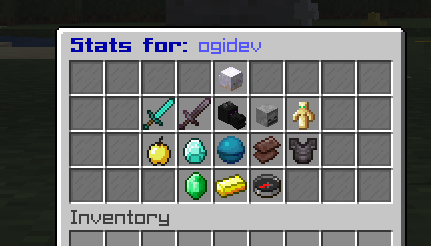
Example Config for GUI
displayed-stats:
  # --- Player Info (Top Center) ---
  - slot: 4
    material: "PLAYER_HEAD"
    skull-owner: "{player}"
    name: "&b{player}'s Stats"
    lore:
      - "&7An overview of player's journey."
      - ""
      - "&ePlaytime: &f%statistic_time_played%"
      - "&eJoin Date: &f%player_first_join_date%"

  # --- Core PvP Stats (Row 2) ---
  - slot: 11
    material: "DIAMOND_SWORD"
    name: "&aPlayer Kills"
    lore:
      - "&7Foes vanquished in battle."
      - ""
      - "&eValue: &f{value}"
    statistic: "PLAYER_KILLS"

  - slot: 12
    material: "NETHERITE_SWORD"
    name: "&cDeaths by Player"
    lore:
      - "&7Times player was bested by another."
      - ""
      - "&eValue: &f{value}"
    statistic: "ENTITY_KILLED_BY"
    type: "ENTITY_TYPE"
    sub-type: "PLAYER"

  - slot: 13
    material: "DRAGON_HEAD"
    name: "&5Ender Dragon Kills"
    lore:
      - "&7How many times player've conquered"
      - "&7the Ender Dragon."
      - ""
      - "&eKills: &f{value}"
    statistic: "KILL_ENTITY"
    type: "ENTITY_TYPE"
    sub-type: "ENDER_DRAGON"

  - slot: 14
    material: "SKELETON_SKULL"
    name: "&cTotal Deaths"
    lore:
      - "&7Every time player've met end."
      - ""
      - "&eValue: &f{value}"
    statistic: "DEATHS"

  - slot: 15
    material: "TOTEM_OF_UNDYING"
    name: "&eTotems Popped"
    lore:
      - "&7How many times player've defied death."
      - ""
      - "&eValue: &f{value}"
    statistic: "USE_ITEM"
    type: "ITEM"
    sub-type: "TOTEM_OF_UNDYING"

  # --- Lifesteal & Resources (Row 3) ---
  - slot: 20
    material: "GOLDEN_APPLE"
    name: "&6Golden Apples Eaten"
    lore:
      - "&7The fruit of PvP champions."
      - ""
      - "&eValue: &f{value}"
    statistic: "USE_ITEM"
    type: "ITEM"
    sub-type: "GOLDEN_APPLE"

  - slot: 21
    material: "DIAMOND"
    name: "&bDiamonds Mined"
    lore:
      - "&7The foundation of wealth and power."
      - ""
      - "&eValue: &f{value}"
    statistic: "MINE_BLOCK"
    type: "BLOCK"
    sub-type: "DIAMOND_ORE"

  - slot: 22 # Centerpiece Lifesteal Stat
    material: "HEART_OF_THE_SEA"
    name: "&c❤ Lifesteal Hearts"
    lore:
      - "&7Current maximum health."
      - ""
      - "&eHearts: &f{value}"
    placeholder: "%lifestealz_hearts%"

  - slot: 23
    material: "NETHERITE_SCRAP"
    name: "&8Ancient Debris Mined"
    lore:
      - "&7Forging the strongest armor."
      - ""
      - "&eValue: &f{value}"
    statistic: "MINE_BLOCK"
    type: "BLOCK"
    sub-type: "ANCIENT_DEBRIS"

  - slot: 24
    material: "NETHERITE_CHESTPLATE"
    name: "&6Mob Kills"
    lore:
      - "&7Creatures slain for loot and XP."
      - ""
      - "&eValue: &f{value}"
    statistic: "MOB_KILLS"

  # --- Economy & Server Info (Bottom Row) ---
  - slot: 30
    material: "EMERALD"
    name: "&aRevived"
    lore:
      - "&7How many times was a player revived"
      - ""
      - "&eValue: &f{value}"
    placeholder: "%lifestealz_revived%"

  - slot: 31 # Bottom Centerpiece
    material: "GOLD_INGOT"
    name: "&ePlayer Balance"
    lore:
      - "&7Current wealth."
      - ""
      - "&eBalance: &f{value}"
    placeholder: "%vault_eco_balance_formatted%"

  - slot: 32
    material: "COMPASS"
    name: "&bOnline Status"
    lore:
      - "&7Is currently online?"
      - ""
      - "&eStatus: &f{value}"
    placeholder: "%player_online%"
🤝 Contributing
Contributions are welcome! If you'd like to contribute to the project, please follow these steps:
- Fork the repository.
- Create a new branch (
git checkout -b feature/YourAmazingFeature). - Make your changes.
- Commit your changes (
git commit -m 'Add some amazing feature'). - Push to the branch (
git push origin feature/YourAmazingFeature). - Open a new Pull Request.
🐛 Bug Reports
If you find a bug, please open an issue on the GitHub Issues page.
Please include the following information in your report:
- Server version (e.g., Paper 1.21.5)
- Plugin version
- A detailed description of the bug
- Steps to reproduce the bug
- Any relevant errors from your console log
Developed by Ogi.