

NormalShops
Item Based Trading / Shops. Best for item based economies!
📖About NormalShops
NormalShops — Player & admin guide
Thanks to https://github.com/Clickism/ClickShop - Clickism
In-world shop (storefront)
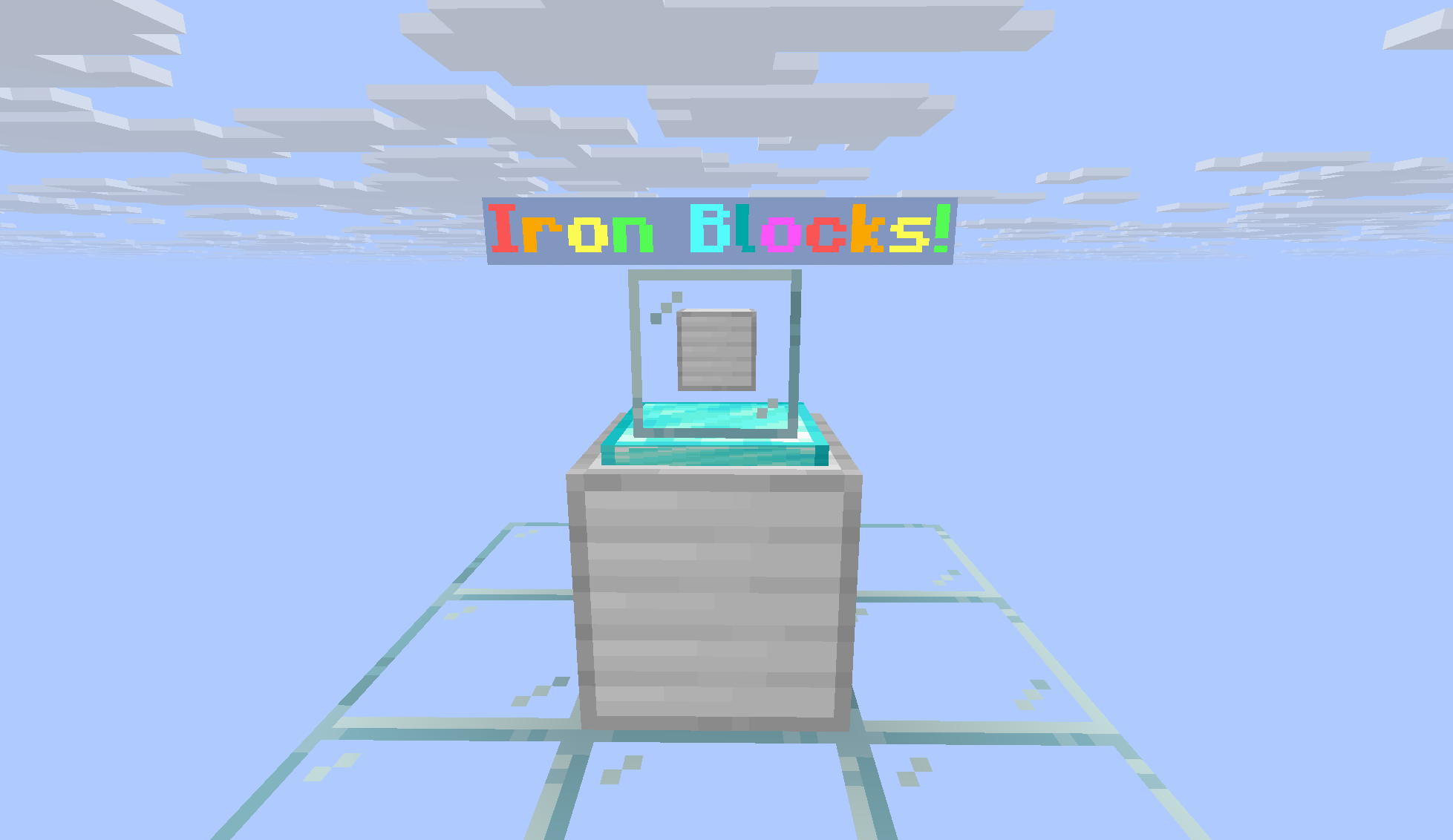
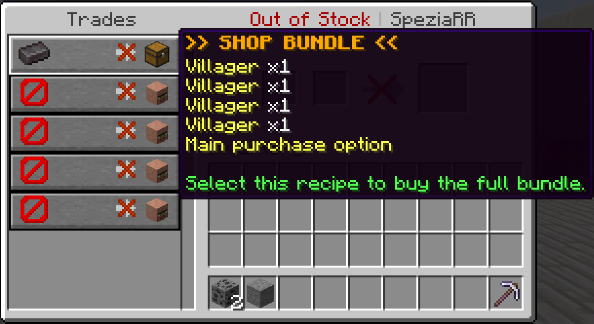
Villager Menus used as trading
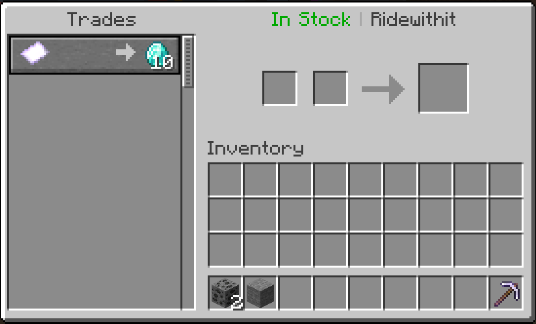
Custom display: item showcase, glass/base blocks, and optional sale-style floating text.
/shops — public shop browser

Paginated list of in-stock shops; click entries to teleport (when enabled).
GUI overview (main menus)

Create/change listing, owner panel, access chooser, buy flow, stock, settings, and more.
Admin / delete hub (shift + right-click)

Force edit, force change owner, delete, history, emulate sale — sensitive actions require op in addition to normalshops.delete.
Creating a shop (walkthrough)
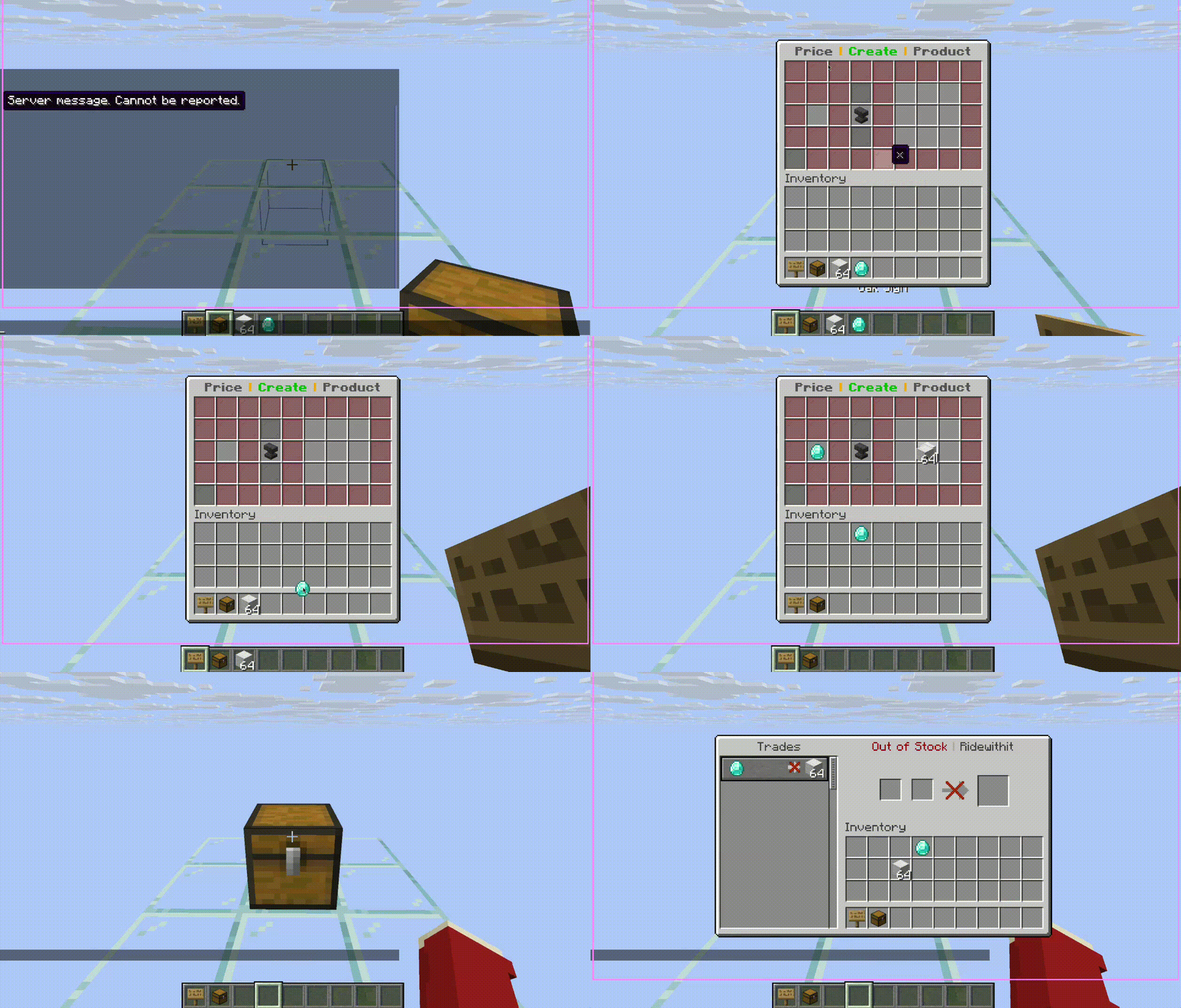
GIF: interact with an empty chest/barrel with a sign, set price and products, and open for business. (Exact flow matches your server’s messages and GUI version.)
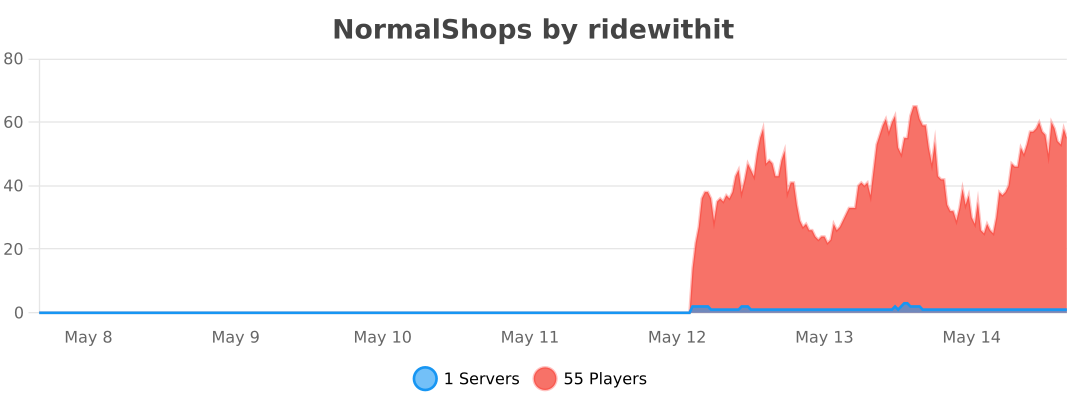
Metrics
Why NormalShops?
NormalShops turns chests and barrels into fully interactive player shops without forcing players through obscure commands. Owners get a polished editor, buyers get a clear purchase flow (classic GUI or villager-style trading), and staff get real tools — history, emulation, ownership transfer — backed by optional CoreProtect integration.
Whether you run a survival economy or a mini-game hub, NormalShops is built to feel native to Minecraft: signs, chests, sounds, and inventories players already understand.
Feature overview
Core shop experience
|
Owner & team tools
|
Detailed feature guide
Creating & editing shops- Hold any sign and right-click an empty chest or barrel (not sneaking, not a double chest) to open the creation GUI.
- Place your price (what buyers pay) and products (what they receive) in the designated areas.
- Click Create Shop to finalize.
Editor controls (create / change product menus):
- Left-click with an item to place it in a slot.
- Right-click with an empty hand to halve the amount in a slot.
- Right-click with the same item as the slot to increase the amount by one.
After creation, right-click your shop block as the owner (or trusted player) to open the access menu: choose Open Editor for management or Open Trade for the buyer-facing experience.
Buying — GUI mode vs villager modevillager-trading-menu: true(default): Buyers interact through a merchant window. Multi-product bundles appear as a highlighted chest recipe (contents stored in block state meta) with preview-only rows using a barrier as the fake “price” so the real product stays obvious.false: Buyers use the classic BuyMenu chest GUI instead.
Out of stock: Buyers can still open the trade view for transparency. The title reflects stock state (e.g. in stock vs out of stock). For non-admin shops, fulfilling trades is blocked when there is nothing to deliver — no ghost purchases.
Impressions: Opening buy/trade flows can increment lifetime impressions for conversion analytics.
Stock management (paged stock chest)- Internal stock is stored as a logical list with pagination (45 item slots per page + prev/next/info/back to editor).
- One player at a time may view a shop’s stock GUI to reduce exploit surface.
- Opening stock is blocked while another player has an active villager trade session on that shop (and vice versa).
- Revision counters detect external changes (e.g. a sale while editing) and refresh or invalidate stale views.
- Stockpile-backed removal still integrates with Transaction logic.
- Collect opens a dedicated earnings inventory instead of dumping everything into the player’s inventory at once.
- Owners take partial withdrawals; bundles can stack in the GUI for readability.
- The top (earnings) inventory is withdraw-only — players cannot deposit or shift-click into earnings slots; their own inventory remains freely movable.
- Same single-viewer and revision philosophy as stock.
- Stockpiles: Connect additional chests to supply sold items. Optional
protect-stockpileskeeps foreign players from opening linked chests (bypass:normalshops.bypass-stockpile). - Earnings piles: Central ender chest “banks” that aggregate payouts from multiple shops (subject to limits in
config.yml). - Tethers: Optional particle / rope visualization while linking (
visualize-tethers). - Double chests: Pile locations are canonicalized so left/right halves resolve to one logical pile.
- Menu colors, custom shop names (length-limited), sale text on displays.
- Frame & glass displays with lights, layering, and “move to top” style controls.
- Per-shop notifications and low-stock warnings in settings.
- Unlimited stock mode exists for special cases (gated behind
normalshops.unlimited-stock— intentionally dangerous on economy servers).
Shift + right-click a shop with normalshops.delete to open the admin / delete hub — including on your own shops.
Important: Force edit, force change owner, deleting someone else’s shop, history, and emulate sale require normalshops.delete and server operator (isOp()). Without op, those actions are denied and logged.
| Admin control | What it does |
|---|---|
| Delete shop | Remove the listing (with optional operator earnings collection via operator-delete-shop-collect). |
| Force edit | Open the full owner editor as staff to adjust price, stock, display, etc. |
| Force change owner | Prompts for a username in chat; transfers ownership safely via ShopManager. |
| Shop history | Paginated persistent per-shop log (buys, edits, connects, emulated sales, villager buys, …). Falls back to CoreProtect block lookup when needed. |
| Emulate sale | Runs a synthetic transaction (stock + earnings + stats + logging) for testing or moderation — tagged distinctly in logs (NormalShops-EmulatedSale). |
CoreProtect (optional): If CoreProtect is present and its API is enabled, NormalShops records interaction-style logs for creates, deletes, buys (GUI & villager), stockpile changes, earnings collection, connects/disconnects, and more — while also appending structured lines to in-plugin history for the GUI.
Safety & anti-dupe design- Editor session lock: Only one management session “owns” deep edits at a time; submenus respect the same lock messaging.
- Management access checks on open and click: if a trusted player is removed while online, GUIs stop accepting actions and can close safely.
- Stock / earnings revisions + exclusive viewers reduce race windows between GUIs, merchants, and async saves.
- Fulfillment checks on villager trades ensure stock is actually removed before counting revenue or sales.
Installation
- Server: Paper or Spigot 1.20.x (API
1.20as declared inplugin.yml). - Java: 17.
- Drop
NormalShops-*.jarintoplugins/. - Optional: Install CoreProtect for external block history and richer audit trails.
- Restart once, then tune
plugins/NormalShops/config.yml,gui.yml, and language files underplugins/NormalShops/messages/.
Quick start
| Step | Action |
|---|---|
| 1 | Get a sign and right-click an empty chest or barrel (not sneaking). |
| 2 | Set price and products in the GUI, then Create Shop. |
| 3 | Right-click the shop block to manage or preview the buyer view. |
| 4 | Use Stock chest in the editor to add paged internal stock. |
| 5 | Use Collect to open the earnings chest and withdraw profits. |
| 6 | Link stockpiles / earnings piles from the editor when you outgrow a single block. |
Permissions
All nodes are prefixed with normalshops..
| Permission | Default | Purpose |
|---|---|---|
normalshops.create |
true |
Create new shops |
normalshops.buy |
true |
Purchase from shops |
normalshops.customize |
true |
Open customization flows |
normalshops.display |
true |
Build advanced displays (needs customize) |
normalshops.sale-text |
true |
Edit floating sale text (needs customize) |
normalshops.stockpile |
true |
Connect stockpiles |
normalshops.earnings-pile |
true |
Connect earnings piles |
normalshops.delete |
op |
Shift-sneak admin hub; dangerous actions also need op |
normalshops.bypass-stockpile |
op |
Open protected foreign stockpiles |
normalshops.unlimited-stock |
op |
Toggle dangerous unlimited stock |
normalshops.reload |
op |
/normalshops reload |
normalshops.version |
true |
/normalshops version (Modrinth compare) |
normalshops.viewshops |
true |
/viewshops, /normalshops view |
normalshops.shops |
true |
/shops browser + teleports |
normalshops.region |
op |
/normalshops region …, /setpoint |
normalshops.restore |
op |
/normalshops restore |
normalshops.stats-holograms |
op |
/normalshops stats-holograms … |
normalshops.update-notify |
op |
Chat when a newer release is on Modrinth |
normalshops.coreprotect-test |
op |
Developer API self-test |
normalshops.coreprotect-debug |
op |
Verbose CoreProtect diagnostics |
Commands
| Command | Description |
|---|---|
/normalshops / /nshops |
Root: view, reload, version, delete, restore, stats-holograms, region |
/normalshops reload |
Reload config.yml, gui.yml, and messages |
/normalshops version |
Jar version + Modrinth update status |
/normalshops delete |
Look at a shop (≤12 blocks); removes it (permission + staff workflow) |
/normalshops restore |
Restore from shop-backups.yml onto targeted chest/barrel |
/normalshops stats-holograms |
list | cleanup private stats displays |
/normalshops region |
make | cancel — pairs with /setpoint for /shops regions |
/viewshops |
List your shops + trusted shops; remote open |
/shops |
Public in-stock browser; optional item filter |
For full syntax and defaults, see plugin.yml in the jar or the README command table.
Configuration
Key files live in plugins/NormalShops/ (or plugins/ClickShop/ if that legacy folder already exists — data migrates there automatically).
| File | Role |
|---|---|
config.yml |
Language, limits, stockpile protection, piston rules, recovery mode, villager GUI toggle, NBT strictness, distances, display range, /shops regions, backups, … |
gui.yml |
Menu layouts and icon materials |
messages/*.yml |
Localizable strings (bundled en_US, de_DE, tr_TR; other codes seed from English) |
data.yml + shops/*.yml |
Serialized ShopManager, per-player managers, and per-shop files |
Highlighted options:
| Key | What it controls |
|---|---|
language |
Message bundle (en_US, de_DE, …). |
check-update |
Modrinth version check on startup (join notify for ops / update-notify). |
protect-stockpiles |
Lock foreign access to linked supply chests. |
villager-trading-menu |
Use merchant UI vs classic buy GUI for customers. |
full-nbt-check |
Stricter matching for advanced items (economy servers). |
max-connection-distance |
How far connectors can reach. |
shop-limit-per-player / pile limits |
Hard caps to protect performance. |
recover-shop-files |
Emergency resync — auto-disables after one run. |
Support & contributing
- PRs: Keep changes focused; match existing code style and avoid unrelated refactors.
- Downloads: NormalShops on Modrinth