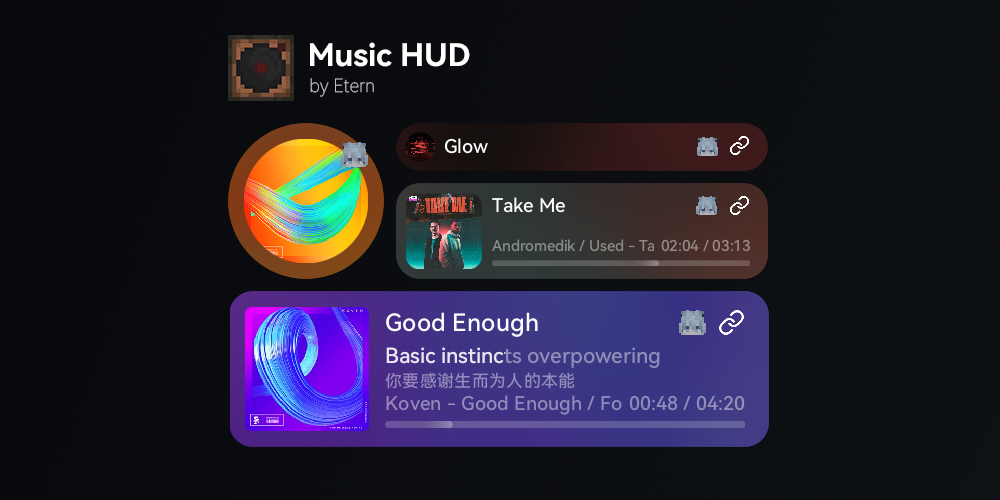
A GUI-based, server-wide song request mod/plugin designed with zero modifications to game mechanics
Due to service scope provided by NetEase, this mod might not work well outside China
Related Links
Third-party Bukkit plugin 1 (1.0.5 stable -)
Third-party Bukkit plugin 2 (1.1.4 hotfix +, now partly merged into main repository)
Prerequisites
- ModernUI (only client)
- Forge Config API Port (only fabric)
- Architectury API (Mod edition, 1.2.0 and below)
Features
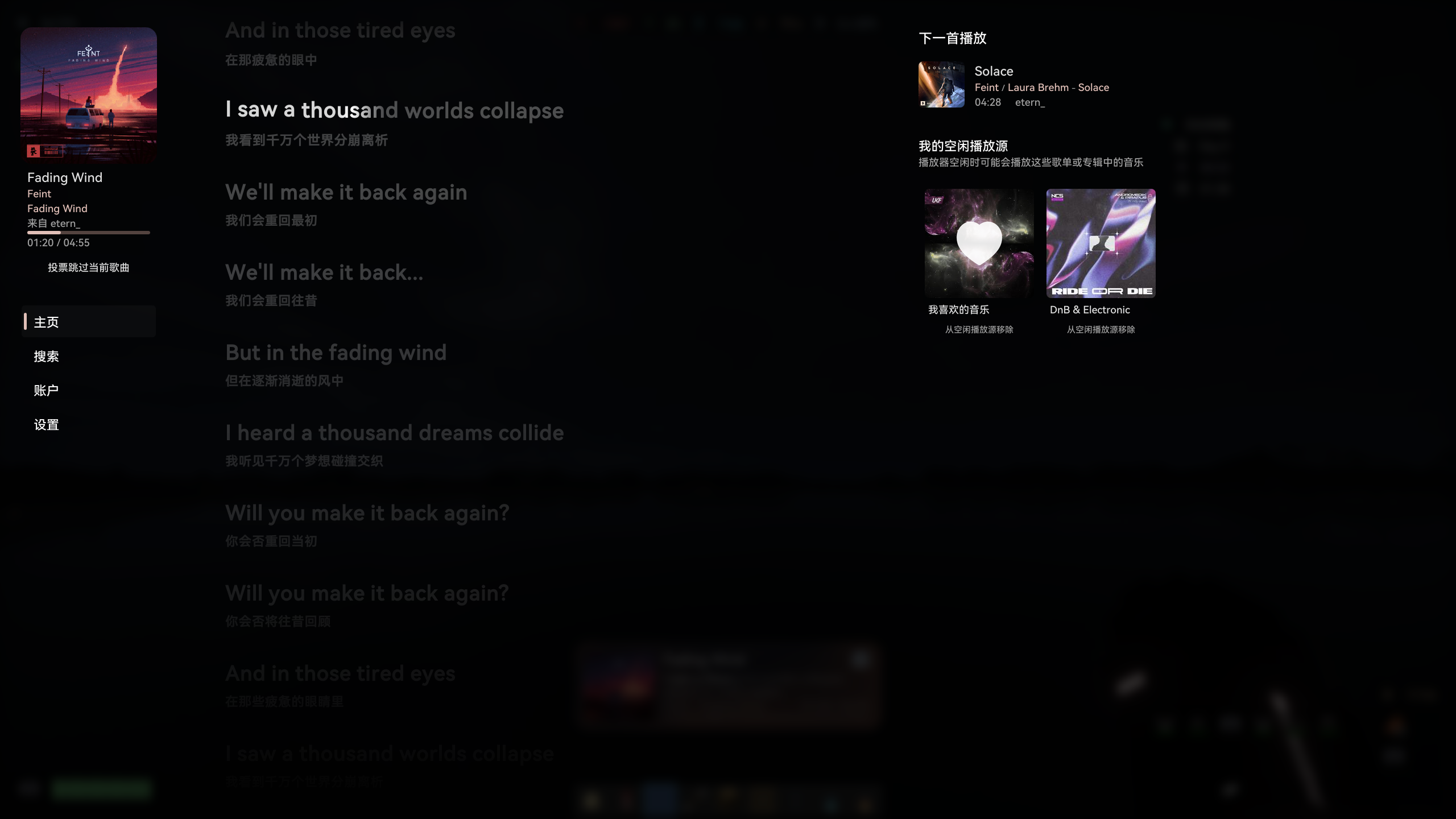
- With graceful GUI, providing an in-game operation interface and a easily configurable HUD.
- Can read NetEase Cloud Music account playlists for convenient song requests.
- The server does not retain user data; it is only temporarily stored during login.
- Streamed playback with no redundant client-side caching.
- Staggered lyrics auto scroll inspired by Apple Music
- HUD dynamic fluid background
- Windows SMTC / Linux MPRIS (have not fully tested yet) support
Functions
- Search for musics, playlists, albums and artists.
- Log in to NetEase Cloud Music account via QR code or SMS code to explore subscribed playlists, albums and artists.
- Synchronized server-wide play queue.
- Configure idle playback sources for automatic random song switching when server is idle.
- Display lyrics, requesting player (or avatar) in the HUD and user interface.
Compatibility
- Currently specially supports to mute Reactive Music when MusicHUD is playing
TO-DO List
- Customizable HUD layout [target 1.3.0/1.4.0]
- More music platform support (QQ Music, Kugou Music) [target 2.0.0]
Usage
Client
First of all, place the prerequisite mods and the MusicHud jar file into the mods folder.
Single-player or LAN Multi-player Host
All you need is to configure or deploy an API server.
Multiplayer (join Server or LAN Multi-player)
You don't need to configure or deploy an API server, but the server or LAN multiplayer host needs to configure or deploy MusicHUD and API server.
Server
All you need is to configure or deploy an API server.
How to Deploy an API Server
There are 2 methods to deploy.
Deploy bound with mod (recommend for client)
This method allows MusicHUD to manage lifecycle of api server.
Due to some limitations, API Server may not be auto-closed when game exit abnormal (e.g., due to a crash)
- Login to GitHub (Important, otherwise can NOT download artifacts) and go to https://github.com/NeteaseCloudMusicApiEnhanced/api-enhanced/actions/workflows/build-dev.yml
- Click latest action runs in type "Build Artifacts" and download platform binary artifacts matches to your pc/server platform
- Uncompress the binary executable file from ZIP file to ...
- Mod edition:
{corepath}/music-hud/ and rename it to api (api.exe on Windows)
- Plugin edition:
{corepath}/plugins/MusicHud/ and rename it to api (api.exe on Windows)
- Or place it anywhere and modify config in game or option
serverApiBinaryExecutablePath (absolute or relative path) in config file /config/music_hud-common.toml.
Deploy separately (recommend for server)
- Deploy NetEase Cloud Music API Enhanced (https://github.com/neteasecloudmusicapienhanced/api-enhanced).
- If not using the default port (3000) of NCM API Enhanced or deploying on another server, modify the
serverApiBaseUrl property in the config file /config/music_hud-server.toml.
CN version description
图形化的全服点歌模组/插件,设计上不修改任何游戏机制
相关链接
MC 百科
第三方 Bukkit 插件实现 1 (1.0.5 stable -)
第三方 Bukkit 插件实现 2 (1.1.4 hotfix +,目前已部分合并至主仓库)
前置依赖
- ModernUI (仅客户端)
- Forge Config API Port (仅 Fabric)
- Architectury API (非插件版,1.2.0 以及更低版本)
特点
- 具有优雅的 GUI,提供游戏内操作界面,以及易配置的 HUD
- 可读取网易云账户歌单,方便点歌
- 服务端不保留用户数据,仅在登录时暂存
- 流式播放,无赘余的客户端缓存
- 受 Apple Music 启发的歌词交错滚动与逐字歌词
- HUD 动态流体背景
- Windows SMTC / Linux MPRIS(尚未充分测试) 支持
功能
- 搜索音乐、歌单、专辑和歌手
- 通过二维码或短信验证码登录网易云账户,查看收藏的歌单、专辑和歌手
- 全服同步播放队列
- 配置空闲播放源,服务器空闲时随机切歌
- 在 HUD 和用户界面中展示歌词,点歌玩家(或头像)
兼容
- 目前特别地支持在 MusicHUD 播放时静音 Reactive Music
大饼 待办清单
- 可自定义的 HUD 布局 [目标 1.3.0/1.4.0]
- 更多音乐平台支持(QQ音乐, 酷狗音乐) [目标 2.0.0]
使用
客户端
首先在 mods 文件夹中放入前置 mod 和 MusicHUD 的 jar 文件
单人模式 或 局域网联机主机
只需要配置/部署 API 服务器
加入服务器 或 加入局域网世界
不需要配置/部署 API 服务器
但是需要服务器/局域网主机配置/部署 MusicHUD 和 API 服务器
服务端
只需要部署 API 服务器
如何部署 API 服务器
两种方法
绑定在 mod 中(推荐客户端使用)
这个方法会让 MusicHUD 管理 API 服务器生命周期
由于一些限制,在游戏非正常退出时(如崩溃)无法自动结束进程
- 登录到 GitHub (重要,否则无法下载工件) 并跳转到 https://github.com/NeteaseCloudMusicApiEnhanced/api-enhanced/actions/workflows/build-dev.yml
- 在 actions 类型中选择 "Build Artifacts" 并进入最新的构建中根据你的平台下载对应的二进制构建产物
- 解压下载得到的压缩包并将其中的二进制可执行文件放置到...
- mod 版:{核心目录}/music-hud/ 并重命名为
api (对于 Windows 为 api.exe)
- 插件版: {核心目录}/plugins/MusicHud/api(.exe)
- 或者放在任意处并在游戏内或配置文件
/config/music_hud-common.toml中修改选项 serverApiBinaryExecutablePath 对应(绝对/相对)目录
独立部署(推荐服务端使用)
- 部署 Netease Cloud Music API Enhanced (https://github.com/neteasecloudmusicapienhanced/api-enhanced)
- 如果不使用 NCM API Enhanced 的默认端口 ( 3000 ) 或在其他服务器上部署,需要修改配置文件
/config/music_hud-server.toml的 serverApiBaseUrl 属性


