


MsgDeluxe
Minecraft plugin for private messages.
📖About MsgDeluxe
Description
This plugin adds the ability to send private messages to other players.
Commands
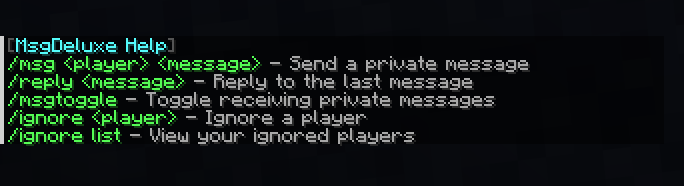
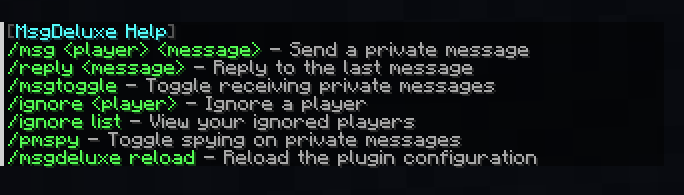
- /msg - Send a private message
- /reply - Reply to the last message
- /msgtoggle - Toggle receiving private message
- /ignore - Ignore a player
- /ignore list - View your ignored players
- /pmspy - Toggle spying on private messages
- /msgdeluxe help - Shows the commands
- /msgdeluxe reload - Reload the plugin configuration
Screenshots




Config
# MsgDeluxe Configuration File

prefix_main: "&8[&bMsgDeluxe&8] "
prefix_pmspy: "&8[&bPMSpy&8] "

format_send: "&8[&bYou &3-> &b%target%&8] &f%message%"
format_receive: "&8[&b%player% &3-> &bYou&8] &f%message%"
format_pmspy: "%prefix_pmspy%&8[&b%player% &3-> &b%target%&8] &f%message%"

sounds:
  enabled: true
  send:
    sound: "ENTITY_EXPERIENCE_ORB_PICKUP"
    volume: 1.0
    pitch: 1.0
  receive:
    sound: "ENTITY_EXPERIENCE_ORB_PICKUP"
    volume: 1.0
    pitch: 1.0

messages:
  no_permission: "&cYou do not have permission to use this command."
  player_only: "&cThis command can only be used by players."
  usage_msg: "&cUsage: /msg <player> <message>"
  usage_reply: "&cUsage: /reply <message>"
  usage_ignore: "&cUsage: /ignore <player>"
  player_not_found: "&cPlayer not found or is currently offline."
  cannot_message_self: "&cYou cannot message yourself."
  target_messages_toggled: "&cThat player is currently not accepting private messages."
  target_ignored_you: "&cYou cannot send a message to this player because they have ignored you."
  no_reply_target: "&cYou have nobody to reply to."
  toggled_off: "&cYou have disabled receiving private messages."
  toggled_on: "&aYou have enabled receiving private messages."
  cannot_ignore_self: "&cYou cannot ignore yourself."
  player_unignored: "&aYou are no longer ignoring %target%."
  player_ignored: "&cYou have ignored %target%. They can no longer message you."
  ignore_list_empty: "&aYou are not ignoring anyone!"
  ignore_list_format: "&8[&bIgnored Players&8] &7%players%"
  pmspy_disabled: "&cPMSpy disabled. You will no longer see private messages."
  pmspy_enabled: "&aPMSpy enabled. You are now spying on private messages."
  config_reloaded: "&aConfiguration has been successfully reloaded."
  help_header: "&8[&bMsgDeluxe Help&8]"
  help_msg: "&a/msg <player> <message> &7- Send a private message"
  help_reply: "&a/reply <message> &7- Reply to the last message"
  help_msgtoggle: "&a/msgtoggle &7- Toggle receiving private messages"
  help_ignore: "&a/ignore <player> &7- Ignore a player"
  help_ignore_list: "&a/ignore list &7- View your ignored players"
  help_pmspy: "&a/pmspy &7- Toggle spying on private messages"
  help_reload: "&a/msgdeluxe reload &7- Reload the plugin configuration"
Admin Permissions
1. msgdeluxe.bypass
This is the most crucial administrative permission. A player with this permission can force-send a private message to anyone, even if the target has toggled their messages off (/msgtoggle) or explicitly ignored them (/ignore). This is primarily designed so that staff members can reach players in urgent or necessary situations without being blocked.
2. msgdeluxe.pmspy
This is the spy mode that allows staff members to secretly read all private messages sent across the server. Players with this permission node can use the /pmspy command to toggle their ability to see everyone else's private conversations in real-time.
3. msgdeluxe.admin
This is the overarching administrator permission for the plugin. Players with this permission can use the /msgdeluxe reload command, which allows them to instantly update the configuration settings (like colors, messages, and sounds) without needing to restart the entire server. (Note: Server Operators automatically have access to this).