Logo
MINECRAFTBIBLE
Items
Items

All game items

Blocks
Blocks

Building blocks

Mobs
Mobs

Creatures & monsters

Biomes
Biomes

World biomes

Structures
Structures

Generated structures

Recipes
Recipes

Crafting guides

Advancements
Advancements

Achievements

Loot Tables
Loot Tables

Drop rates

Tags
Tags

Item groupings

All Versions
View all data →
Capes
Cape ArchiveNEW

Browse rare Minecon capes, OptiFine capes, and custom capes from players worldwide

Browse

Player Database
Player DatabasePopular

Search any player

Skin Browser
Skin Browser

Browse & download skins

Cape Gallery
Cape GalleryNEW

Minecon & OptiFine capes

Seed Vault
Seed Vault

Curated seeds

Learn

Guides
GuidesNew

Tutorials & tips

Blog
Blog

News & updates

Community

Community Hub
Community HubHub

Posts, discussions & more

All Versions
View community →
Seed Analyzer
Seed Analyzer

World seed analysis

Loot Explorer
Loot Explorer

Drop rates

Crafting Calculator
Crafting Calculator

Material planning

Enchant Calculator
Enchant Calculator

Probability math

Redstone Lab
Redstone Lab

Signal timing

Trading Profit
Trading Profit

Villager ROI

All Versions
View all tools →
Mods
Mods

Browse all mods

Plugins
Plugins

Server plugins

Resource Packs
Resource Packs

Textures & sounds

Shaders
Shaders

Visual enhancements

Datapacks
Datapacks

World logic

Scanner
Mod Intelligence

Scan & analyze any mod

All Versions
View all mods →
Loading...
IntroductionIntroductionVersion HistoryVersion HistoryGuidesGuidesBlog & NewsBlog & News
ItemsItemsBlocksBlocksMobsMobsRecipesRecipesBiomesBiomesStructuresStructuresAdvancementsAdvancementsLoot TablesLoot TablesTagsTags
ModsModsPluginsPluginsResource PacksResource PacksShadersShadersDatapacksDatapacks

MinecraftBible

The Ultimate Wiki

Logo
MINECRAFTBIBLE

The ultimate Minecraft reference. Every item, block, mob, and recipe documented with precision.

Community

  • Skin Browser
  • Cape Gallery
  • Seed Vault
  • Blog
  • Guides

Database

  • Items
  • Blocks
  • Mobs
  • Recipes
  • Biomes
  • Structures

Tools

  • Seed Analyzer
  • Mod Intelligence
  • Crafting Calculator
  • Enchant Calculator

Mods & Packs

  • Mods
  • Plugins
  • Resource Packs
  • Shaders
  • Datapacks

Site & Legal

  • About
  • Authors
  • Editorial Policy
  • Corrections
  • Contact
  • Privacy Policy
  • Terms of Service
  • DMCA
  • Sitemap

© 2026 MinecraftBible. Not affiliated with Mojang or Microsoft.

PrivacyTermsContact
MineVerify
PluginMIT

MineVerify

Lightweight PaperMC plugin allowing apps to verify Minecraft players through in-game code validation

4
Downloads
0
Followers
1 weeks ago
Updated
📦
1
Versions
managementtechnologyutilitypaperpurpurspigot
Download Latestvv0.1.0+mc26.1.2View on Modrinth

📖About MineVerify

MineVerify

Lightweight PaperMC plugin allowing apps to verify Minecraft players through generated in-game codes.

📋 Overview

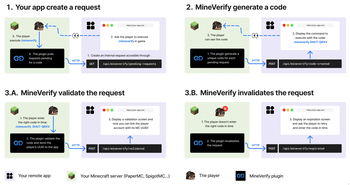
MineVerify lets external apps verify that a Minecraft account is controlled by a real player on
your server.

The app creates an internal verification request and asks the player to run /mineverify.
The plugin then polls configured apps, generates a temporary code, validates /mineverify <code>
in game, and reports the verified Minecraft UUID and username back to the app.

MineVerify only makes outbound requests to configured apps. It does not expose a public HTTP API on
the Minecraft server.

[See the gallery]

✨ Features

  • Verifies that a real connected Minecraft player owns a generated code
  • Lets several external apps use the same Minecraft server for verification
  • Keeps the Minecraft server private by using outbound app calls only
  • Sends the app the verified Minecraft UUID and username after validation
  • Expires unused codes automatically
  • Expires pending verifications during graceful server shutdowns
  • Provides admin status commands to inspect current verification activity
  • Supports localized in-game messages

🚀 Installation

  1. Install a PaperMC server with Java 25+
  2. Download the latest MineVerify-x.x.x+mcx.x.x.jar from the releases page
  3. Drop the jar into your server's plugins/ folder
  4. Restart the server or run /reload confirm
  5. Configure your apps in plugins/MineVerify/config.yml

🕹 Command Usage

Command Permission Description
/mineverify mineverify.use Starts checking configured apps for pending verification requests.
/mineverify <code> mineverify.use Validates a generated code for the connected player.
/mineverify status mineverify.admin Shows polling state, configured apps, stored requests, and last app responses.
/mineverify status requests mineverify.admin Shows admin status with stored request details.

/mineverify and /mineverify <code> must be run by a real player. Admin status commands can be
run by admins or from the console.

⚙️ Configuration

config.yml defines the language, remote apps, and code validity.

language: "en_us"

apps:
  my-app:
    name: "Your App"
    base-url: "https://your-app.com"
    token: "generated-token-from-your-app"
    poll-interval-seconds: 3

linking:
  code-ttl-seconds: 60
Key Default Description
language en_us In-game message language. Available values are listed in config.yml.
apps.<id>.name <id> Player-facing app name.
apps.<id>.base-url Required App backend base URL.
apps.<id>.token Required Bearer token used by MineVerify when calling this app.
apps.<id>.poll-interval-seconds 3 Poll interval used only during an active player-triggered polling session.
linking.code-ttl-seconds 60 Generated code validity duration.

🔁 Verification Flow

  1. The app creates an internal request for its own user.
  2. The app asks the player to join the Minecraft server and run /mineverify.
  3. MineVerify starts a temporary polling session.
  4. MineVerify calls each configured app for pending requests.
  5. MineVerify generates a code for each new pending request and sends it to the owning app.
  6. The app shows /mineverify <code> to the user.
  7. The player runs /mineverify <code> in game.
  8. MineVerify validates the code and reads the connected player's UUID and username.
  9. MineVerify reports either validation or expiration to the app.

🔌 App Endpoints

It's always MineVerify that contacts the app, never the opposite.
In this way, each app configured in config.yml must implement these endpoints on its own backend.

Endpoint Method Description
/api/mineverify/pending-requests GET Returns app requests waiting for a generated code.
/api/mineverify/code-created POST Receives the generated code and expiration time.
/api/mineverify/validated POST Receives the verified Minecraft UUID and username.
/api/mineverify/expired POST Receives an expiration event for an unused code or a graceful server shutdown.

Every request sent by MineVerify includes:

Authorization: Bearer <app-token>

IMPORTANT:
To fully integrate MineVerify into your app, follow
docs/APP_INTEGRATION.md.


Crafted by Sukikui

👥 Team & Contributors

Sukikui
SukikuiOwner

⚙️ Compatibility

Environment
🖥️ Server-side
Loaders
paperpurpurspigot
Minecraft Versions
26.1.2

🔗 Links

Modrinth Page