

PluginGPL-3.0-only
MineGames
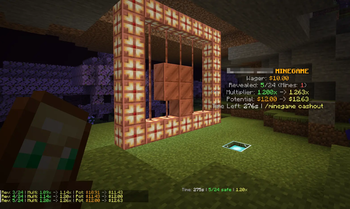
MineGames is a Paper 1.21+ casino plugin with three game types: MineGame, Slots and Roulette. It uses Vault economy, supports per-station cosmetics, holograms, and casino frame animations. Very easy to setup and play!
215
Downloads
2
Followers
3 months ago
Updated
📦
3
Versions
📖About MineGames
MineGames


MineGames is a Paper 1.21+ casino plugin with three game types:
- MineGame: reveal safe blocks, avoid mines, cash out at your chosen point.


- Roulette: perpetual rounds where players bet on red/black/green.


- Slots: lever-driven reels with configurable widths, rows, frames, and payouts.

All games use Vault economy, support per-station cosmetics, holograms, and casino frame animations.
Requirements
- Java 21
- Paper 1.21+
- Vault
- A Vault-compatible economy plugin (for example EssentialsX Economy)
Install
- Place
minegames-1.x.x.jarinplugins/. - Ensure Vault + economy plugin are installed.
- Start/restart server.
- Edit
plugins/MineGames/config.ymlas needed. - Create stations:
- MineGame station: stand on your station block and run
/minegameadmin create - Roulette station: stand at board center and run
/rouletteadmin create - Slots station: stand where you want the machine and run
/slotsadmin create [3-8] [1|2]
Join gifts are also supported. New players can receive a configurable welcome payout once, with the message and amount controlled in config.yml and via /minegamesjoin.
Gameplay
Mines
- Stand on a MineGame station block.
- Start a game:
/minegame <mines> <wager> - Break/click tiles to reveal safe blocks.
- Cash out with
/minegame cashoutor by breaking a frame block. - Lose by hitting a mine or timeout, win by clearing all safe tiles.
Roulette
- Stand near a Roulette station.
- Place bet:
/roulette <red|black|green> <amount> - Bets close when countdown ends, then spin/result phase resolves.
- Payouts apply automatically for winning color bets.
- Round resets and repeats continuously.
Slots
- Stand near a Slots station.
- Pull the lever to spin and pay the configured wager.
- Reels animate for a few seconds and then stop from left to right.
- Matching the winning block pays out based on how many appear or which payline lands.
- The station can be customized with outer frame, inner frame, winning block, row count, and lever-side frame animation.
Commands
Player Commands
- Mines:
/minegame <mines 1-24> <wager>/minegame cashout
- MineGame aliases:
/mine,/mines - Roulette:
/roulette <red|black|green> <amount>
MineGame Admin (mine.admin)
Primary command: /minegameadmin (legacy alias: /mineadmin)
- Station lifecycle:
/minegameadmin create/minegameadmin remove/minegameadmin regen/minegameadmin list/minegameadmin reload
- House accounting:
/minegameadmin housebalance/minegameadmin housewithdraw <amount|all>
- Toggles:
/minegameadmin holo <on|off>/minegameadmin debug <on|off>
- Global config:
/minegameadmin set [global] <path> <value>/minegameadmin set [global] <path>(shows current value)
- Per-station cosmetics (or all stations):
/minegameadmin setframe [all] <BLOCK|reset>/minegameadmin sethidden [all] <BLOCK|reset>/minegameadmin setsafe [all] <BLOCK|reset>/minegameadmin setmine [all] <BLOCK|reset>
- Per-station casino frame (or all stations):
/minegameadmin casinoframe [all] <BLOCK> <pattern 1-10>/minegameadmin casinoframe [all] mode <idle_only|always>/minegameadmin casinoframe [all] <off|reset>
Roulette Admin (roulette.admin)
- Station lifecycle:
/rouletteadmin create/rouletteadmin remove/rouletteadmin regen/rouletteadmin list/rouletteadmin reload
- House accounting:
/rouletteadmin housebalance/rouletteadmin housewithdraw <amount|all>
- Global config:
/rouletteadmin set [global] <path> <value>/rouletteadmin set [global] <path>(shows current value)/rouletteadmin set global <path> <value>forces a global change even when standing near a station
- Per-station board cosmetics (or all stations):
/rouletteadmin setframe [all] <BLOCK|reset>/rouletteadmin setred [all] <BLOCK|reset>/rouletteadmin setblack [all] <BLOCK|reset>/rouletteadmin setgreen [all] <BLOCK|reset>/rouletteadmin setselector [all] <BLOCK|reset>
- Per-station board size:
/rouletteadmin set board-size <value>while standing near a station changes that station only
- Per-station casino frame (or all stations):
/rouletteadmin casinoframe [all] <BLOCK> <pattern 1-10>/rouletteadmin casinoframe [all] mode <always|betting_only>/rouletteadmin casinoframe [all] <off|reset>
Slots Admin (slots.admin)
- Station lifecycle:
/slotsadmin create [3-8] [1|2]/slotsadmin remove/slotsadmin regen/slotsadmin list/slotsadmin reload
- House accounting:
/slotsadmin housebalance/slotsadmin housewithdraw <amount|all>
- Global config:
/slotsadmin set [global] <path> <value>/slotsadmin set [global] <path>(shows current value)/slotsadmin set global <path> <value>forces a global change even when standing near a station
- Per-station cosmetics (or all stations):
/slotsadmin setouterframe [all] <BLOCK|reset>/slotsadmin setinnerframe [all] <BLOCK|reset>/slotsadmin setwinning [all] <BLOCK|reset>
- Per-station price:
/slotsadmin set cost-per-spin <value>while standing near a station changes that station only
- Per-station casino frame (or all stations):
/slotsadmin casinoframe [all] <BLOCK> <pattern 1-10>/slotsadmin casinoframe [all] mode <idle_only|always>/slotsadmin casinoframe [all] <off|reset>
Join Gift
/minegamesjoin true|falseenables or disables the first-join gift./minegamesjoin set <amount>changes the welcome payout.- Seen players are stored in
join_rewards.yml, so each player only receives the gift once. - The welcome message is editable under
messages.join-gift.welcomeinconfig.yml.
Permissions
mine.admin(default: op)roulette.admin(default: op)
Config Layout
- Mines:
board.*game.*announcements.*effects.*hologram.*messages.*frame-animation.*
- MineGame frame height toggle:
board.frame-one-highertrue= frame/grid one block above beaconfalse= frame/grid at beacon level
- Roulette:
roulette.*roulette-frame-animation.*
Distance / Activation / Hologram Settings
- Global casino frame activation distance (used by both game types):
casino-frame-activation-distance(default20.0)frame-animation.interval-ticks(MineGame frame animation speed)roulette-frame-animation.interval-ticks(Roulette frame animation speed)
- MineGame hologram visibility:
hologram.view-rangehologram.behind-beacon-distancehologram.base-heighthologram.line-spacing
- Roulette station activation + hologram visibility:
roulette.activation-distance-from-frame(players must be near frame for active spinning)roulette.max-bet-distance(max distance to place bets when not standing directly on board)roulette.hologram-view-rangeroulette.hologram-heightroulette.hologram-line-spacingroulette.hologram-title-gaproulette.hologram-section-gap
Notes
set ...commands edit the nearest station when the setting is station-local, unless you useset global ...to force a global default.setframe/setred/...andcasinoframecommands edit station overrides.- Adding
allapplies cosmetic override commands to every station of that game type. - Mines, roulette, and slots rebaseline their saved footprints when a size change would otherwise leave old blocks behind.
housebalance/housewithdraware admin-only (mine.admin/roulette.admin).housewithdrawpays the withdrawn amount directly to the admin executing the command.- MineGame board height is controlled by
board.frame-one-higher(settable via/minegameadmin set board.frame-one-higher <true|false>). - Roulette color defaults are percent-based (
48.61 / 48.61 / 2.78) and auto-scale with board size. - Changing Roulette selector block clears old selector blocks from the selector layer before placing new ones.
- Removing MineGame/Roulette/Slots stations restores original world blocks for stations created on current versions (snapshot-based restore).
- Roulette station creation anchors the board directly under the admin's feet (replaces floor blocks there).
- Holograms are configured with no-wrap text display behavior for more consistent spacing.
Storage
plugins/MineGames/config.yml(global settings)plugins/MineGames/stations.yml(MineGame stations + overrides)plugins/MineGames/roulette_stations.yml(Roulette stations + overrides)plugins/MineGames/mines_restore.yml(MineGame original-block snapshots for restore on station removal)plugins/MineGames/roulette_restore.yml(Roulette original-block snapshots for restore on station removal)plugins/MineGames/house_balances.yml(separate MineGame/Roulette house balance + wager/payout totals)
License
GPLv3. See LICENSE.