
MINECRAFTBIBLE
Loading...


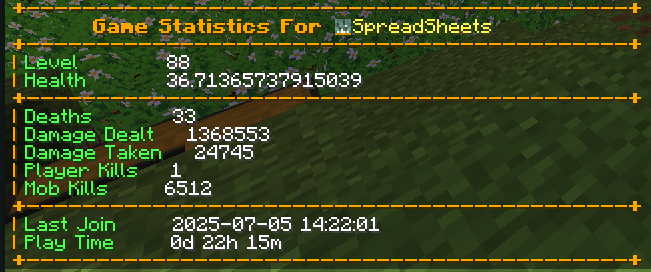
Player Statistics is a Minecraft server plugin that tracks and syncs player statistics to MySQL database also providing useful commands and features for both players and server administrators.
Player Statistics is a Minecraft server plugin that tracks and manages player statistics, providing useful commands and features for both players and server administrators.
.jar file from the Releases section..jar file into your server's plugins directory.After the first run, a config.yml file will be generated in the plugin's folder.
Open config.yml and update the MySQL database settings and other options as needed:
mysql:
  host: localhost
  port: 3306
  database: minecraft
  username: root
  password: yourpassword
Save the file and restart the server to apply changes.
| Command | Description | Permission |
|---|---|---|
/stats |
View your statistics | playerstatistics.stats |
/syncplayers |
Sync all player data with database | playerstatistics.sync |
/debugger |
Debug plugin operations (admin) | playerstatistics.debug |
Note: Most users do not need to build from source. Download the pre-built
.jarfrom the releases if you just want to use the plugin.
Clone this repository:
git clone https://github.com/yourusername/PlayerStatistics.git
cd PlayerStatistics
Build the plugin:
mvn clean compile
mvn clean package
The compiled .jar will be in the target/ directory.
Contributions are welcome! To contribute:
git checkout -b feature/AmazingFeature)git commit -m 'Add some AmazingFeature')git push origin feature/AmazingFeature)Please follow the existing code style and include clear commit messages.
For issues or feature requests, please open an issue on GitHub.