


Minecraft Paintball
fast paced 2-teams shooter
📖About Minecraft Paintball

Minecraft Paintball is a fast-paced shooter game with 2 teams battling with paintball guns. Players who get painted from helmet to boots are stunned and must hope for a teammate to revive them with a water bomb. The team with the last players standing wins!
Disclaimer: This plugin is not affiliated with Mineplex and was made as a hobby project to keep Mineplex's paintball mini-game alive. Use at your own risk.
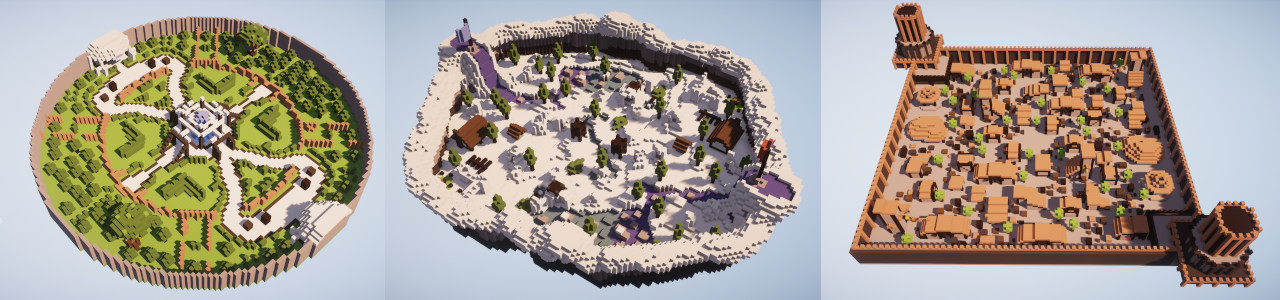
Playable Maps
If you are looking for maps to play this game, hop on our Discord where ready-to-play maps are available to download!
Guns
There are 3 types of guns players can choose from with different properties:

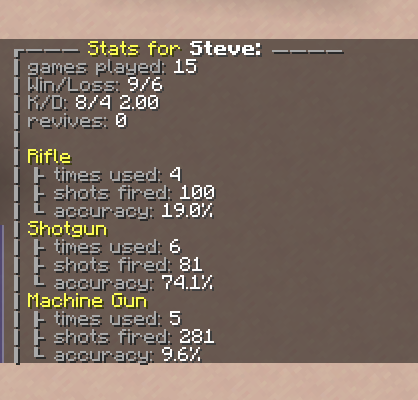
Stats
With /pb stats you can see the statistics about the games you played or the statistics from other players.
Simple Setup
- Download the plugin and WorldEdit and slap it into your plugins folder.
- Head to our Discord and download the world with playable maps.
- Start your server and join a round of paintball with your friends:
/pb join Paintball.
Custom Setup
SetupTo set up your own paintball game, you need to do the following steps:
- Create at least 1 arena (a map) where the paintball battle can take place.
- Create 1 waiting lobby where players wait until enough players have joined to start a game.
- Link the arena to the waiting lobby.
Arena Setup
The arenas (or maps) where the battles take place consist of:
- 1 WorldEdit Schematic to reset after a match.
- Spawnpoints for both teams, where the players are teleported to at the beginning of the game.
The commands for that are:
/pb arena create <arena name> <schematic name>
Creates the arena with a name and a schematic. The arena schematic will be pasted to the location you are at./pb arena add-spawn <arena name> <team name>
The block you are standing on will now be added as a spawn point for one of the two teams (Ember or Ice).
Lobby Setup
Players must join a waiting lobby to start a paintball game. When the minimum number of players joined, a countdown to the start of the game begins. In the lobby players can select their weapon, queue for a team, and vote for the map to play on next.
/pb lobby create <lobby name>
Creates a waiting lobby. The block you are standing on is now the spawn point for players joining the lobby./pb join <lobby name>
Command to join a lobby./pb lobby link-arena <lobby name> <arena name>
Links an arena to a lobby so that it can be played in that lobby.
A lobby MUST have at least 1 linked arena to start a game.
Now you are ready to play :)
PlaceholderAPI
This plugin supports placeholders for displaying the stats for each player, e.g., with holograms.
List of Placeholderspaintball_games_played
paintball_games_won
paintball_games_lost
paintball_kills
paintball_deaths
paintball_kd
paintball_revives
paintball_rifle_times_used
paintball_rifle_shots_fired
paintball_rifle_bullet_hits
paintball_rifle_accuracy
paintball_shotgun_times_used
paintball_shotgun_shots_fired
paintball_shotgun_bullet_hits
paintball_shotgun_accuracy
paintball_machine_gun_times_used
paintball_machine_gun_shots_fired
paintball_machine_gun_bullet_hits
paintball_machine_gun_accuracy[/code]
Config
Config#change this to "plugins/FastAsyncWorldEdit/schematics" if you are using FAWE
schematics-folder: "plugins/WorldEdit/schematics"
#seconds until game start if enough players joined a lobby
countdown:
seconds: 60
game:
#minimum amount of players to get a game started
min-players: 2
#maximum amount of players to join a lobby
max-players: 16
#amount of hearts that players get ingame
player-health-points: 4
#how many water bombs each player gets at start of game
water-bombs: 3
#chat prefixes that players get ingame. Use & to add color codes
chat-prefix:
alive: "%team-color%<%player%>&r"
dead: "&7Dead %team-color%<%player%>&r"
#modifiers to fine tune each paintball kit
kit-settings:
rifle:
#damage in 1/2 hearts
bullet-dmg: 3
bullet-speed: 3.0
bullet-spread: 0.01
#speed potion effect strength
player-speed: 1
shotgun:
bullet-count: 6
bullet-dmg: 1
bullet-speed: 1.25
bullet-spread: 0.35
player-speed: 1
machine-gun:
bullet-dmg: 1
bullet-speed: 2.25
max-bullet-spread: 0.2
player-speed: 1
Permissions
Permissionspaintball.play
allows players to join paintball lobbies. Enabled for everyone by default.paintball.moderator
Allows player to make others join a lobby with/pb join <player name>and start a game with/pb start.paintball.configure
Allows player to use/pb lobbyand/pb arenacommands.
List of all Commands
Commands/pb reload
Reload changes in the config.yml or language.yml./pb join <lobby name>
Join a paintball game./pb stats <player name>
View your stats of the games you or another player played./pb leave
Leave a game lobby./pb start
Force starts the game in a lobby./pb arenacreate <arena name> <schematic name>
Creates an arena with the specified schematic (from the schematics folder, see config). The schematic will be pasted to where you are currently standing.delete <arena name>
Deletes an arena.copy <old arena name> <new arena name>
Creates a copy of an arena with a new name and your current location to paste the schematic there.move <arena name>
Moves the whole arena over to your current location.add-spawn <arena name> <team name>
Adds a team spawn to an arena where players of a team will be spawned when the game starts.remove-spawn <arena name> <team name> <spawn list index>
Removes a team spawn from an arena.list-spawns <arena name> <team name>
Lists all spawns for a team.reset <arena name>
Rebuilds the schematic of an arena manually.
/pb lobbycreate <lobby name>
Creates a waiting lobby. The lobby’s spawn point is set to where you are currently standing.delete <lobby name>
Deletes a waiting lobby.link <lobby name> <arena name>
Links an arena to a lobby. The arena will now show up in the map vote menu of that lobby.unlink <arena name>
Unlink an arena from a lobby.set-spawn <lobby name>
Sets a lobby’s spawn point to where you are currently standing.set-exit <lobby name>
Sets a lobby’s exit spawn point to where people teleport when leaving the lobby.list-arenas <lobby name>
Lists all arenas linked to a certain lobby.
/pb listarenas
Lists all arenas created on the server.lobbies
Lists all lobbies created on the server.
Roadmap
- ✅ pew pew
- ✅ translation support
- ❓ Sniper Rifle
Long range sniper rifle. Sneak to scope. Higher damage the longer scoped. - ❓ idk achievements?
- ❓ your ideas