Logo
MINECRAFTBIBLE
Items
Items

All game items

Blocks
Blocks

Building blocks

Mobs
Mobs

Creatures & monsters

Biomes
Biomes

World biomes

Structures
Structures

Generated structures

Recipes
Recipes

Crafting guides

Advancements
Advancements

Achievements

Loot Tables
Loot Tables

Drop rates

Tags
Tags

Item groupings

All Versions
View all data →
Capes
Cape ArchiveNEW

Browse rare Minecon capes, OptiFine capes, and custom capes from players worldwide

Browse

Player Database
Player DatabasePopular

Search any player

Skin Browser
Skin Browser

Browse & download skins

Cape Gallery
Cape GalleryNEW

Minecon & OptiFine capes

Seed Vault
Seed Vault

Curated seeds

Learn

Guides
GuidesNew

Tutorials & tips

Blog
Blog

News & updates

Community

Community Hub
Community HubHub

Posts, discussions & more

All Versions
View community →
Seed Analyzer
Seed Analyzer

World seed analysis

Loot Explorer
Loot Explorer

Drop rates

Crafting Calculator
Crafting Calculator

Material planning

Enchant Calculator
Enchant Calculator

Probability math

Redstone Lab
Redstone Lab

Signal timing

Trading Profit
Trading Profit

Villager ROI

All Versions
View all tools →
Mods
Mods

Browse all mods

Plugins
Plugins

Server plugins

Resource Packs
Resource Packs

Textures & sounds

Shaders
Shaders

Visual enhancements

Datapacks
Datapacks

World logic

Scanner
Mod Intelligence

Scan & analyze any mod

All Versions
View all mods →
Loading...
IntroductionIntroductionVersion HistoryVersion HistoryGuidesGuidesBlog & NewsBlog & News
ItemsItemsBlocksBlocksMobsMobsRecipesRecipesBiomesBiomesStructuresStructuresAdvancementsAdvancementsLoot TablesLoot TablesTagsTags
ModsModsPluginsPluginsResource PacksResource PacksShadersShadersDatapacksDatapacks

MinecraftBible

The Ultimate Wiki

Logo
MINECRAFTBIBLE

The ultimate Minecraft reference. Every item, block, mob, and recipe documented with precision.

Community

  • Skin Browser
  • Cape Gallery
  • Seed Vault
  • Blog
  • Guides

Database

  • Items
  • Blocks
  • Mobs
  • Recipes
  • Biomes
  • Structures

Tools

  • Seed Analyzer
  • Mod Intelligence
  • Crafting Calculator
  • Enchant Calculator

Mods & Packs

  • Mods
  • Plugins
  • Resource Packs
  • Shaders
  • Datapacks

Site & Legal

  • About
  • Authors
  • Editorial Policy
  • Corrections
  • Contact
  • Privacy Policy
  • Terms of Service
  • DMCA
  • Sitemap

© 2026 MinecraftBible. Not affiliated with Mojang or Microsoft.

PrivacyTermsContact
MelodyMine
PluginApache-2.0

MelodyMine

Minecraft Proximity Voice Chat Plugin Without Mod

2.8K
Downloads
8
Followers
1 years ago
Updated
📦
25
Versions
game-mechanicstechnologyutilitybukkitpaperpurpurspigot
Download Latestv2.0.5View on Modrinth

📖About MelodyMine

title

What is MelodyMine? 🤔

MelodyMine is an open-source voice chat plugin for Minecraft servers, eliminating the need for any mods. It facilitates voice communication directly from the browser, enhancing the multiplayer experience.

How MelodyMine Works 🔧

The entire MelodyMine system consists of three components:

  1. Minecraft Plugin 🧩
  2. Websocket Server 🌐
  3. Next.js Server 🚀

These components establish connections via websockets, where data is transmitted from the plugin to the websocket server.
The websocket server identifies which data needs to be sent for individual checks on the Next.js server.
Finally, the Next.js server communicates with the client, utilizing data received from the websocket via the plugin, to maintain voice communication among online players in the voice chat.

📥 For detailed installation instructions, check out the Installation Guide.

🌟 For a list of features, visit the Features Guide.

How to Use MelodyMine 🚀

To utilize MelodyMine, players simply need to join the server and use the command /melodymine start link to receive a link for client entry. Clicking on this link redirects them to the website without any additional requirements. Just being near an online player will enable you to hear their voice.

If you prefer, you can enter the voice chat via your phone by using the command /melodymine start qrcode, which will generate a QR code. After scanning it, you'll be able to join the voice chat.

🎉 For a demo, visit our website: MelodyMine.TAHER7.iR

🎮 Server IP: Play.TAHER7.IR

Why Should I Use MelodyMine? 🌟

MelodyMine offers personalized features for players, a comprehensive API, and complete support with examples for developers to create their own essential additions. Currently, many servers and players are using MelodyMine, indicating their satisfaction with its functionalities.

🔍 For command details, refer to the Commands Guide.

🔐 For permissions details, check the Permissions Guide.

📌 For information on placeholders, see the Placeholders Guide.

💡 Explore how to use the plugin in depth by visiting the Plugin Usage Guide.
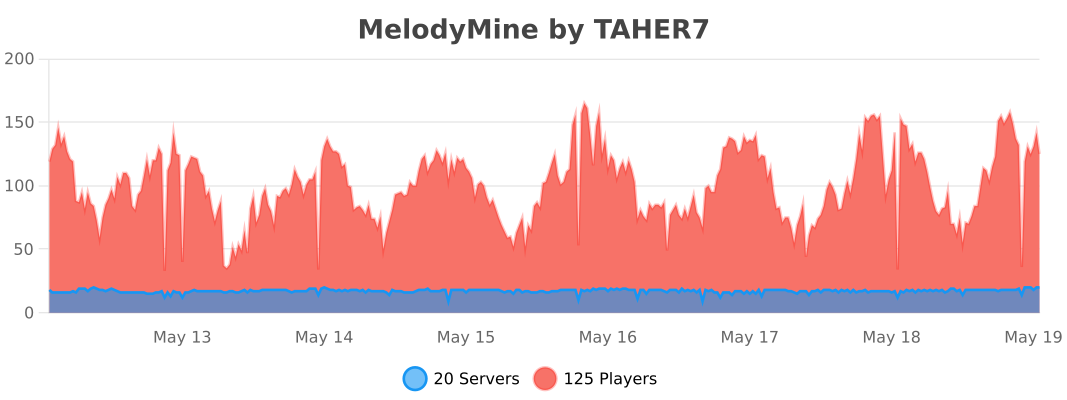

MelodyMine BStats

👥 Team & Contributors

TAHER7
TAHER7Owner

⚙️ Compatibility

Environment
🖥️ Server-side
Loaders
bukkitpaperpurpurspigot
Minecraft Versions
1.131.21.1

🔗 Links

Modrinth Page