Logo
MINECRAFTBIBLE
Items
Items

All game items

Blocks
Blocks

Building blocks

Mobs
Mobs

Creatures & monsters

Biomes
Biomes

World biomes

Structures
Structures

Generated structures

Recipes
Recipes

Crafting guides

Advancements
Advancements

Achievements

Loot Tables
Loot Tables

Drop rates

Tags
Tags

Item groupings

All Versions
View all data →
Capes
Cape ArchiveNEW

Browse rare Minecon capes, OptiFine capes, and custom capes from players worldwide

Browse

Player Database
Player DatabasePopular

Search any player

Skin Browser
Skin Browser

Browse & download skins

Cape Gallery
Cape GalleryNEW

Minecon & OptiFine capes

Seed Vault
Seed Vault

Curated seeds

Learn

Guides
GuidesNew

Tutorials & tips

Blog
Blog

News & updates

Community

Community Hub
Community HubHub

Posts, discussions & more

All Versions
View community →
Seed Analyzer
Seed Analyzer

World seed analysis

Loot Explorer
Loot Explorer

Drop rates

Crafting Calculator
Crafting Calculator

Material planning

Enchant Calculator
Enchant Calculator

Probability math

Redstone Lab
Redstone Lab

Signal timing

Trading Profit
Trading Profit

Villager ROI

All Versions
View all tools →
Mods
Mods

Browse all mods

Plugins
Plugins

Server plugins

Resource Packs
Resource Packs

Textures & sounds

Shaders
Shaders

Visual enhancements

Datapacks
Datapacks

World logic

Scanner
Mod Intelligence

Scan & analyze any mod

All Versions
View all mods →
Loading...
IntroductionIntroductionVersion HistoryVersion HistoryGuidesGuidesBlog & NewsBlog & News
ItemsItemsBlocksBlocksMobsMobsRecipesRecipesBiomesBiomesStructuresStructuresAdvancementsAdvancementsLoot TablesLoot TablesTagsTags
ModsModsPluginsPluginsResource PacksResource PacksShadersShadersDatapacksDatapacks

MinecraftBible

The Ultimate Wiki

Logo
MINECRAFTBIBLE

The ultimate Minecraft reference. Every item, block, mob, and recipe documented with precision.

Community

  • Skin Browser
  • Cape Gallery
  • Seed Vault
  • Blog
  • Guides

Database

  • Items
  • Blocks
  • Mobs
  • Recipes
  • Biomes
  • Structures

Tools

  • Seed Analyzer
  • Mod Intelligence
  • Crafting Calculator
  • Enchant Calculator

Mods & Packs

  • Mods
  • Plugins
  • Resource Packs
  • Shaders
  • Datapacks

Site & Legal

  • About
  • Authors
  • Editorial Policy
  • Corrections
  • Contact
  • Privacy Policy
  • Terms of Service
  • DMCA
  • Sitemap

© 2026 MinecraftBible. Not affiliated with Mojang or Microsoft.

PrivacyTermsContact
MC Server Admin Panel
PluginLicenseRef-All-Rights-Reserved

MC Server Admin Panel

A web panel for remote control of the Minecraft server, which allows you to send commands without logging into the game, view and edit the parameters and inventory of players in real time through a browser without using RCON.

340
Downloads
1
Followers
2 months ago
Updated
📦
6
Versions
utilitybukkitpaperpurpurspigot
Download Latestv1.2.4View on Modrinth

📖About MC Server Admin Panel

MCpanel is a plugin that adds a web-based administration panel for your Minecraft server, accessible via a browser.

After logging in, you can send commands via the console, get a list and statistics of online players, change player settings, change server settings, plug-ins, and edit your Minecraft server files.

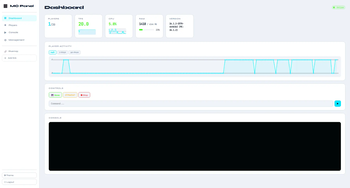
The Dashboard tab will provide you with access to server statistics with TPS graph, CPU graph, the number of online players, RAM used, server version, and player activity statistics in the form of a 24H/7days/30days graph.
Quick management functions like:
Save - Forcibly saves all changes in the world: chunks, player data, entities, inventories, achievements, etc.
Restart - to restart the Minecraft server.
Stop- to stop the Minecraft server.
A field for manually entering commands to the Minecraft server and a window for issuing information.

The Players tab It will allow you to view all players online, their parameters, their ping and the ability to edit their inventory, parameters and settings.

  • Open the inventory of any of the players, add, delete or change items in the inventory.
  • Add experience.
  • Change the game mode.
  • Restore health or feed.
  • Teleport to another player or by coordinates.
  • Kick the player.
  • Give or revoke OP from player.

The console tab gives you access to the Minecraft server console for manual command entry with a large output window so that nothing distracts you from your tasks.

The Management tab provides quick access to server management

  • Plugins - for viewing, deleting and installing(uploading) plugins.
  • Files - Working with server files, editing, deleting, downloading and uploading .
  • Settings - quick access to the server.properties file to change the server settings to the server.
  • Users - Create new users with different access rights.

And additional place to save and quickly access your own links to your sites.

The plugin works via the built-in HTTP* server, does not require RCON, and opens at your server IP address in the browser.
After installing the plugin, use the configuration file to change the port, host IP address, username, and password.

*by default it will use your server IP and 8090 port.
**If you have any thoughts about what else you would like to see in the panel, share them. I will try to implement them, thank you.

👥 Team & Contributors

VenDooM
VenDooMOwner

⚙️ Compatibility

Environment
🖥️ Server-side
Loaders
bukkitpaperpurpurspigot
Minecraft Versions
1.2.11.2.21.2.31.2.41.2.51.151.15.11.15.2+38 more

🔗 Links

Modrinth Page