


Maze Generator
Generate custom, random and huge labyrinths. Customizable themes!
📖About Maze Generator
Maze Generator
Epic showcase by KasaiSora
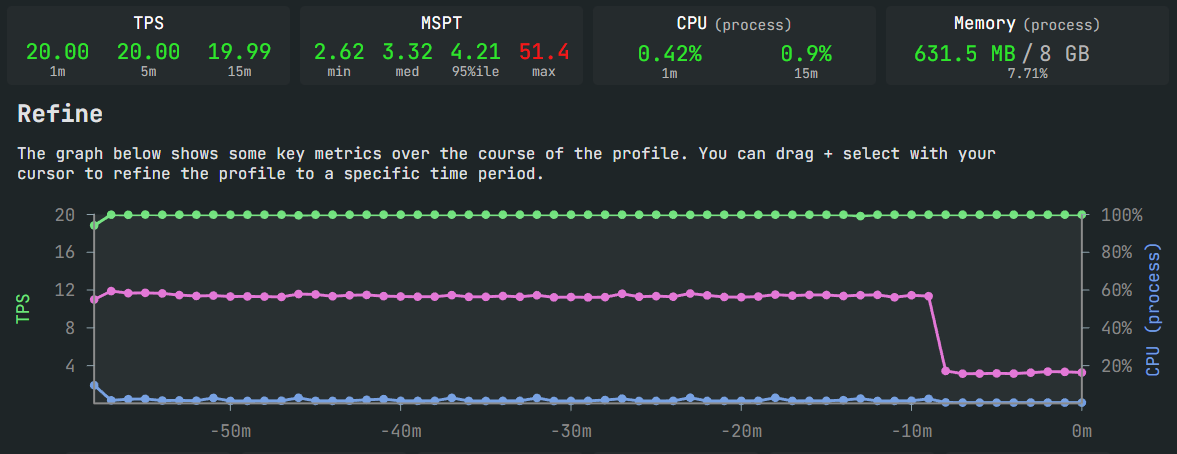
Usable on low end servers or big crowded servers
📧 Feel free to contact me at [email protected]
MazeGenerator 🧩
Build massive, themed mazes in Minecraft without freezing the server. The plugin generates the maze layout incrementally and places blocks over time with a configurable per-tick budget. Work is grouped per chunk, and chunks are only loaded on demand at the exact moment blocks need to be placed.
- Paper
Features ✨
- Streaming generation and placement - no giant in-memory queues.
- On-demand chunk loading only (never preloads).
- Autotuned per-tick time budget to protect TPS.
- Chunk-grouped placement (multiple cells per job) to reduce overhead.
- Weighted material themes for floor, wall, and top (
themes.yml). - Options for hollow walls and closed roofs.
- Tab-complete for arguments, plus
/maze help,/maze stop,/maze reload.
Installation ⚙️
- Build or download the plugin JAR.
- Drop the JAR into your server’s
plugins/folder. - Start the server once to generate default config and data files.
Files created/used:
plugins/MazeGenerator/config.yml- performance and behavior settings.plugins/MazeGenerator/themes.yml- material weights per theme.plugins/MazeGenerator/messages.yml- user-facing messages.
Use /maze reload after changing these files, or restart the plugin/server.
Commands ⌨️
/maze- starts a build with sensible defaults near your position./maze stop- stops all active maze builds./maze help- prints usage and argument reference./maze reload- reloadsconfig.yml,themes.yml, andmessages.yml.
Permissions:
mazegenerator.maze- use/mazeand view status.mazegenerator.reload- use/maze reload.
Arguments (key:value)
Order does not matter; tab-complete suggests keys and many values.
x,y,z: World coordinates (defaults to your position).world: World name (defaults to your world).mazeSizeX,mazeSizeZ: Maze size in cells (odd enforced internally).cellSize: Block width and length of each cell footprint.wallHeight: Vertical wall height (excluding top layer).hasExits:true|false- ensure at least one exit at maze border.additionalExits: Extra exits on top of the first (0..N).hasRoom:true|false- carves a central rectangular room.roomSizeX,roomSizeZ: Room dimensions (cells) for the central room.erosion: 0..1 - occasional small holes in nearby walls while carving.closed:true|false- roof over paths as well (otherwise paths are open to sky).hollow:true|false- wall cells as a shell (edges only) for huge block savings.themeName: Theme key fromthemes.yml(tab-complete lists available themes).
Examples:
/maze mazeSizeX:51 mazeSizeZ:51 cellSize:2 wallHeight:4 hasExits:true additionalExits:1 themeName:forest/maze world:world_nether x:100 y:80 z:-200 mazeSizeX:41 mazeSizeZ:41 themeName:snowy/maze mazeSizeX:75 mazeSizeZ:75 cellSize:3 wallHeight:5 hasExits:true hollow:true closed:false themeName:desert
Configuration (config.yml) 🛠️
Defaults are tuned to preserve TPS on most servers. Key settings:
millis-per-tick(default 3)
Base time budget per tick used by the builder. Autotune adjusts this up or down within bounds.jobs-batch-cells(default 64)
How many maze cells the scheduler tries to collect per top-up. Larger values reduce overhead a little, but can increase burstiness.cells-per-job(default 16)
How many cells to pack into a single placement job for a given chunk. Higher values reduce scheduler overhead and redundant chunk loads.set-block-data(default false)
Attach CustomBlockData to placed blocks. For most builds this should remain false (saves I/O and memory).defer-wall-fill(default false)
Build order option:true: carve first (corridors appear quickly), then fill remaining walls; generally fewer total writes.false: fill walls first, then carve; looks like a solid mass at first, then paths appear.
autotune:(enabled by default)min-millis-per-tick,max-millis-per-tick- bounds for the per-tick time budget.increase-step,decrease-step- how fast the budget grows or shrinks.spare-high,spare-low- thresholds based on remaining time in the current 50 ms tick.
status-interval-jobs(default 1000)
Prints a progress update in chat roughly every N jobs executed.
Note: The plugin loads chunks on demand at placement time. There is no preloading and no background chunk budgets.
Example: Smooth (minimal TPS impact)
millis-per-tick: 2
jobs-batch-cells: 32
cells-per-job: 8
set-block-data: false

autotune:
  enabled: true
  min-millis-per-tick: 1
  max-millis-per-tick: 4
  increase-step: 1
  decrease-step: 2
  spare-high: 18
  spare-low: 12

defer-wall-fill: true
status-interval-jobs: 500
Example: Balanced (default-like)
millis-per-tick: 3
jobs-batch-cells: 64
cells-per-job: 16
set-block-data: false

autotune:
  enabled: true
  min-millis-per-tick: 1
  max-millis-per-tick: 8
  increase-step: 1
  decrease-step: 2
  spare-high: 18
  spare-low: 12

defer-wall-fill: false
status-interval-jobs: 1000
Example: Fast (accept some risk of spikes)
millis-per-tick: 5
jobs-batch-cells: 128
cells-per-job: 32
set-block-data: false

autotune:
  enabled: true
  min-millis-per-tick: 2
  max-millis-per-tick: 10
  increase-step: 1
  decrease-step: 1
  spare-high: 20
  spare-low: 10

defer-wall-fill: true
status-interval-jobs: 750
Themes (themes.yml) 🎨
Themes control weighted material selection for three sections: floor, wall, and top.
Example:
desert:
  floor:
    SANDSTONE: 20
    RED_SANDSTONE: 10
  wall:
    SAND: 40
    CHISELED_SANDSTONE: 20
  top:
    SANDSTONE: 3

forest:
  floor:
    GRASS_BLOCK: 20
    DIRT: 2
  wall:
    OAK_LOG: 30
    OAK_LEAVES: 25
  top:
    OAK_LOG: 3
Weights are positive integers. Higher weight means more likely. If a section is empty, it falls back to STONE.
Tips:
- Use more variety in
wallandtopfor a more organic look. - Keep
topmaterials lighter for interesting silhouettes.
Messages (messages.yml) 💬
plugin-prefix,job-started,job-status,job-done,job-stopped,command-error,no-permission,config-reloaded.- Color codes use
&and are translated on send.
How Autotune Works (Quick) ⚖️
- Measures spare time within the current 50 ms server tick (based on a tick start event).
- If there is plenty of spare time (
spare >= spare-high), it increases the per-tick time budget byincrease-stepup tomax-millis-per-tick. - If the tick is tight (
spare < spare-low), it decreases bydecrease-stepdown tomin-millis-per-tick. - The builder places blocks only until
now + currentMillisPerTickin each tick.
Performance Tips 🚀
- Use
hollow: trueand a largercellSizeto reduce total blocks dramatically. - Increase
cells-per-jobandjobs-batch-cellsto reduce scheduling overhead. - Keep
set-block-data: falseunless you really need it. - Prefer
defer-wall-fill: truefor faster time-to-visible maze and fewer writes.
Troubleshooting 🧰
"Maze seems stuck" or no progress:
- Chat updates are periodic. Lower
status-interval-jobsfor more frequent feedback. - Check console for errors. If chunks are extremely far, each job will load them on demand; this can be slow but should not stall.
- Chat updates are periodic. Lower
TPS dips during build:
- Lower
millis-per-tick,jobs-batch-cells, orcells-per-job. - Keep
autotune.enabled: trueso the budget backs off automatically.
- Lower
Themes look too uniform:
- Add more materials and weights to
wallandtopsections.
- Add more materials and weights to