
Logo
MINECRAFTBIBLE
Items
Items

All game items

Blocks
Blocks

Building blocks

Mobs
Mobs

Creatures & monsters

Biomes
Biomes

World biomes

Structures
Structures

Generated structures

Recipes
Recipes

Crafting guides

Advancements
Advancements

Achievements

Loot Tables
Loot Tables

Drop rates

Tags
Tags

Item groupings

All Versions
View all data →
Capes
Cape ArchiveNEW

Browse rare Minecon capes, OptiFine capes, and custom capes from players worldwide

Browse

Player Database
Player DatabasePopular

Search any player

Skin Browser
Skin Browser

Browse & download skins

Cape Gallery
Cape GalleryNEW

Minecon & OptiFine capes

Seed Vault
Seed Vault

Curated seeds

Learn

Guides
GuidesNew

Tutorials & tips

Blog
Blog

News & updates

Community

Community Hub
Community HubHub

Posts, discussions & more

All Versions
View community →
Seed Analyzer
Seed Analyzer

World seed analysis

Loot Explorer
Loot Explorer

Drop rates

Crafting Calculator
Crafting Calculator

Material planning

Enchant Calculator
Enchant Calculator

Probability math

Redstone Lab
Redstone Lab

Signal timing

Trading Profit
Trading Profit

Villager ROI

All Versions
View all tools →
Mods
Mods

Browse all mods

Plugins
Plugins

Server plugins

Resource Packs
Resource Packs

Textures & sounds

Shaders
Shaders

Visual enhancements

Datapacks
Datapacks

World logic

Scanner
Mod Intelligence

Scan & analyze any mod

All Versions
View all mods →
Loading...
IntroductionIntroductionVersion HistoryVersion HistoryGuidesGuidesBlog & NewsBlog & News
ItemsItemsBlocksBlocksMobsMobsRecipesRecipesBiomesBiomesStructuresStructuresAdvancementsAdvancementsLoot TablesLoot TablesTagsTags
ModsModsPluginsPluginsResource PacksResource PacksShadersShadersDatapacksDatapacks

MinecraftBible

The Ultimate Wiki

Logo
MINECRAFTBIBLE

The ultimate Minecraft reference. Every item, block, mob, and recipe documented with precision.

Community

  • Skin Browser
  • Cape Gallery
  • Seed Vault
  • Blog
  • Guides

Database

  • Items
  • Blocks
  • Mobs
  • Recipes
  • Biomes
  • Structures

Tools

  • Seed Analyzer
  • Mod Intelligence
  • Crafting Calculator
  • Enchant Calculator

Mods & Packs

  • Mods
  • Plugins
  • Resource Packs
  • Shaders
  • Datapacks

Site & Legal

  • About
  • Authors
  • Editorial Policy
  • Corrections
  • Contact
  • Privacy Policy
  • Terms of Service
  • DMCA
  • Sitemap

© 2026 MinecraftBible. Not affiliated with Mojang or Microsoft.

PrivacyTermsContact
Mace Glitch Fix
PluginMIT

Mace Glitch Fix

Fixes the glitch where players abused ghost blocks to keep their mace damage bonus

70
Downloads
1
Followers
1 months ago
Updated
📦
3
Versions
game-mechanicsutilitypaper
Download Latestv1.2View on Modrinth

📖About Mace Glitch Fix

What the glitch is

With a small amount of redstone and good timing (or even just a mod), players can make their client not see a block. Serverside it's still there, but if the player were to walk onto it they would see themselves fall a fraction of a block and then teleport back up repeatedly. This somehow keeps your fall distance from resetting so you keep your damage bonus. To any other player it just looks like you're standing still, yet you can still one shot them and really any entity so long as you fell far enough.

How the plugin works

The moment that a player tries to damage anything with this exploit, it will be entirely cancelled with no damage dealt. Other than in v1.0 which prevented use on the ground, this will not affect regular mace use at all, if there are any false positives then please make a new issue on my GitHub.

Showcase GIF
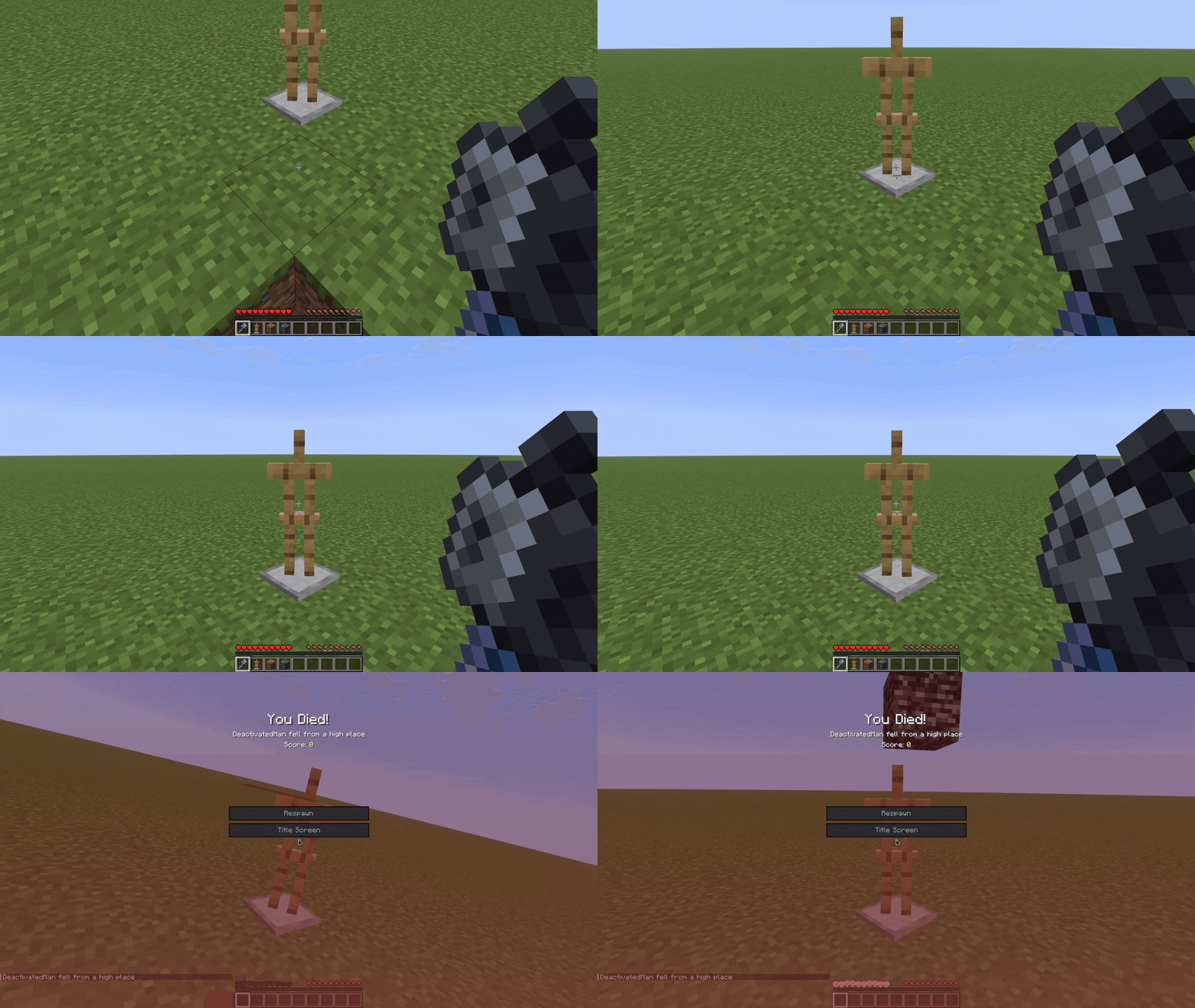
Showcase of what happens in survival. The attack gets cancelled and the player dies to fall damage.

Config

min-fall-distance - Players falling less than this (default 5) will be ignored
cancel-fall-dmg - If fall damage that the player would take in setting up should still be applied
do-ground-attack - Act as if the glitched attack was a regular on-ground attack
log-cancels - If the plugin should log each detected attack to console
developer-mode - Testing ONLY, read below

Testing

For testing purposes, I have left in a developer-mode toggle, which will make these ghost blocks easier for admins to replicate as this method doesn't require precise timing. All you have to do is place a piece of bedrock, and the block two down will become a ghost block provided that it was a solid block. Only leave this on for testing.

👥 Team & Contributors

DeactivatedMan
DeactivatedManOwner

⚙️ Compatibility

Environment
🖥️ Server-side
Loaders
paper
Minecraft Versions
1.211.21.11.21.31.21.41.21.51.21.61.21.71.21.8+5 more

🔗 Links

Modrinth Page