
MINECRAFTBIBLE
Loading...

A simple enchant plugin to add some extra enchants to the game.
A simple enchantment plugin that adds extra enchants to the game.
You can give players an enchanted book with:
/ee give <player> <enchant_name> <level>
Players can click the enchanted book in their inventory and then click a compatible tool to enchant it, or apply it through an anvil.
If you would like a new enchantment added, feel free to contact me on Discord.
and more...
Descriptions for all enchantments can be found in the configuration file:
https://github.com/M0diis/M0-ExtraEnchants/blob/main/src/main/resources/config.yml
The plugin also supports config-driven enchantments, see more here:
https://github.com/M0diis/M0-ExtraEnchants/tree/main/src/main/resources/custom-enchants
extraenchants.command.list — Access to /ee listextraenchants.command.enchant — Access to /ee give <player> <enchant_name> <level>extraenchants.command.unenchant — Access to /unenchantextraenchants.signs.use — Permission to use enchant signsextraenchants.signs.create — Permission to create enchant signsThe full configuration file can be found on GitHub:
https://github.com/M0diis/M0-ExtraEnchants/blob/main/src/main/resources/config.yml
enchants:
  ... # All enchants are listed here

messages:
  no-permission: "&c&lYou do not have permission to do this!"
  player-not-found: "&c&lPlayer not found."
  enchantment-list: "&9&lCurrent Enchants:\n&3&lTelepathy, Plow, Lava Walker, Bonded..."
  usage: "&c&lCommand usage: &d/&7ee <enchantment> <player>"
  enchant-removed: "&4%enchant_name% enchant has been removed"
  enchant-conflicts: "&cEnchant conflicts with one of the enchants shown below:"
  cannot-enchant-item: "&cYou cannot enchant this item."
  enchant-applied: "&aSuccessfully applied enchantment to item."
  hold-item: "&cYou must hold an item in your hand."
  reloaded: "&aSuccessfully reloaded config."

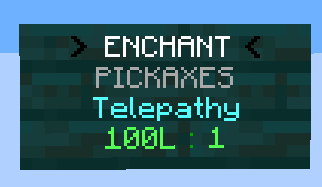
# Enchant signs work similar to EssentialsX signs.
# It supports the ExtraEnchants enchantments and vanilla ones.
# To create an enchant sign, use the following format (first line should match enchant-signs.first-line-format).
# > ENCHANT <
# ENCHANTABLE_ITEM_TYPE
# ENCHANTMENT
# COST : LEVEL
#
# Sign example:
# > ENCHANT <
#     ANY
#  TELEPATHY
#   1000 : 1
#
# Item type can be: TOOLS, ARMOR, WEAPONS, ALL
# or specify the type of armor, e.g. HELMET, CHESTPLATE, LEGGINGS, BOOTS, ELYTRA, SHIELD
# or specify the type of tool, e.g. PICKAXE, AXE, SHOVEL, HOE, SWORD, BOW, FISHING_ROD
# or specify the type of weapon, e.g. SWORD, BOW, CROSSBOW
# The default limitation still applies if you don't specify anything.
#
# Cost can be defined in money, experience or levels. (The currency symbol can be anything)
# The following formats are supported:
# - 100 : 1
# - 100$ : 1
# - 100 $ : 1
# - 100L : 1
# - 100 L : 1
# - 100XP : 1
# - 100 XP : 1
enchant-signs:
  enabled: true
  # You can add own color codes when placing it. This should be plain.
  # You can also add color format to other lines too.
  enchant-first-line-format: "> ENCHANT <"
  disenchant-first-line-format: "> DISENCHANT <"
  retrieve-first-line-format: "> RETRIEVE <"
  messages:
    sign-created: "&aSuccessfully created enchant sign."
    invalid-enchant: "&cInvalid enchantment."
    invalid-item-type: "&cInvalid item type."
    invalid-cost-level: "&cInvalid cost and level format."
    not-enough-money: "&cYou do not have enough money to purchase this enchant."
    no-item-in-hand: "&cYou must hold an item in your hand."
    cannot-enchant-item: "&cYou cannot enchant this item with this sign."
    enchant-applied: "&aSuccessfully applied enchantment."
    already-enchanted: "&cThis item is already enchanted."
    not-enough-xp: "&cYou do not have enough XP to purchase this enchant."
    not-enough-levels: "&cYou do not have enough levels to purchase this enchant."
    item-not-enchanted: "&cThis item is not enchanted."
    enchant-removed: "&4%enchant_name% enchant has been removed"
    enchant-retrieved: "&aSuccessfully retrieved enchantment."
# General debug flag for Messenger.debug() calls
debug: false

# Enables the custom-enchants/*.yml framework (books, triggers, execution, list entries).
# Set to false to disable config-driven enchants globally.
config-driven-enchants: true

# Specific debug flags for detailed logging
debug-enchants:
  pipeline: false
  timber: false
  telepathy: false

notify-update: true

# Lore line format for config-driven custom enchants.
# Placeholders: %enchant_name%, %level_roman%, %level%
custom-enchants:
  lore-format: "&7%enchant_name% %level_roman%"